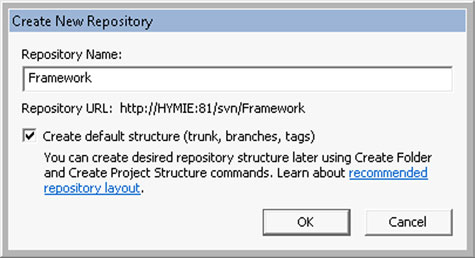
concept tag in category software development

This is an excerpt from Manning's book Agile Metrics in Action: How to measure and improve team performance.
Tags —There were two types of high-level tasks: refactor work and new features. They used labels to tag each task with the type of work they were doing. This allowed them to show progress on each effort separately.
The alternative to adding tags in most systems is creating custom fields. This is the equivalent of adding columns to a flat database table; the more fields you add, the more unwieldy it becomes to work with. Teams are forced into using the structure that exists, which may not translate into how they work. When new people join the team or when new efforts spin up, it becomes cumbersome to add all the data required in the system just to create tasks. This is visualized in figure 3.7.
Figure 3.7. The difference between organizing flat project data and adding relevant metadata with tags
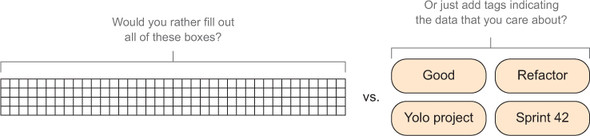
Adding data in the form of tags allows you to add the data you need when you need it and allows you to return to tasks once they’re complete to add any kind of data you want to report on. This is valuable because it helps you figure out what works well for your team even if it’s contrary to normal trends. For example, the number of comments on a ticket could mean that your team is communicating well, but it could also mean that the original requirements were very poor and they were flushed out through comments on the card. By going back and marking cards as “worked well” or “train wreck,” for example, you can find trends that may not have been visible before.
In addition to the other good reasons for using tags, this method of organizing your tasks allows you to sort, aggregate, or map-reduce your data much easier. Instead of modifying queries and domain objects to get good analysis, you can simply add more tags, and you’ll be able to see clear trends in your data, as you’ll see later in this chapter.
Some PTSs like JIRA support tags or labels and have explicit fields for them. In JIRA the data comes back in a format that’s nice and easy to work, as shown in the next listing.
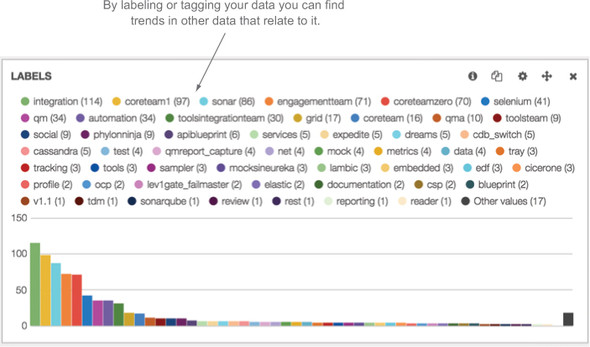
Tags and labels help you associate different tasks by putting an objective label on them. This helps you see associations between properties of tasks that you may not have thought of slicing up before. Figure 3.13 shows a simple aggregation of tags for a specific project. In this example all you can see is what the most common tags are and the count of the different tags.

This is an excerpt from Manning's book Git in Practice.
In figure 1.3, you can see the main Git objects we’re concerned with: commits, blobs, and trees. There’s also a tag object, but don’t worry about tags until they’re introduced in technique 36. Figure 1.2 showed an example of a commit object and how it stores metadata and referenced file contents. The file-contents reference is actually a reference to a tree object. A tree object stores a reference to all the blob objects at a particular point in time and other tree objects if there are any subdirectories. A blob object stores the contents of a particular version of a particular single file in the Git repository.
Remember refs from section 1.7? A tag is another ref (or pointer) for a single commit. Tags differ from branches in that they’re (usually) permanent. Rather than pointing to the work in progress on a feature, they’re generally used to describe a version of a software project.
For example, if you were releasing version 1.3 of your software project, you’d tag the commit that you release to customers as v1.3 to store that version for later use. Then if a customer later complained about something being broken in v1.3, you could check out that tagged commit and test against it, confident that you were using the same version of the software that the customer was. This is one of the reasons you shouldn’t modify tags; once you’ve released a version to customers, if you want to update it, you’ll likely release a new version such as 1.4 rather than changing the definition of 1.3.


This is an excerpt from Manning's book Continuous Integration in .NET.
A tag is a snapshot of your repository taken at a given time and given a meaningful name. It’s used every time something important happens, such as when you make a release or implement an important feature. We consider tags irrelevant for the CI process.