concept Solr in category solr

This is an excerpt from Manning's book Relevant Search: With applications for Solr and Elasticsearch.
Getting a search engine to behave can be maddening. Whether you’re just getting started with Solr or Elasticsearch, or you have years of experience, you’ve likely struggled with low-quality search results. Out-of-the-box settings haven’t met your needs, and you’ve fought to deliver even marginally relevant search results.
Luckily for you, Solr reader, the code in this chapter can be easily translated from Elasticsearch to Solr. You need to understand just one key difference: instead of JSON over HTTP, Solr configures analyzers by using XML within Solr’s schema.xml configuration file.
Solr allows you to define custom fieldTypes that control analysis—for example:
<fieldType name="text_standard_clone" class="solr.TextField">
    <analyzer>
        <tokenizer class="solr.StandardTokenizerFactory"/>
        <filter class="solr.StandardFilterFactory"/>
        <filter class="solr.LowerCaseFilterFactory"/>
        <filter class="solr.StopFilterFactory" words="stopwords.txt" />
    </analyzer>
</fieldType>
Beginning to look familiar? This analyzer block corresponds to the analyzer configured previously in Elasticsearch. Once you see the correspondence, you can easily implement chapter 4’s examples in Solr. In the preceding snippet, a single <tokenizer .../> configures this analyzer with a standard tokenizer (class="solr.StandardTokenizerFactory"). This corresponds to the "tokenizer": JSON element for the previous Elasticsearch specification. Similarly the <filter .../> lines specify a sequence of token filters to run, just as Elasticsearch’s analyzer has a filter element followed by a JSON list.
Unlike Elasticsearch, in which you’d configure the stopwords filter elsewhere with a stop-words list or file, Solr places the configuration options on the filter itself (notice words="stopwords.txt").
Elasticsearch provides fine-grained control of analysis, allowing you to specify analyzers even at query time. Solr works a bit differently, giving you the capability to customize only at the fieldType level. The fieldType allows you to define whether the analyzer applies to index or query time. So to analyze differently when querying, you’d use the following structure:
Solr starts you out with term-centric search, using its edismax query parser. Query parsers are less central to Elasticsearch. Solr doesn’t have cross-field search, but you could easily add it with a query parser. What accounts for these differences? Solr is a thick server querying system; it does quite a bit for you. Elasticsearch, more of a thin server, layers on relatively little. Instead, Elasticsearch exposes an API closer to the raw Lucene query API. Figure B.1 illustrates this difference.
Figure B.1. Query customization in Solr and Elasticsearch. Solr lets developers push more customization into its thicker query API. Elasticsearch exposes simpler primitives to work with.
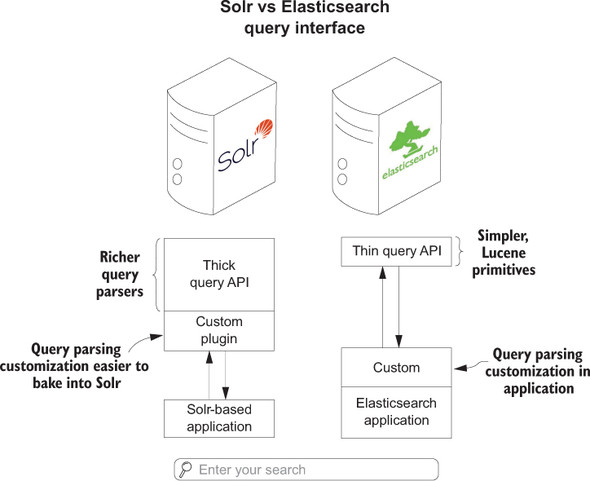
What do we mean by a thick versus thin query API? When querying, Solr adds a lot of capabilities in its extensive library of meaty query parsers. A query parser lets you interact with search by using its own custom query syntax. It then translates this into underlying Lucene queries such as Boolean queries, term queries, or dismax. These query parsers abstract many of the Lucene details from you. Elasticsearch’s strategy is quite the opposite. Elasticsearch works to give you primitives closer to the underlying Lucene queries for you to construct larger, more complex queries outside the search engine. Elasticsearch’s query API does relatively little for you. The exceptions to this don’t add a lot of magic, and translate one or two basic settings to Lucene queries (for example, multi_match). Only query_string stands out as a true query parser as Solr would define it.
In many ways, this makes Elasticsearch a better choice for teaching you about Lucene search: its API is closer to the underlying Lucene queries. Solr, while often giving you some powerful query parsers, obscures the nuts and bolts. Solr, however, makes it easy to create your own query parsers by using underlying Lucene code. For a Solr developer, this would be one of the first plugins you’d implement. There’s also a thriving ecosystem of query parsers implementing functionality such as graph search or complex phrase search. For Elasticsearch developers, however, a custom query parser would be one of the last things you’d try to do. The Elasticsearch developer would be more likely to attempt to implement comparable functionality outside the search engine itself by using the query API.
With that context in place, you can begin to see where Solr fits into our discussions in chapters 5 and 6.

This is an excerpt from Manning's book Solr in Action.
This book is about Apache Solr, a specific NoSQL technology. Solr, just as its nonrelational brethren, is optimized for a unique class of problems. Specifically, Solr is a scalable, ready-to-deploy enterprise search engine that’s optimized to search large volumes of text-centric data and return results sorted by relevance. That was a bit of a mouthful, so let’s break that statement down into its basic parts:
Solr is able to scale to handle as many queries as you need across billions of documents in tens to hundreds of milliseconds. Handling thousands of queries per second and hundreds of millions of documents or more, however, is generally beyond the scope of what a single server can handle. For large documents, Solr may only be able to store a few million documents per server, whereas for small documents Solr may be able to store hundreds of millions and still maintain reasonable query speed. Although there is no magic formula for determining the right server configuration for any particular use case, there are some general guidelines that can lead you in the right direction.
As you may remember from chapter 5, SolrJ enables you to communicate with Solr from your own application’s Java code. SolrJ ships with Solr, which means that when you pull the Solr code or download a Solr release, the correct version of the SolrJ library is pulled as well. SolrJ can also (optionally) utilize a Java binary request/response format, reducing the serialization/deserialization overhead associated with other communication formats. Using SolrJ, you can communicate across an HTTP connection, as with any other client library, but you can also embed Solr within your application and talk to it directly without exposing an HTTP connection on your server.
SolrJ is compiled into the apache-solr-solrj-*.jar file in your $SOLR_INSTALL/dist/ directory, where * represents your version of Solr. SolrJ contains dependencies on various other libraries, located in the $SOLR_INSTALL/dist/solrj-lib/, $SOLR_INSTALL/dist/, and $SOLR_INSTALL/example/lib/ directories. You will need to include each of these dependencies in your classpath or else use a dependency manager like Maven to pull these in automatically for you. If you are using Maven, you can add the following (specifying your current Solr version) to your project’s pom.xml file to add SolrJ and its dependencies:
<dependency>
  <groupId>org.apache.solr</groupId>
  <artifactId>solr-solrj</artifactId>
  <version>4.7.0</version>
</dependency>
Once you have added SolrJ to your project, you need to create a SolrServer object to interact with Solr. You can create either HttpSolrServer or EmbeddedSolrServer, based upon whether you want to connect to a running Solr instance (over HTTP) or to use Solr in an embedded mode on your current system without exposing Solr over HTTP.
As you can see, you have many SolrServer implementations from which to choose based upon the specific nature of your application and Solr configuration. Because HttpSolrServer serves as the lowest common denominator among your options, we will use it to demonstrate the basic SolrJ operations. You saw how to use SolrJ to send documents to Solr for indexing in chapter 5 (section 5.5.2). In addition to sending document updates, SolrJ can be used to invoke the full range of Solr requests directly from Java. The following listing demonstrates how to perform basic document updates, deletes, and searches.