concept rule profile in category sonarqube

This is an excerpt from Manning's book SonarQube in Action.
Finally, the description widget ends with a link to an RSS feed of Alert events on the project. We mentioned earlier that there are several types of events. One type of event relates to Alert thresholds you can set on a rule profile. When those thresholds are crossed in either direction, an Alert is raised (chapter 13 covers setting Alerts). For instance, you may choose to set an Alert when test coverage falls below 80%, or when the number of Blocker-level issues exceeds 0. These rule-based events are what the RSS feed gives you.
Next we’ll take a brief look at rule profiles—the sets of rules against which your code is measured in an analysis—and how to change the defaults. We’ll round out the chapter with a summary of issues-related plugins that might be of interest.
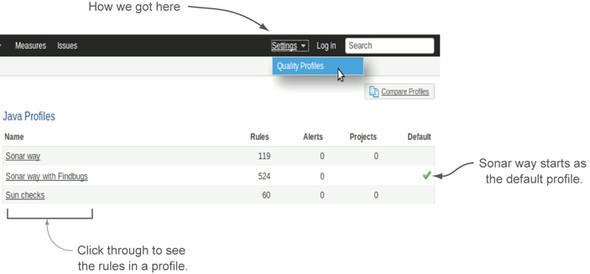
Even though SonarQube uses multiple external rules engines for Java and C#, it doesn’t turn on all three tools full-bore. Instead, it packages selected rules from each tool into what it calls profiles. Multiple profiles can exist per language, and one profile is always set as a default for that language. The default for a language almost never includes every single rule that’s available for the language. New projects and projects that haven’t been specifically pinned to a rule profile (unassigned projects) are measured against their language’s default.