concept dataset in category spark
This is an excerpt from Manning's book Spark in Action, Second Edition.
Transformations are operations you perform on data, such as extracting a year from a date, combining two fields, normalizing data, and so on. In this chapter, you’ll learn how to use dataframe-specific functions to perform transformations, as well as methods directly attached to the dataframe API. You will merge two dataframes into one by using a SQL union-like operation. You’ll also see the difference between a dataset and a dataframe, and how to go from one to the other.
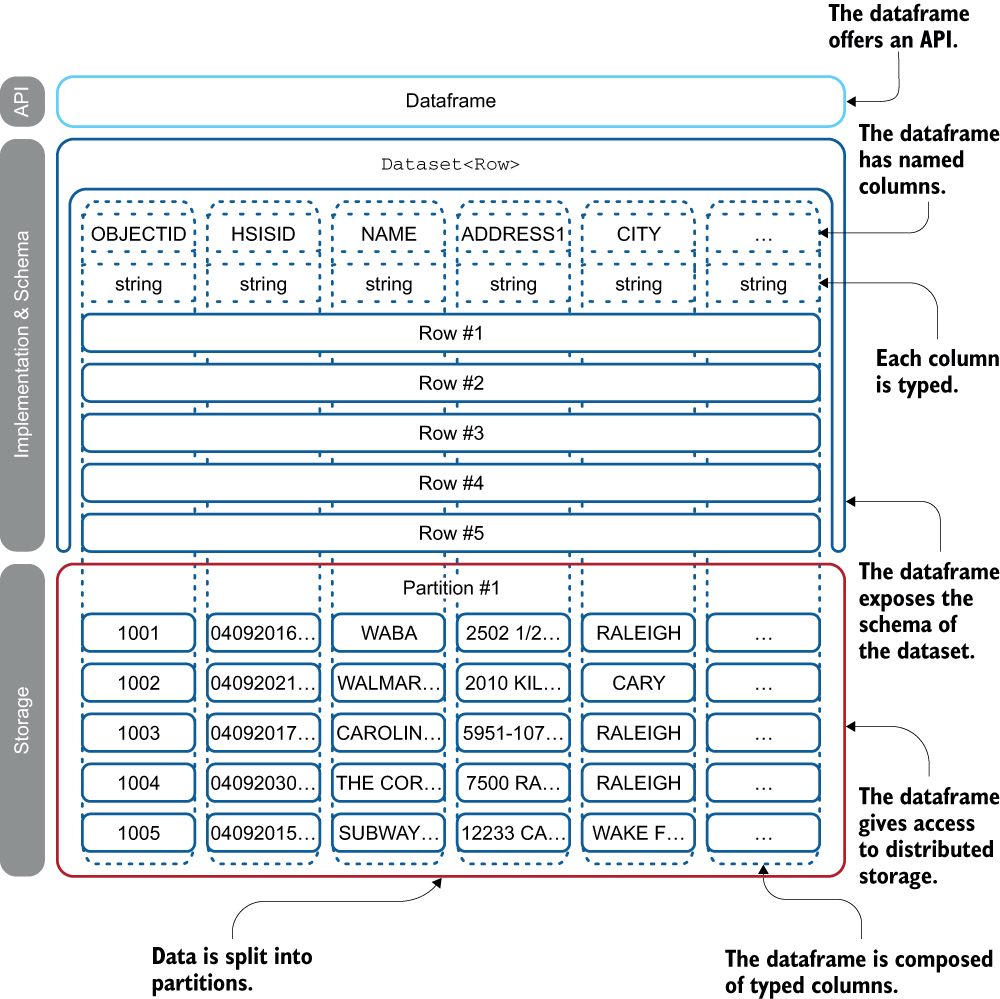
Let’s focus on the first part: ingesting the file and turning the dataframe into a dataset of books. The output will be as follows:
*** Books ingested in a dataframe
+---+--------+--------------------+-----------+--------------------+
| id|authorId| title              |releaseDate| link               |
+---+--------+--------------------+-----------+--------------------+
| 1 | 1      |Fantastic Beasts ...| 11/18/16  |http://amzn.to/2k...|
| 2 | 1      |Harry Potter and ...| 10/6/15   |http://amzn.to/2l...|
...
only showing top 5 rows

root #1
  |-- id: integer (nullable = true)
  |-- authorId: integer (nullable = true)
  |-- title: string (nullable = true)
  |-- releaseDate: string (nullable = true) #2
  |-- link: string (nullable = true)

*** Books are now in a dataset of books
+--------+---+-----------------+-----------------+-----------------+
|authorId| id| link            | releaseDate     | title           |
+--------+---+-----------------+-----------------+-----------------+
| 1      | 1 |http://amzn.to...|[18, 0, 0, 10,...|Fantastic Beas...|
| 1      | 2 |http://amzn.to...|[6, 0, 0, 9, 0...|Harry Potter a...|
...
only showing top 5 rows

root #3
  |-- authorId: integer (nullable = true)
  |-- id: integer (nullable = true)
  |-- link: string (nullable = true)
|-- releaseDate: struct (nullable = true)    #4
|   |-- date: integer (nullable = true)   #4 #5
|   |-- hours: integer (nullable = true)    #4
|   |-- minutes: integer (nullable = true)  #4
|   |-- month: integer (nullable = true)    #4
|   |-- seconds: integer (nullable = true)  #4
|   |-- time: long (nullable = true)        #4
|   |-- year: integer (nullable = true)     #4
  |-- title: string (nullable = true)
The fields are sorted after you convert your dataframe to a dataset. This is not something you asked the application to do; it is a bonus (or “malus,” depending on the day). However, remember to use
unionByName()(instead ofunion()) if you plan on combining datasets after that, because fields may have shifted during take-off (an analogy to things being moved around in the overhead compartment when you’re flying, meaning you don’t know what you’re going to get when you open the cover).