concept authentication in category spring

This is an excerpt from Manning's book Spring Security in Action.
If we’d go to the official website, https://spring.io/projects/spring-security, they describe Spring Security as a powerful and highly customizable framework for authentication and access control. I would simply say it is a framework that enormously simplifies baking security for Spring applications.
Spring Security is the primary choice for implementing application-level security in Spring applications. Generally, its purpose is to offer you a highly customizable way of implementing authentication, authorization, and protection against common attacks. Spring Security is open-source software released under the Apache 2.0 license. You can access the source code of the project on GitHub at https://github.com/spring-projects/spring-security/, and I highly recommend that you contribute to the project as well.
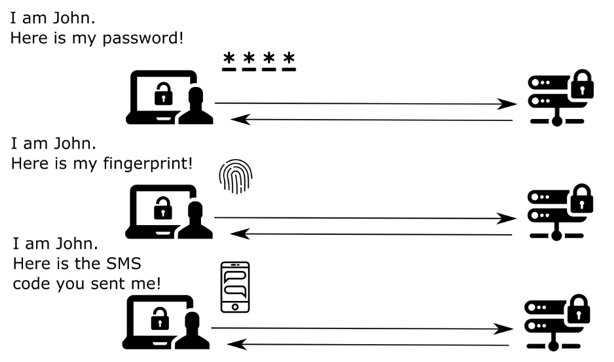
In enterprise applications, sometimes you might find yourself in the situation in which the default implementation of authentication based on username and password does not apply. Several scenarios could be required to be implemented by your application when it comes to authentication (figure 5.2). For example, you might want the user to be able to prove who they are by using a code received in an SMS message or displayed by a specific application. You might need to implement authentication scenarios where the user has to provide a certain kind of key stored in a file. You might even need to use a representation of the user’s fingerprint to implement the authentication logic. A framework’s purpose is to be flexible enough to allow you to implement any of these requested scenarios.
Figure 5.2 For an application, you might need to implement authentication in different fashions. While in most cases, a username and a password are enough, in some cases, the scenario of the user’s authentication might be more complicated.
5.1.1 Representing the request during authentication
In this section, we discuss how Spring Security represents a request during the authentication process. It is important to touch this aspect before diving into implementing custom authentication logic. As you’ll learn in section 5.1.2, to implement a custom AuthenticationProvider, you first need to understand how to represent the authentication event itself. In this section, we take a look at the contract representing the authentication and discuss the methods you need to know.
Authentication is one of the essential interfaces involved in the process with the same name. The Authentication interface represents the authentication request event and holds details of the entity that requested access to the application. You can use the information related to the authentication request event during the authentication process and after its end. The details of the entity that requested access to the application are also called a principal. If you ever used the Java Security API in any app, you learned that, in the Java Security API, an interface named Principal represents the same concept. The Authentication interface of Spring Security extends this contract. The Authentication contract in Spring Security represents a principal and also adds information on whether the authentication process finished, as well as the collection of authorities. The fact that this contract was designed to extend the Principal contract from Java Security API is a good aspect in terms of compatibility with implementations of other frameworks or applications. This flexibility allows for more facile migrations to Spring Security from applications that already implement authentication in another fashion.
Listing 5.1 The Authentication interface as declared in Spring Security
public interface Authentication extends Principal, Serializable {

  Collection<? extends GrantedAuthority> getAuthorities();
  Object getCredentials();
  Object getDetails();
  Object getPrincipal();
  boolean isAuthenticated();
  void setAuthenticated(boolean isAuthenticated)
     throws IllegalArgumentException;

}