concept browser in category spring

This is an excerpt from Manning's book Spring Security in Action.
Take a look at figure 1.5. An authenticated user can access the /products/{name} endpoint. From the browser, a web app calls this endpoint to retrieve and display the user’s products from a database. But what happens if the app doesn’t check to whom the products belong when returning them? Some user could find a way to get the details of another user. This situation is just one of the examples that should be taken into consideration from the beginning of the design of the application so that you can avoid them.
In this section, we discuss applying CSRF protection in practical situations. Now that you know how CSRF protection works in Spring Security, you need to know where you should use it in the real world. Which kinds of applications need to use CSRF protection? You’ll use CSRF protection for the web apps running in a browser, where you expect that mutating operations can be done only by the browser that loaded the display content of the web app. The most basic example I can provide here is a simple web application developed on the standard Spring MVC flow. We’ve already made such an application when discussing the Form Login in chapter 5. And that web app from chapter 5 actually used CSRF protection. Did you notice that the login operation in that application used HTTP POST? Then why didn’t we need to do anything explicitly about CSRF in that case? The reason why we didn’t observe it was because we didn’t develop any mutating operation within it ourselves. For the default login, Spring Security correctly applies CSRF protection for us. The framework takes care of adding the CSRF token to the login request.
In this section, we discuss Cross-Origin Resource Sharing (CORS) and how to apply it with Spring Security. Firstly, what is CORS, and why should you care? The necessity for CORS came from web applications ran in browsers. By default, the browsers don’t allow requests made for another domain than the one from which the site was loaded. For example, if you access the site from example.com, the browser won’t let the site make requests to api.example.com, as presented in figure 10.12.
Figure 10.12 Cross-Origin Resource Sharing works like this: When accessed from example.com, the website cannot make requests to api.example.com because it’s cross-domain.

We can briefly say that CORS is a mechanism used by a browser to relax this strict policy and allow requests made between different origins in some conditions. You need to learn this because there’s a high chance that you’ll have to apply it with applications, especially nowadays, where usually the frontend and the backend are separate applications. It is very common today that a frontend application is developed using a framework like Angular, ReactJS, or Vue to be hosted at a domain like example.com, but calls endpoints on the backend hosted at another domain like api.example.com. We’ll develop some examples from which you’ll learn how to apply CORS policies for your web applications, as well as some details that you need to know such that you avoid leaving security breaches in your applications.
Starting the application and opening the page in the browser with localhost:8080, we observe that the page doesn't display anything. We’ve expected to see a HELLO on the page, as this is what the /test endpoint returns. When we check the browser console, what we see is an error printed by the JavaScript call. The error looks like in the next code snippet.
Access to XMLHttpRequest at 'http://127.0.0.1:8080/test' from origin 'http://localhost:8080' has been blocked by CORS policy: No 'Access-Control-Allow-Origin' header is present on the requested resource.The error message tells us that the response wasn’t accepted because the Access-Control-Allow-Origin HTTP header doesn’t exist. This behavior happens because we didn’t configure anything regarding CORS in our Spring Boot application, and by default, it doesn’t set any header related to CORS. So the behavior of the browser of not accepting to display the response is correct. I would like you, however, to notice that in the application console, the log proves the method was called. The next code snippet shows what you’ll find in the application console.
INFO 25020 --- [nio-8080-exec-2] c.l.s.controllers.MainController : Test method calledThis aspect is important! I’ve met many developers who understand CORS as a restriction similar to authorization or CSRF protection. Instead of being a restriction similar to CSRF, CORS helps to relax a rigid restriction for cross-domain calls. And even with the restrictions applied, in some situations, the endpoint could happen to be called. This behavior doesn’t always happen. Sometimes, the browser first makes a call using the HTTP OPTIONS method to test whether the actual request would be allowed. We call this test request a preflight request. If the preflight request fails, the browser won’t try at all to make the original request. The preflight request and the decision to make it or not are the responsibility of the browser. You don’t have to implement this logic. But it is important to understand it, so you won’t be surprised to see cross-origin calls to the backend even if you did not specify any CORS policies for specific domains. This could happen as well when you have a client-side app developed with a framework like Angular or ReactJS. Figure 10.15 presents this request flow.
Figure 10.15 For simple requests, the browser sends the original request directly to the server. The browser rejects the response if the server doesn’t allow the origin. In some cases, the browser sends a preflight request to test if the server accepts the origin. If the preflight request succeeds, the browser sends the original request.
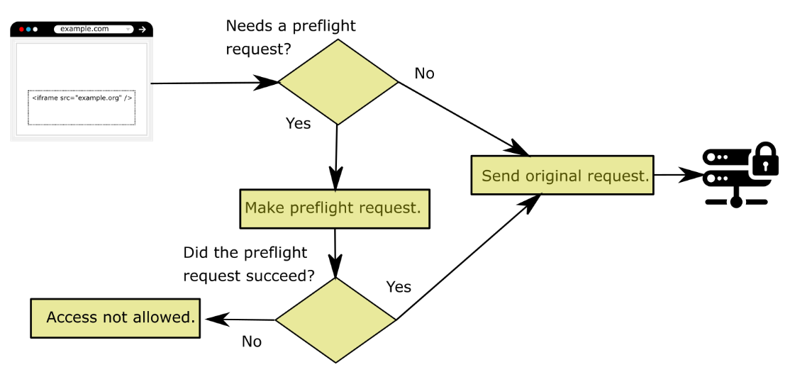
The browser omits to make the preflight request if the HTTP method is GET, POST, or OPTIONS, and it only has some basic headers as described in the official documentation: https://www.w3.org/TR/cors/#simple-cross-origin-request-0. In this case, the browser will make the request but won’t accept the response if the origin is not specified in the response, as presented in figures 10.9 and 10.10.
But the CORS mechanism is, in the end, related to the browsers and not a way to securing the endpoints from not being called by anybody. The only thing it guarantees you is that from a browser, only origin domains that you allow can make requests from their pages in the browser.