concept filter in category spring

This is an excerpt from Manning's book Spring Microservices in Action, 2E.
To solve this problem, we need to abstract these cross-cutting concerns into a service that can sit independently and act as a filter and router for all the microservice calls in our architecture. This cross-cutting concern is called a services gateway. Our service clients no longer directly call a microservice. Instead, all calls are routed through the service gateway, which acts as a single Policy Enforcement Point (PEP), and are then routed to a final destination.
These application policies are considered cross-cutting concerns because we want them to be applied to all the services in our application without having to modify each service to implement them. In this fashion, the Spring Cloud Gateway predicate and filter factories can be used in a similar way as a J2EE servlet filter or a Spring Aspect that can match or intercept a wide body of behaviors and decorate or change the behavior of the call without the original coder being aware of the change. While a servlet filter or Spring Aspect is localized to a specific service, using the gateway, its predicates and filters allows us to implement cross-cutting concerns across all the services being routed through the gateway. Remember, predicates allow us to check if the requests fulfill a set of conditions before processing the request.
The following figure 8.9 shows the architecture that the Spring Cloud Gateway uses to apply the predicates and filters when a request comes to the gateway.
Figure 8.9 Spring Cloud Gateway architecture to apply the predicates and filters when a request is made.

The first step is when the gateway client (browsers, apps, …) sends a request to our Spring Cloud Gateway. Once that request is received, it goes directly to the Gateway Handler that is in charge of verifying that the requested path matches the configuration of the specific route it is trying to access. If everything matches, it enters the Gateway Web Handler that is in charge of reading the filters and send the request to those filters for further processing. Once the request passes all the filters, it forwards it to the routing configuration (a microservice).

This is an excerpt from Manning's book Spring Security in Action.
With a different shade, I represented the components that we’ll start with: the UserDetailsService and the PasswordEncoder. These two components focus on the part of the flow, which I’ll often refer to as “the user management part”. The UserDetailsService and the PasswordEncoder are the components dealing directly with the user details and their credentials, as you’ll find in this chapter. We’ll discuss the PasswordEncoder in detail in chapter 4. Further, in this book, I’ll detail the other components you could customize in the authentication flow: the AuthenticationProvider, the SecurityContext, and the filters.
In Spring Security, the HTTP filters delegate the different responsibilities that apply to an HTTP request. In chapters 3 through 5, where we discussed the HTTP Basic authentication and authorization architecture, I’ve often referred to filters. You learned that there is a component we named authentication filter, which delegates the authentication responsibility to the authentication manager. You learned as well that a certain filter takes care of the authorization configuration after successful authentication. In general, in Spring Security, the HTTP filters manage each responsibility that must be applied to the request. The filters form a chain of responsibilities. A filter receives the request, executes its logic, and eventually delegates the request to the next filter in the chain (figure 9.1).
Figure 9.1 The filters chain receives the request. Each filter uses a manager to apply specific logic to the request and, eventually, delegates the request further in the chain to the next filter.

The idea is very simple. When you go to the airport, from entering the terminal to boarding the aircraft, you go through multiple filters (figure 9.2). You first present your ticket, then your passport is verified, and afterward, you go through security. At the airport decision, more filters might be applied. For example, in some cases, right before boarding, your passport and visa are validated once more. This is an excellent analogy to the filter chain in Spring Security. In the same way, you customize filters in a filter chain with Spring Security that will act on the HTTP requests. Spring Security provides filter implementations that you add to the filter chain through customization, but you can also define custom filters.
Figure 9.2 At the airport, you go through a filter chain to eventually board the aircraft. In the same way, Spring Security has a filter chain that acts on the HTTP requests received by the application.

In this chapter, we discuss how you can customize the filters that are part of the authentication and authorization architecture in Spring Security. For example, you might want to augment the authentication by adding one more step for the user, like checking their email address or using a one-time password. You could as well add functionality referring to auditing the authentication events. You’ll find various scenarios where applications use auditing authentication: from debugging purposes to identifying users’ behavior. Using today’s technology and machine learning algorithms could improve applications by learning the users’ behavior in using an app and know by this if somebody hacked their account or is impersonating them.
You learned in the previous chapters that the authentication filter intercepts the request and delegates the authentication responsibility further to the authorization manager. If we want to execute certain logic before the authentication, we quickly do this by inserting a filter before the authentication filter.
The filters, in Spring Security architecture, are typical HTTP filters. We can create filters by implementing the Filter interface from the javax.servlet package. Like for any other HTTP filter, you have to override the doFilter() method to implement its logic. The doFilter() method receives as parameters the ServletRequest, ServletResponse, and the FilterChain.
9.3 Adding a filter after an existing one in the chain
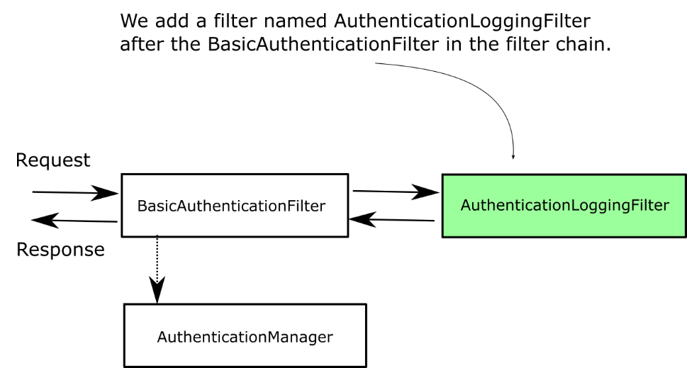
In this section, we discuss adding a filter after an existing one in the filter chain. You’ll use this approach whenever you want to execute some logic after something already existing in the filter chain. Let’s assume that you have to execute some logic after the authentication process. Examples for this could be: notifying a different system after certain authentication events or simply for logging and tracing purposes (figure 9.8). As in section 9.1, we’ll implement an example to show you how to add a filter after an existing one. You can quickly adapt it to your needs for a real-world scenario.
For the application we implement now as an example, we have log all the successful authentication events. We do this by adding a filter after the authentication filter (figure 9.8). We consider that what bypasses the authentication filter represents a successfully authenticated event, and we want to log it. Continuing the example from section 9.1, we’ll also log the request ID received through the HTTP header.
Figure 9.8 We add the AuthenticationLoggingFilter after the BasicAuthenticationFilter to log the requests that the application has authenticated.
Listing 9.5 presents the definition of a filter that logs the requests that passed the authentication filter.
Listing 9.5 Defining a filter to log the requests
public class AuthenticationLoggingFilter implements Filter {

  private final Logger logger =
          Logger.getLogger(
          AuthenticationLoggingFilter.class.getName());

  @Override
  public void doFilter(
    ServletRequest request,
    ServletResponse response,
    FilterChain filterChain)
      throws IOException, ServletException {

      var httpRequest = (HttpServletRequest) request;
      var requestId = httpRequest.getHeader("Request-Id");    #A

      logger.info("Successfully authenticated    #B
                     request with id " +  requestId);    #B

      filterChain.doFilter(request, response);   #C
  }
}

This is an excerpt from Manning's book Spring Microservices in Action.
To solve this problem, you need to abstract these cross-cutting concerns into a service that can sit independently and act as a filter and router for all the microservice calls in your application. This cross-cutting concern is called a services gateway. Your service clients no longer directly call a service. Instead, all calls are routed through the service gateway, which acts as a single Policy Enforcement Point (PEP), and are then routed to a final destination.

This is an excerpt from Manning's book Spring Integration in Action.
1 In this context, it’s probably better to think of filter as meaning processor.
To enable the selective consumption of messages, you can use a special type of message handler, a message filter. As you can see in figure 6.1, the filter is a message handler that evaluates messages without transforming them and publishes back to an output channel only the ones that satisfy a given rule.
Figure 6.1. A message filter evaluates incoming messages. Only A’s are published to the next channel, whereas B’s and C’s are discarded.

Of course, the decision of whether a certain component can process certain types of messages can be made by the component itself. For example, the plain old Java object (POJO) implementation of a service activator can decide whether messages are valid. Embedding this decision into the component works well if the decision is based on a broad general principle that’s applicable everywhere that component is used. Filters are useful wherever the filtering condition is based on an application-specific requirement that’s not inherently linked to the Java implementation of the business service.
