concept JDBC in category spring

This is an excerpt from Manning's book Spring in Action, Sixth Edition.
In this chapter, you’re going to add data persistence to the Taco Cloud application. You’ll start by using Spring support for JDBC (Java Database Connectivity) to eliminate boilerplate code. Then you’ll rework the data repositories to work with the JPA (Java Persistence API), eliminating even more code.

This is an excerpt from Manning's book Spring in Practice.
This chapter assembles the data persistence, ORM, DAO, and transaction-management infrastructure you’ll be using throughout the rest of the book. Although there are cases where it’s useful to work directly with JDBC, the ORM approach confers major benefits in terms of simplifying the codebase. Most of the persistence examples throughout the book are ORM-based—specifically Hibernate-based—and so a large part of what we’ll do here is explain not only how ORM fits into the scheme of things, but also how to perform common tasks with Hibernate specifically. We don’t pretend to offer an exhaustive treatment of Hibernate, but we hope that it’s sufficient to allow you to make sense of the code examples and get started with Hibernate if you aren’t already using it.[1]
None. Assumes familiarity with SQL and JDBC.

This is an excerpt from Manning's book Spring Batch in Action.
Every Spring transaction manager must be configured using the factory provided by the framework to create connections and sessions. In the case of JDBC, the factory is an instance of the DataSource interface.
In the Java world, you access relational databases with JDBC or an ORM tool. Spring Batch provides writers for both. Our use case for this section is to write Product objects into a relational database. We first look at the JDBC item writer.
The JdbcBatchItemWriter class is an implementation of the ItemWriter interface for JDBC that sits on top of the Spring JDBC layer, which itself hides the complexities of using the JDBC API directly. The JdbcBatchItemWriter class uses JDBC���s batch features to execute a group of SQL statements all at once for an item set, as illustrated in figure 6.8.

This is an excerpt from Manning's book Spring Dynamic Modules in Action.
JDBC is the foundation for accessing relational databases from Java applications. It provides an abstraction that hides the specifics of interacting with different kinds of databases, and it allows you to specify SQL queries to get or update data. JDBC provides a robust foundation for applications to persist their data.
Using JDBC within OSGi has particular constraints, especially with respect to the JDBC driver. In this section, we’ll describe how to make JDBC work in OSGi and how to organize OSGi applications that use it.
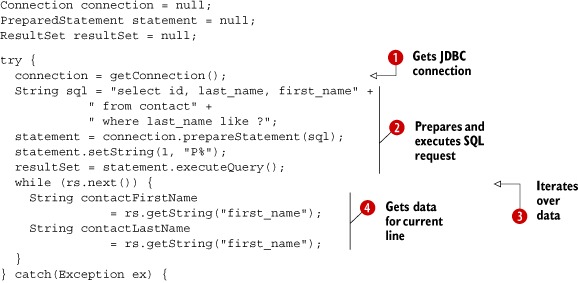
Listing 7.1 shows an example of using JDBC to execute a SQL select request from a Java application. This listing implements best practices to correctly release resources. JDBC leaves the release of resources up to the application rather than trying to handle it transparently.
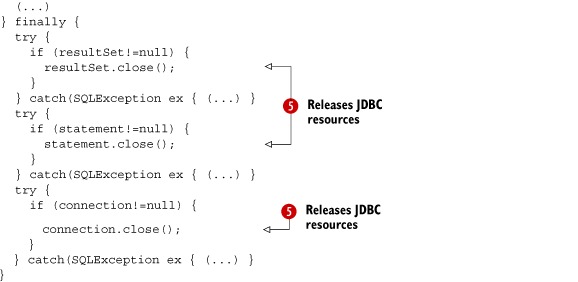
Listing 7.1 shows a classic way of using JDBC to execute SQL requests for both querying and updating data. We first obtain a JDBC connection
enabling us to create a statement to execute SQL requests
. We create a JDBC prepared statement, allowing us to use a parameterized SQL request. In our example, the request gets contacts whose names begin with the letter P. We also set parameters on the prepared statement. We can then execute the request, get the corresponding result set, and iterate over it
to get data contained in its current line
. Finally we need to release all the JDBC resources
.
An extension to JDBC is also available to provide additional support for server-side usage through the javax.sql package. The more well-known interface of this extension is the DataSource interface, which corresponds to a connection factory and is commonly used by pool implementations. The Spring Framework also provides implementations of the DataSource interface within its JDBC support.
We won’t discuss the details of JDBC any further, because it’s beyond the scope of this book, but we will concentrate on using it within an OSGi environment. We’ll also look at how to use JDBC within enterprise applications when using Spring DM.
JDBC isn’t hard to use, but it requires a lot of repetitive and error-prone code: forget to close a connection and your application will become unstable, and diagnosing the cause can be very difficult.