concept organization service in category spring
This is an excerpt from Manning's book Spring Microservices in Action, 2E.
When the licensing service is invoked, it will call the organization service to retrieve the organization information associated with the designated organization ID. The actual resolution of the organization service’s location will be held in a service discovery registry. For this example, we’ll register two instances of the organization service with a service discovery registry and then use client-side load balancing to look up and cache the registry in each service instance. Figure 6.4 shows this arrangement:
We’re going to inject a queue between the licensing and organization service with a messaging approach. This queue won’t be used to read data from the organization service but will instead be used by the organization service to publish when any state changes within the organization data managed by the organization service occur. Figure 10.2 demonstrates this approach.
Figure 10.2 As organization state changes, messages will be written to a message queue that sits between the two services.
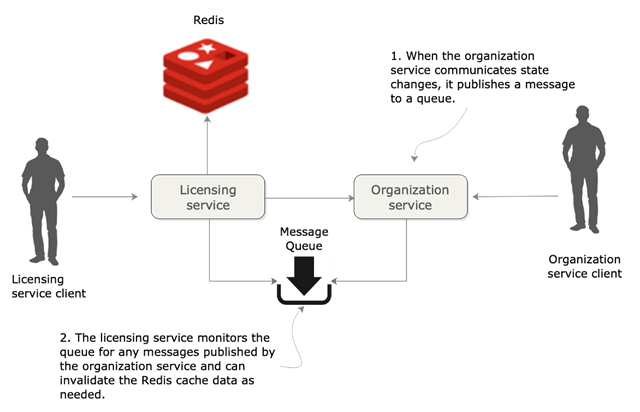
In the model in figure 10.2, every time organization data changes, the organization service publishes a message out to a queue. The licensing service is monitoring the queue for messages, and when a message comes in, it clears the appropriate organization record out of the Redis cache. When it comes to communicating state, the message queue acts as an intermediary between the licensing and organization service. This approach offers four benefits:
The presence of the queue allows us to guarantee that a message will be delivered even if the consumer of the service is down. The organization service can keep publishing messages even if the licensing service is unavailable. The messages will be stored in the queue and will stay there until the licensing service is available. Conversely, with the combination of a cache and the queuing approach, if the organization service is down, the licensing service can degrade gracefully because at least part of the organization data will be in its cache. Sometimes old data is better than no data.
The first thing we need to do is set up our Maven dependencies in the organization service’s Maven pom.xml file. The pom.xml file can be found in the organization service root directory. In the pom.xml, we need to add two dependencies: one for the core Spring Cloud Stream libraries and the other to include the Spring Cloud Stream Kafka libraries:
<dependency>
        <groupId>org.springframework.cloud</groupId>
        <artifactId>spring-cloud-stream</artifactId>
    </dependency>
    <dependency>
        <groupId>org.springframework.cloud</groupId>
        <artifactId>spring-cloud-starter-stream-kafka</artifactId>
    </dependency>
Once the Maven dependencies have been defined, we need to tell our application that it’s going to bind to a Spring Cloud Stream message broker. We do this by annotating the organization service’s bootstrap class
/organization-service/src/main/java/com/optimagrowth/ organization/OrganizationServiceApplication.javawith an@EnableBindingannotation. The following code listing 10.1 shows the organization service’sOrganizationServiceApplication.javasource code.
This is an excerpt from Manning's book Spring Microservices in Action.
Now that you’ve enabled the Feign client for use in your licensing service, let’s look at a Feign client interface definition that can be used to call an endpoint on the organization service. The following listing shows an example. The code in this listing can be found in the src/main/java/com/thoughtmechanix/licenses/clients/OrganizationFeignClient.java class.
/*Package and import left off for conciseness*/
@FeignClient("organizationservice")                              #1
public interface OrganizationFeignClient {
@RequestMapping(
      method= RequestMethod.GET,
      value="/v1/organizations/{organizationId}",
      consumes="application/json")                               #2
 Organization getOrganization(
  @PathVariable("organizationId") String organizationId);        #3
}
You start the Feign example by using the @FeignClient annotation and passing it the name of the application id of the service you want the interface to represent. Next you’ll define a method, getOrganization(), in your interface that can be called by the client to invoke the organization service.
How you define the getOrganization() method looks exactly like how you would expose an endpoint in a Spring Controller class. First, you’re going to define a @RequestMapping annotation for the getOrganization() method that will map the HTTP verb and endpoint that will be exposed on the organization service invocation. Second, you’ll map the organization ID passed in on the URL to an organizationId parameter on the method call, using the @PathVariable annotation. The return value from the call to the organization service will be automatically mapped to the Organization class that’s defined as the return value for the getOrganization() method.
With a messaging approach, you’re going to inject a queue in between the licensing and organization service. This queue won’t be used to read data from the organization service, but will instead be used by the organization service to publish when any state changes within the organization data managed by the organization service occurs. Figure 8.2 demonstrates this approach.
Figure 8.2. As organization state changes, messages will be written to a message queue that sits between the two services.
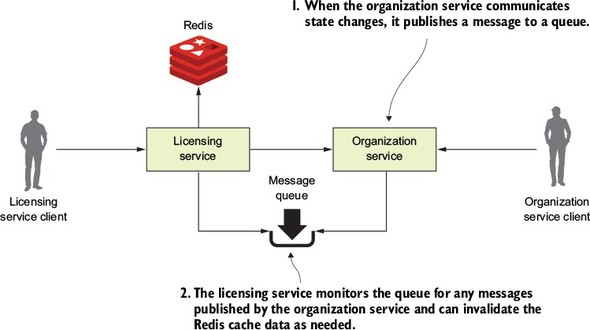
In the model in figure 8.2, every time organization data changes, the organization service publishes a message out to a queue. The licensing service is monitoring the queue for messages and when a message comes in, clears the appropriate organization record out of the Redis cache. When it comes to communicating state, the message queue acts as an intermediary between the licensing and organization service. This approach offers four benefits:
The presence of the queue allows you to guarantee that a message will be delivered even if the consumer of the service is down. The organization service can keep publishing messages even if the licensing service in unavailable. The messages will be stored in the queue and will stay there until the licensing service is available. Conversely, with the combination of a cache and the queuing approach, if the organization service is down, the licensing service can degrade gracefully because at least part of the organization data will be in its cache. Sometimes old data is better than no data.
The first thing you need to do is set up your Maven dependencies in the organization service’s Maven pom.xml file. The pom.xml file can be found in the organization-service directory. In the pom.xml, you need to add two dependencies: one for the core Spring Cloud Stream libraries and the other to include the Spring Cloud Stream Kafka libraries:
<dependency>
    <groupId>org.springframework.cloud</groupId>
    <artifactId>spring-cloud-stream</artifactId>
  </dependency>
<dependency>
    <groupId>org.springframework.cloud</groupId>
    <artifactId>spring-cloud-starter-stream-kafka</artifactId>
</dependency>
Once the Maven dependencies have been defined, you need to tell your application that it’s going to bind to a Spring Cloud Stream message broker. You do this by annotating the organization service’s bootstrap class organization-service/src/main/java/com/thoughtmechanix/organization/Application.java with an @EnableBinding annotation. The following listing shows the organization service’s Application.java source code.
In figure 8.1, when a user calls the licensing service, the licensing service will need to also look up organization data. The licensing service will first check to retrieve the desired organization by its ID from the Redis cluster. If the licensing service can’t find the organization data, it will call the organization service using a REST-based endpoint and then store the data returned in Redis, before returning the organization data back to the user. Now, if someone updates or deletes the organization record using the organization service’s REST endpoint, the organization service will need to call an endpoint exposed on the licensing service, telling it to invalidate the organization data in its cache. In figure 8.1, if you look at where the organization service calls back into the licensing service to tell it to invalidate the Redis cache, you can see at least three problems: