concept password grant in category spring

This is an excerpt from Manning's book Spring Security in Action.
Refresh tokens also have advantages over reauthentication in the password grant type. Even if with the password grant type, if we don’t use refresh tokens, we either would have to ask the user again to authenticate or store their credentials. Storing the users’ credentials when using the password grant is one of the biggest mistakes you could do! And I’ve seen this approach used in real applications! Don’t do it! If you store the username and password – and assuming you save them as plaintext or something reversible because you have to be able to reuse them – you expose those credentials. Refresh tokens help you solve this problem easier and safer. Instead of unsafely storing the credentials and without needing to redirect the user every time, you can store a refresh token and use it to obtain a new access token when needed. Storing the refresh token is safer because you can revoke it if you find that it was exposed. Moreover, don’t forget that people tend to have the same credentials for multiple apps. So losing the credentials is way worse than losing a token that one could use with a specific application.
Figure 12.9 The refresh token grant: The Client has an access token, which expired. To avoid forcing the user to log in again, the Client uses the refresh token to issue a new access token.
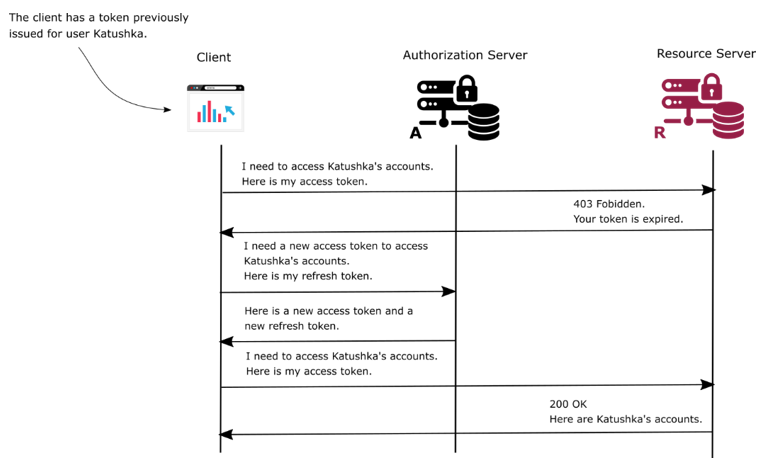
Finally, let’s find out how to use a refresh token. Where do you get a refresh token from? The authorization server returns the refresh token together with the access token when using a flow like authorization code grant or password grant. With the client credentials grant, there’s no refresh token because this flow doesn’t need user credentials. Once the Client has a refresh token, when the access token expires, the Client should issue a request with the following details:
If you wish your Authorization Server to support refresh tokens, you need to add the refresh token grant to the grant list of the client. For example, if you wish to change the project we created in section 13.1.3 to prove the password grant, you would change the client as presented in listing 13.11.