concept public key in category spring

This is an excerpt from Manning's book Spring Security in Action.
If we have two different keys for encryption (x, k1) -> y and decryption (y, k2) -> x, then we say that the encryption is done with asymmetric keys. Then, (k1, k2) is called a key pair. The key used for encryption, k1, is also referred to as the public key, while k2 is known as the private one. This way, only the owner of the private key can decrypt the data.
The public key is linked to the private key, and this is why we call it a pair. But the public key can only be used to validate the signature. One cannot sign the token using the public key (figure 15.6).
Figure 15.6 If a hacker manages to obtain the public key, they won’t be able to use it to sign tokens. The public key can only be used to validate the signature.
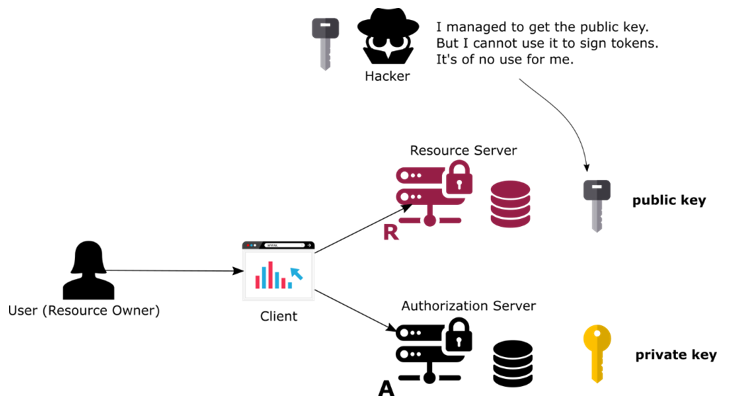
Obtaining the public key
To get the public key for the previously generated private key, you can run the command in the next code snippet.
keytool -list -rfc --keystore ssia.jks | openssl x509 -inform pem -pubkeyYou will be prompted to fill the password used when generating the public key - in my case, ssia123, and then you should find the public key and a certificate in the output. Only the value of the key is essential for us. This key should look similar to the next code snippet.
-----BEGIN PUBLIC KEY-----
MIIBIjANBgkqhkiG9w0BAQEFAAOCAQ8AMIIBCgKCAQEAijLqDcBHwtnsBw+WFSzG
VkjtCbO6NwKlYjS2PxE114XWf9H2j0dWmBu7NK+lV/JqpiOi0GzaLYYf4XtCJxTQ
DD2CeDUKczcd+fpnppripN5jRzhASJpr+ndj8431iAG/rvXrmZt3jLD3v6nwLDxz
pJGmVWzcV/OBXQZkd1LHOK5LEG0YCQ0jAU3ON7OZAnFn/DMJyDCky994UtaAYyAJ
7mr7IO1uHQxsBg7SiQGpApgDEK3Ty8gaFuafnExsYD+aqua1Ese+pluYnQxuxkk2
Ycsp48qtUv1TWp+TH3kooTM6eKcnpSweaYDvHd/ucNg8UDNpIqynM1eS7KpffKQm
DwIDAQAB
-----END PUBLIC KEY-----
This is it! We now have a private key we can use to sign the JWTs and a public key we can use to validate the signature. Now we just have to configure them in our Authorization Server and Resource Server.