concept repository in category spring
This is an excerpt from Manning's book Spring Microservices in Action, 2E.
Git. Git (https://git-scm.com/) is an open-source version control system that allows you to manage and track changes to any text file. Spring Cloud Config can integrate with a Git-backend repository and read the application’s configuration data out of the repository.
Listing 2.2 Maven pom file for the licensing service
<?xml version="1.0" encoding="UTF-8"?>
<project xmlns="http://maven.apache.org/POM/4.0.0" xmlns:xsi="http://www.w3.org/2001/XMLSchema-instance"
    xsi:schemaLocation="http://maven.apache.org/POM/4.0.0 https://maven.apache.org/xsd/maven-4.0.0.xsd">
    <modelVersion>4.0.0</modelVersion>
       <parent>
        <groupId>org.springframework.boot</groupId>
        <artifactId>spring-boot-starter-parent</artifactId>    #A
        <version>2.2.3.RELEASE</version>
        <relativePath/> <!-- lookup parent from repository -->
    </parent>
    <groupId>com.optimagrowth</groupId>
    <artifactId>licensing-service</artifactId>
    <version>0.0.1-SNAPSHOT</version>
    <name>License Service</name>
    <description>Ostock Licensing Service</description>

    <properties>
        <java.version>11</java.version>    #B
    </properties>

    <dependencies>
        <dependency>
            <groupId>org.springframework.boot</groupId>
            <artifactId>spring-boot-starter-actuator</artifactId>    #C
        </dependency>
        <dependency>
            <groupId>org.springframework.boot</groupId>
            <artifactId>spring-boot-starter-web</artifactId>    #D
        </dependency>

        <dependency>
            <groupId>org.springframework.boot</groupId>
            <artifactId>spring-boot-starter-test</artifactId>
            <scope>test</scope>
            <exclusions>
                <exclusion>
                    <groupId>org.junit.vintage</groupId>
                    <artifactId>junit-vintage-engine</artifactId>
                </exclusion>
            </exclusions>
        </dependency>
         <dependency>
            <groupId>org.projectlombok</groupId>
            <artifactId>lombok</artifactId>
            <scope>provided</scope>
        </dependency>
    </dependencies>

    <build>
        <plugins>
            <plugin>
                <groupId>org.springframework.boot</groupId>
                <artifactId>spring-boot-maven-plugin</artifactId>    #E
            </plugin>
        </plugins>
    </build>
</project>
Push the microservices images into repositories.

This is an excerpt from Manning's book Spring Batch in Action.
After describing Spring Batch XML capabilities, we show how to configure batch jobs and related entities with this dedicated XML vocabulary. We also look at configuring a repository for batch execution metadata. In the last part of this chapter, we focus on advanced configuration topics and describe how to make configuration easier.
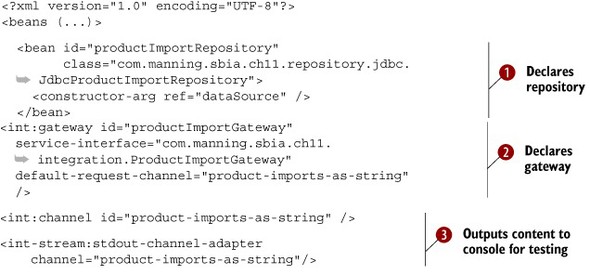
The repository and gateway are part of the root application context. The following listing shows their configuration along with other infrastructure beans, such as the transaction manager.

Listing 11.15 shows a new repository class dependency: JobExplorer. The Spring Batch JobExplorer interface provides easy access to batch metadata. The repository uses it to retrieve job instances and job executions. The repository’s get method contains the logic to communicate the status of an import. It starts by checking the existence of the import the caller is querying
. If the method finds no corresponding import, it throws an exception. Once you know the import exists, you can start thinking about communicating its status. At
, you define the default status—PENDING—which means the import exists but no corresponding job instance exists yet (the import file is in the submission directory, waiting for Spring Integration to pick it up). At
, you try to find the corresponding job instance, and if it exists, you retrieve the status of its last execution.
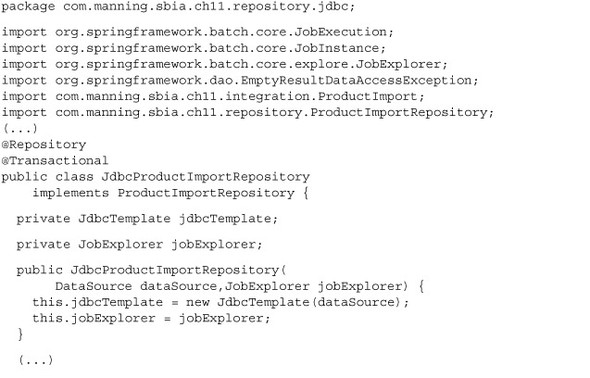
The repository only communicates the status of the import, but it could also communicate any information available in the batch metadata, such as duration of the import and number of records written and skipped.
The new version of the repository is a good example of using Spring Batch beans to access batch metadata. Because the repository now depends on the job explorer, it requires a modification in its Spring configuration. The following snippet shows how to declare the job explorer and how to inject it in the repository:
<bean id="jobExplorer"
      class="org.springframework.batch.core.explore.support.
   JobExplorerFactoryBean">
  <property name="dataSource" ref="dataSource" />
</bean>
<bean id="productImportRepository"
      class="com.manning.sbia.ch11.repository.jdbc.
   JdbcProductImportRepository">
  <constructor-arg ref="dataSource" />
  <constructor-arg ref="jobExplorer" />
</bean>
Now that the repository connects the application and Spring Batch, let’s see how to leverage this information in the web controller.