concept Spring Integration in category spring

This is an excerpt from Manning's book Spring in Practice.
Spring provides a number of APIs useful for integration styles, including Spring Data REST, Spring HATEOAS, Spring Integration, and Spring AMQP/Rabbit. Integration is such a large topic that it’s impossible for a single chapter to do more than touch on the complexities and solutions involved, but we’ve tried to offer a starting point to support further exploration and study. Spring Integration in Action and RabbitMQ in Action, both published by Manning, are great places to start.
4 There are other possibilities as well. For instance, you could stand up a dedicated (that is, not directly attached to any existing app) integration bus based on Spring Integration. We won’t explore that here, but by the end of this chapter it should be obvious how to do it.

This is an excerpt from Manning's book Spring Integration in Action.
Spring Integration addresses these challenges. It aims to increase productivity, simplify development, and provide a solid platform from which you can tackle the complexities. It offers a lightweight, noninvasive, and declarative model for constructing message-driven applications. On top of this, it includes a toolbox of commonly required integration components and adapters. With these tools in hand, developers can build the types of applications that literally change the way their companies do business.
Spring Integration stands on the shoulders of two giants. First is the Spring Framework, a nearly ubiquitous and highly influential foundation for enterprise Java applications that has popularized a programming model which is powerful because of its simplicity. Second is the book Enterprise Integration Patterns (Hohpe and Woolf, Addison-Wesley, 2003), which has standardized the vocabulary and catalogued the patterns of common integration challenges. The original prototype that eventually gave birth to the Spring Integration project began with the recognition that these two giants could produce ground-breaking offspring.
By the end of this chapter, you should have a good understanding of how the Spring Integration framework extends the Spring programming model into the realm of enterprise integration patterns. You’ll see that a natural synergy exists between that model and the patterns. If the patterns are what Spring Integration supports, the Spring programming model is how it supports them. Ultimately, software patterns exist to describe solutions to common problems, and frameworks are designed to support those solutions. Let’s begin by zooming out to see what solutions Spring Integration supports at a very high level.
From the 10,000-foot view, Spring Integration consists of two parts. At its core, it’s a messaging framework that supports lightweight, event-driven interactions within an application. On top of that core, it provides an adapter-based platform that supports flexible integration of applications across the enterprise. These two roles are depicted in figure 1.1.

There we have it: a classic Hello World example. This one is flexible enough to say hello to anyone. Because this book is about Spring Integration, and we’ve already established that it’s a framework for building messaging applications based on the fundamental enterprise integration patterns, you may be asking, Where are the Message, Channel, and Endpoint? The answer is that you typically don’t have to think about those components when defining the behavior. What we implemented here is a straightforward POJO with no awareness whatsoever of the Spring Integration API. This is consistent with the general Spring emphasis on noninvasiveness and separation of concerns. That said, let’s now tackle those other concerns, but separately, in the configuration:
<beans:beans
   xmlns:beans="http://www.springframework.org/schema/beans"
   xmlns:xsi="http://www.w3.org/2001/XMLSchema-instance"
   xmlns="http://www.springframework.org/schema/integration"
   xsi:schemaLocation="http://www.springframework.org/schema/beans
   http://www.springframework.org/schema/beans/spring-beans.xsd
   http://www.springframework.org/schema/integration
   http://www.springframework.org/schema/integration/spring-integration.xsd">

  <channel id="names"/>

  <service-activator input-channel="names" ref="helloService"
                     method="sayHello"/>

  <beans:bean id="helloService"
              class="siia.helloworld.channel.MyHelloService"/>

</beans:beans>
This code should look familiar. In the previous section, we saw an example of the Spring Framework’s support for message-driven POJOs, and the configuration for that example included an element from the jms namespace that similarly included the ref and method attributes for delegating to a POJO via an internally created Message-ListenerAdapter instance. Spring Integration’s service activator plays the same role, except that this time it’s more generic. Rather than being tied to the JMS transport, the service activator is connected to a Spring Integration MessageChannel within the ApplicationContext. Any component could be sending messages to this service activator’s input-channel. The key point is that the service activator doesn’t require any awareness or make any assumptions about that sending component.
All of the configured elements contribute components to a Spring Application-Context. In this simple case, you can bootstrap that context programmatically by instantiating the Spring context directly. Then, you can retrieve the MessageChannel from that context and send it a message. We use Spring Integration’s MessageBuilder to construct the actual message, shown in the following listing. Don’t worry about the details; you’ll learn much more about message construction in chapter 3.
Enterprise Integration Patterns describes the patterns used in the exchange of messages, as well as the patterns that provide the glue between applications. Like the diagram in figure 1.1, it’s about messaging and integration in the broadest sense, and the patterns apply to both intra-application and inter application scenarios. Spring Integration supports the patterns described in the book, so we need to establish a broad understanding of the definitions of these patterns and the relations between them.

This is an excerpt from Manning's book Spring Roo in Action.
API-based editors —Editing support for Spring WebFlow, Spring Integration, Spring Batch, and other features is provided. Open one of these files in the editor and see the tabs along the bottom, which provide graphical editing features.
Listing 14.8. Maven build dependencies for Spring Integration
<!-- Spring Integration Dependencies --> <dependency> <groupId>org.apache.activemq</groupId> <artifactId>activemq-core</artifactId> <version>${activemq.version}</version> </dependency> <dependency> <groupId>org.springframework.integration</groupId> <artifactId>spring-integration-jms</artifactId> <version>${spring.integration.version}</version> </dependency> <dependency> <groupId>org.springframework.integration</groupId> <artifactId>spring-integration-jmx</artifactId> <version>${spring.integration.version}</version> </dependency> <dependency> <groupId>org.springframework</groupId> <artifactId>spring-jms</artifactId> <version>${spring.version}</version> <scope>compile</scope> </dependency> <dependency> <groupId>org.springframework.integration</groupId> <artifactId>spring-integration-core</artifactId> <version>${spring.integration.version}</version> </dependency> <dependency> <groupId>org.springframework.integration</groupId> <artifactId>spring-integration-stream</artifactId> <version>${spring.integration.version}</version> </dependency> <dependency> <groupId>org.springframework.integration</groupId> <artifactId>spring-integration-mail</artifactId> <version>${spring.integration.version}</version> </dependency>
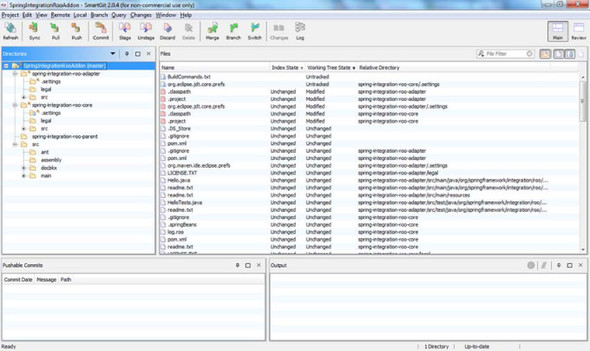
You’ll perform the following steps to install the Spring Integration add-on:

This is an excerpt from Manning's book Spring Batch in Action.
Spring Integration is a framework to facilitate messaging enterprise integration. Like Spring Batch, it’s part of the Spring portfolio. Spring Integration provides support for the enterprise integration patterns described in the EIP book and makes using these patterns easier for any Spring-based application.
Don’t confuse Spring Integration with an enterprise service bus (ESB). Spring Integration is a framework that you embed in your applications, not a container that runs your application code. Figure 11.6 illustrates how you can use Spring Integration in your applications.
Figure 11.6. Spring Integration enables messaging within Spring applications. It can be embedded in any Spring application and can integrate with external systems using built-in adapters for various technologies, such as HTTP, JMS, file systems, and RMI.

Spring Integration provides support for enterprise integration patterns and simplifies message handling: routing, transforming, splitting, and aggregating are all operations you can easily perform on messages with Spring Integration. Note that the Spring Integration messaging infrastructure is agnostic to any backing technology: messages can come from any source (a file dropped on the file system or a JMS queue, for example), be routed through the application thanks to the messaging bus, and then be sent to any target. This makes applications that use Spring Integration decoupled from their surrounding environment.
If the usefulness of Spring Integration is still in doubt, don’t worry: we’ll dive into some examples soon. First, let’s examine the relationship between Spring Integration and Spring Batch.
In listing 11.5, you create a JobLaunchRequest (to launch your echoJob job) and wrap the request object in a Spring Integration message. Spring Integration provides the MessageBuilder class to create the message. You use it to set the payload (or body) of the message with the job launch request. Once you create the message, you can look up the job-requests channel from the application context and send the request. If you execute the code from listing 11.5, you’ll see output like the following on the console:
{param1=value1}
JobExecution: id=1, startTime=Tue Jul 27 11:07:33 CEST 2010,
   endTime=Tue Jul 27 11:07:33 CEST 2010,
   lastUpdated=Tue Jul 27 11:07:33 CEST 2010, status=COMPLETED,
   exitStatus=exitCode=COMPLETED;exitDescription=,
   job=[JobInstance: id=1,JobParameters=[{param1=value1}],Job=[echoJob]]
The first line of output on the console comes from the EchoJobParametersTasklet. The second line is the job execution displayed by the console channel adapter. This means that your job launch with Spring Integration is a success!
Wrapping and unwrapping messages with Spring Integration
When you send the job launch request, you wrap it in a Spring Integration message, even though the JobLaunchingMessageHandler uses a JobLaunchRequest object. You do this because Spring Integration automatically unwraps the payload from the message. The framework analyzes the signature of the message handler and is smart enough to call the handler’s method with the payload as the parameter. You didn’t even specify a method to call in the serviceactivator XML element! You can also use annotations on the message handler to help Spring Integration extract information from the message: @ServiceActivator specifies which method to call on an incoming message, and @Header extracts a header from the message. With Spring Integration, message handlers can have flexible method signatures.
Because enterprise integration patterns are mainly message driven and Spring Integration supports messaging, you might think Spring Integration and Spring Batch wouldn’t need each other. After all, the Spring Batch integration style is file transfer, not messaging. But these two frameworks are complementary, and Spring developers who deal with enterprise integration should have both in their toolbox. If frameworks had astrological signs, Spring Integration and Spring Batch would be compatible!