concept datum in category sql server

This is an excerpt from Manning's book Learn Windows SQL Server Administration in a Month of Lunches.
SQL Server is Microsoft’s relational database management system (RDBMS), and it’s at the heart of many corporate applications. Its job is, quite simply, to store data. Application developers write applications that add, remove, and change data constantly. As a major platform component, SQL Server requires a bit of ongoing maintenance—and that’s what this book is designed to teach.
Shared —Allows someone else to read, but not change, the data. SQL Server allows multiple Shared locks on the same data. Update —Allows someone else to read the data but tells SQL Server that the data is being read with the intent of updating it. SQL Server only allows one Update lock on a given piece of data, but it will allow multiple Shared locks at the same time. Update locks are eventually converted to an Exclusive lock when the query makes the update. The idea here is that UPDATE queries are technically a two-step process, with the first step reading the existing data and the second step modifying it. An Update lock helps keep the data available for others to read for as long as possible. Exclusive —Used to change data. SQL Server will allow one and only one Exclusive lock on a given piece of data, and it won’t allow any other locks on that same data. If you’re trying to change data, and therefore trying to acquire an Exclusive lock on it, you’ll be blocked until all other existing locks go away. Thanks to escalation, SQL Server has to take a lot more locks than you might think. Let’s say you get an Exclusive lock on a row. SQL Server doesn’t know what your plans are for the entire transaction, so it has to reserve the right to escalate that lock to a page, extent, table, and so on. At the same time it gets your Exclusive lock on the row, it also gets an Intent Exclusive lock on the page, extent, table, and so on. Those intent locks are how the server enables itself to escalate your lock, if needed. SQL Server has to acquire the Intent locks first, meaning it starts from the largest object (say, the entire database) and works its way down until it reaches the data it wants the real lock on.
SQL Server also keeps track of a lock’s isolation level. Isolation describes how well a transaction is protected from others. In a Read Uncommitted query, a SELECT statement is allowed to read data without first obtaining a Shared lock. That means other transactions might come along and obtain an Exclusive lock on the data, and that SELECT statement might be reading data that is actively being changed. That’s called a dirty read, because the data being read might be dirty, or not fully committed. That level of isolation (technically I suppose it’s nonisolation) helps improve concurrency, but the application has to be written to deal with potential data integrity problems. There are levels of isolation, but I’m not going to focus much on them because at a low level of administration you can’t work with them. I’ll mention them as appropriate in the upcoming discussion.

This is an excerpt from Manning's book SQL Server MVP Deep Dives Vol. 2.
The overwhelming majority of database designs that I’ve encountered use artificial sequential enumerator keys such as IDENTITY for just about every table in the database. College classes about databases, books about database development, web articles, and most other materials include examples that use artificial keys almost exclusively. I believe that this practice is so widespread that new students, learning to become database developers, take it as a fact of life that this is how it should be done. Moreover, many database developers have come from a background of procedural programming, where the concept of object handles, pointers, and physical addresses fits perfectly with the notion of a “row handle,” which an artificial key seems to offer. Joe Celko, a well-known relational database expert and author, often claims that the origins of this practice are rooted all the way back in the 1950s when magnetic tapes were used to store sequential chunks of data and physical pointers were the only available means for the programming languages of those days to access the data. Celko is among the very few who wholeheartedly (some claim overly so) preaches for using natural keys. So who is right?
Listing 1. Enabling Service Broker and setting up transport security: DataReceiver
USE master -- SET UP TRANSPORT SECURITY -- create a master key for the master database -- DO NOT FORGET THIS PASSWORD AND STORE IT SOMEWHERE SAFE CREATE MASTER KEY ENCRYPTION BY PASSWORD = 'Put_Your_Custom_Password_For_DataReceiver_Master_DB_Here' GO -- create certificate for the service broker TCP endpoint for secure --communication between servers CREATE CERTIFICATE CertificateDataTransferReceiver WITH -- BOL: The term subject refers to a field in the metadata of -- the certificate as defined in the X.509 standard SUBJECT = 'CertDataTransferReceiver', -- set the start date yyyyMMdd format START_DATE = '20111001', -- set the expiry date EXPIRY_DATE = '20500101' -- enables the certificate for service broker initiator ACTIVE FOR BEGIN_DIALOG = ON GO -- save certificate to a file and copy it to the DataSender instance -- so we can enable secure connection BACKUP CERTIFICATE CertificateDataTransferReceiver -- this path must be somewhere where we have permissions TO FILE = 'c:\CertificateDataTransferReceiver.cer' GO -- create endpoint which will be used to receive data from DataSender -- instance CREATE ENDPOINT ServiceBrokerEndPoint -- set endpoint to actively listen for connections STATE = STARTED -- set it for TCP traffic only since service broker only supports TCP --protocol -- by convention, 4022 is used but any number between 1024 and 32767 -- is valid. AS TCP (LISTENER_PORT = 4022) FOR SERVICE_BROKER ( -- authenticate connections with our certificate AUTHENTICATION = CERTIFICATE CertificateDataTransferReceiver, -- default value is REQUIRED encryption but let's just set it --to SUPPORTED -- SUPPORTED means that the data is encrypted only if the -- opposite endpoint specifies either SUPPORTED or REQUIRED. ENCRYPTION = SUPPORTED ) GO -- Finally grant the connect permissions to public. GRANT CONNECT ON ENDPOINT::ServiceBrokerEndPoint TO PUBLIC
Once your source systems have been identified, you should invest time profiling their data in order to assess its health and quality. As Jack E. Olson explains in his book Data Quality, The Accuracy Dimension (Morgan Kaufmann, 2003), data has quality if it satisfies the requirements of its intended use. That means accuracy and relevance of data depends on the context of its use. For example, although data may be of good quality from a transactional system standpoint, it may not have the completeness or accuracy necessary for specific analytical requirements the data warehouse system has to support.

This is an excerpt from Manning's book SQL Server DMVs in Action: Better Queries with Dynamic Management Views.
When a query is run, the optimizer inspects the relevant tables, row counts, constraints, indexes, and data statistics to determine a cost-effective way of fulfilling the query. Statistics describe the range and density of the data values for a given column. These are used to help determine the optimal path to the data. This information is used to create a plan that’s cached for reuse. In essence, statistics can greatly influence how the underlying data is queried.
When the data in the table changes, the statistics may become stale, and this may result in a less-efficient plan for the available data. To get around this, the statistics are typically updated automatically, and any necessary plans are recompiled and recached.
Indexes are used to improve the performance of data retrieval, to order data, and sometimes to enforce uniqueness. It’s the first of these uses, improving data retrieval, that I’ll focus on in this chapter. We’ll use the DMVs to identify indexes that may be suboptimal or unnecessary, as well as indexes the optimizer would like to use but are missing. All these aspects of index optimality can affect the performance of your SQL queries, sometimes significantly. I’ll provide discussions within each code snippet on index optimization.
Indexes are data structures that duplicate part of the data already held in the underlying table the index relates to. Although this duplication can be costly for updates, it provides a quick way of accessing the table’s data. This is especially true when the index contains all the information the query needs. In this case, the table isn’t accessed at all; only the index is accessed. This type of index is called a covered index.
A table can have many indexes, but only one contains all the columns and physically orders the table’s rows. This is the clustered index. The clustered index is typically used for retrieving a range of rows between two values (for example, to retrieve all the invoices between two invoice dates). As such, the clustered index is often determined by the most important queries, which retrieve a range of data. Having the data physically contiguous will improve query performance, especially where you want most of the data on the row, because each retrieved page will have related relevant data. Tables without a clustered index are known as heaps.

This is an excerpt from Manning's book SQL Server 2008 Administration in Action.
Backup and data compression— In SQL Server 2005 and earlier, third-party utilities were used to compress backups. SQL Server 2008 includes not only backup compression, but also the ability to compress data within the database, enabling significant disk space and cost savings, and in some cases, a significant performance boost. We’ll cover data and backup compression in chapters 9 and 10.
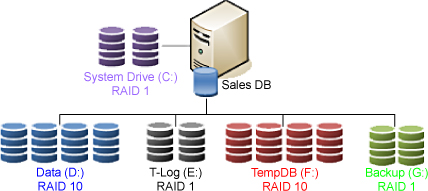
As shown in figure 9.1, an important database file configuration task, particularly for databases with direct-attached storage, is to provide separate physical RAID-protected disk volumes for data, transaction log, tempdb, and backup files.
The problem with this approach is twofold; the data in the database is no longer transactionally consistent with the BLOB files, and database backups aren’t guaranteed to be synchronized with the BLOBs (unless the database is shut down for the period of the backup, which isn’t an option for any 24/7 system).