concept file in category sql server

appears as: files, file, file, files
SQL Server MVP Deep Dives Vol. 2

This is an excerpt from Manning's book SQL Server MVP Deep Dives Vol. 2.

Placing SQL Server files is half art and half science. The science half comes from understanding the I/O capabilities of the storage solution that you’re using. The art half comes from being able to see how the database server will, in the abstract, push I/O down to the storage array. As you move files around the server from disk to disk, RAID array to RAID array, you have to be able to visualize how the I/O for each RAID array will change on both sets of disks, and how these changes will impact the overall storage array, such as the cache workload, frontend loops, and backend loops.

Listing 2. Loading the SMO reference library
#Load the assembly and read the list of servers from a file [System.Reflection.Assembly]::LoadWithPartialName ('Microsoft.SqlServer.SMO') | out-null;

When a database and its transaction log are first created, ideally both should be presized so that autogrowth doesn’t have to be used to grow your files. This approach offers three benefits to transaction logs. First, it helps to prevent physical file fragmentation because the transaction log is created at one time, and autogrowth won’t need to kick in and grow the file. Autogrowth is one of the leading causes of physical file fragmentation. Second, when autogrowth kicks in and grows the transaction log, the space has to be zeroed out (unlike database files with instant file initialization turned on). This process can take time, and during the autogrowth, SQL Server has to pause all activity in the log, which might make your users upset if the transaction log has to grow a lot. Third, autogrowth can lead to a situation where your transaction logs have too many virtual log files, which can impact performance. More on this topic shortly.

SQL Server DMVs in Action: Better Queries with Dynamic Management Views

This is an excerpt from Manning's book SQL Server DMVs in Action: Better Queries with Dynamic Management Views.

Table 1.1. The major DMV groups

DMV group

Description

Change data capture Change data capture relates to how SQL Server captures change activity (inserts, updates, and deletes) across one or more tables, providing centralized processing. It can be thought of as a combination of trigger and auditing processing in a central area. These DMVs contain information relating to various aspects of change data capture, including transactions, logging, and errors. This group of DMVs occurs in SQL Server 2008 and higher.
Common Language Runtime The Common Language Runtime allows code that runs on the database to be written in one of the .NET languages, offering a richer environment and language and often providing a magnitude increase in performance. These DMVs contain information relating to various aspects of the .NET Common Language Runtime, including application domains (these are wider in scope than a thread and smaller than a session), loaded assemblies, properties, and running tasks.
Database These DMVs contain information relating to various aspects of databases, including space usage, partition statistics, and session and task space information.
Database mirroring The aim of database mirroring is to increase database availability. Transaction logs are moved quickly between servers, allowing fast failover to the standby server. These DMVs contain information relating to various aspects of database mirroring, including connection information and pagerepair details.
Execution These DMVs contain information relating to various aspects of query execution, including cached plans, connections, cursors, plan attributes, stored procedure statistics, memory grants, query optimizer information, query statistics, active requests and sessions, SQL text, and trigger statistics.
Extended events Extended events allow SQL Server to integrate into Microsoft’s wider event-handling processes, allowing integration of SQL Server events with logging and monitoring tools. This group of DMVs occurs in SQL Server 2008 and higher.
Full-text search Full-text search relates to the ability to search character-based data using linguistic searches. This can be thought of as a higher-level wildcard search. These DMVs contain information relating to various aspects of fulltext search, including existing full-text catalogs, index populations currently occurring, and memory buffers/pools.
Index These DMVs contain information relating to various aspects of indexes, including missing indexes, index usage (number of seeks, scans, and lookups, by system or application, and when they last occurred), operational statistics (I/O, locking, latches, and access method), and physical statistics (size and fragmentation information).
Input/Output (I/O) These DMVs contain information relating to various aspects of I/O, including virtual file statistics (by database and file, number of reads/writes, amount of data read/written, and I/O stall time), backup tape devices, and any pending I/O requests.
Object These DMVs contain information relating to various aspects of dynamic management objects; these relate to object dependencies.
Query notification These DMVs contain information relating to various aspects of query notification subscriptions in the server.
Replication These DMVs contain information relating to various aspects of replication, including articles (type and status), transactions, and schemas (table columns).
Resource Governor In the past, running inappropriate ad hoc queries on the database sometimes caused timeout and blocking problems. SQL Server 2008 implements a resource governor that controls the amount of resources different groups can have, allowing more controlled access to resources. These DMVs contain information relating to various aspects of Resource Governor, including resource pools, governor configuration, and workload groups. This group of DMVs occurs in SQL Server 2008 and higher.
Service Broker Service Broker is concerned with providing both transactional and disconnected processing, allowing a wider range of architectural solutions to be created. These DMVs contain information relating to various aspects of Service Broker, including activated tasks, forwarded messages, connections, and queue monitors.
SQL Server Operating System These DMVs contain information relating to various aspects of the SQL Server Operating System (SQLOS), including performance counters, memory pools, schedulers, system information, tasks, threads, wait statistics, waiting tasks, and memory objects.
Transaction These DMVs contain information relating to various aspects of transactions, including snapshot, database, session, and locks.
Security These DMVs contain information relating to various aspects of security, including audit actions, cryptographic algorithms supported, open cryptographic sessions, and database encryption state (and keys).

You can examine, at both the database and the individual file levels, the performance of the physical disks that the data resides on using the DMV sys.dm_io_virtual_file_stats. This DMV accepts two parameters, namely, the database_id and the file_id, which limit the database and file under investigation. In our examples, we’re interested in all the files on all the databases, so we supply NULL parameter values to the DMV.

11.11.3. Average read/write times per file, per database

It’s also possible to identify poorly performing files and disks by obtaining the average read and write times per file for each database on the server instance. These should be below 20 milliseconds. The script you use to determine the average read and write time (in milliseconds) by file per database is shown in the listing that follows.

Listing 11.11. Average read/write times per file, per database
SET TRAN ISOLATION LEVEL READ UNCOMMITTED SELECT DB_NAME(database_id) AS DatabaseName , file_id , io_stall_read_ms / num_of_reads AS 'Average read time' , io_stall_write_ms / num_of_writes AS 'Average write time' FROM sys.dm_io_virtual_file_stats(NULL, NULL) WHERE num_of_reads > 0 and num_of_writes > 0 ORDER BY DatabaseName
Figure 11.12. Output showing the average read and write times per file, per database

Figure 11.12 shows the result of running the “Average read/write times per file, per database” script. The columns that are output show the average read and write times per file, per database. Any values over 20 milliseconds should be investigated as a matter of priority.

SQL Server 2008 Administration in Action

This is an excerpt from Manning's book SQL Server 2008 Administration in Action.

In contrast, large files benefit from a larger allocation unit. In fragmented disks with a small allocation unit size, a single large file will occupy many allocation units, which are probably spread over many different parts of the disk. If you use a larger allocation unit, a file will have a better chance of being located in consecutive disk sectors, making the read and writes to this file more efficient.

  • Data and log files should be on separate drives.
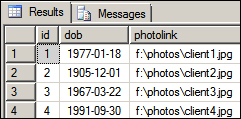
  • Figure 9.7. Rather than store the BLOB in the database, an alternate approach is to simply store the link to the file in the database.