concept session in category sql server

This is an excerpt from Manning's book Learn Windows SQL Server Administration in a Month of Lunches.
Once you’re done, click OK to close the window. You’ll need to right-click the new session in SQL Server Management Studio, and select Start to start the session. When any new blocked process reports are generated, they’ll be listed underneath that session. These reports show what processes are being blocked, what database they were trying to access, what kind of lock they were trying to obtain, and so on. This helps me figure out what exactly is happening, and to provide useful information to a developer or vendor.
Live data isn’t always what you want; sometimes you want to run a session all day, or overnight, and analyze what was captured at some later time. No problem. Take a look at figure 17.8.
You can see that my session expands to show the ring buffer being used to store event information. That’s because, when I created the session, I elected to keep the most recent 1,000 events in memory, remember? The ring buffer is where those live. The buffer stores captured information in XML, and you can click the buffer data to display the XML, as shown in figure 17.9.
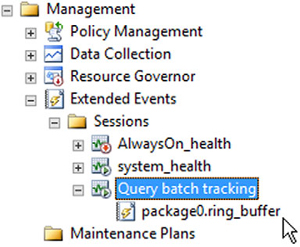
Because sessions can be a little hard to set up, SQL Server includes the New Session Wizard, which helps create a new session based on predefined templates provided by Microsoft. I’ll walk you through an example that tracks query batch information, and then discuss some of the permutations offered by the Wizard.

This is an excerpt from Manning's book SQL Server DMVs in Action: Better Queries with Dynamic Management Views.
Table 1.1. The major DMV groups
Now we’ve identified the types of object and the space they’re consuming, it would be worthwhile to drill down on the sessions that have used this space. This would allow us to identify specific sessions (users/connections) that might be causing space usage problems.
This script shows you how much space is still being used by the completed batches of SQL queries. Usually, any allocated space is reclaimed. This script is useful in showing which sessions still have tempdb space associated with them.
Listing 9.5. Space used and reclaimed in tempdb for completed batches
SET TRANSACTION ISOLATION LEVEL READ UNCOMMITTED SELECT CAST(SUM(su.user_objects_alloc_page_count + su.internal_objects_alloc_page_count) * (8.0/1024.0) AS DECIMAL(20,3)) AS [SpaceUsed(MB)] , CAST(SUM(su.user_objects_alloc_page_count - su.user_objects_dealloc_page_count + su.internal_objects_alloc_page_count - su.internal_objects_dealloc_page_count) * (8.0/1024.0) AS DECIMAL(20,3)) AS [SpaceStillUsed(MB)] , su.session_id , ec.connection_id , es.login_name , es.host_name , st.text AS [LastQuery] , ec.last_read , ec.last_write , es.program_name FROM sys.dm_db_session_space_usage su INNER JOIN sys.dm_exec_sessions es ON su.session_id = es.session_id LEFT OUTER JOIN sys.dm_exec_connections ec ON su.session_id = ec.most_recent_session_id OUTER APPLY sys.dm_exec_sql_text(ec.most_recent_sql_handle) st WHERE su.session_id > 50 GROUP BY su.session_id, ec.connection_id, es.login_name, es.host_name , st.text, ec.last_read, ec.last_write, es.program_name ORDER BY [SpaceStillUsed(MB)] DESCThis script uses three DMVs and one DMF to find the space used and not reclaimed by sessions; a brief description of each is given in table 9.3.
Table 9.3. DMVs/DMF that reveal tempdb space used and not reclaimed by sessions for completed batches
DMV/DMF
Description
sys.dm_db_session_space_usage Contains details of space used by user and internal objects for each session. Specifically, contains the number of pages allocated and de-allocated by each session. sys.dm_exec_sessions Contains details of sessions on SQL Server. sys.dm_exec_connections Contains details of connections to SQL Server. sys.dm_exec_sql_text DMF that returns the SQL text identified by a given sql_handle Joining the DMVs and the DMF gives us enough information to identify the tempdb space used and not reclaimed by each session, across all the databases on the server. The DMVs sys.dm_db_session_space_usage, sys.dm_exec_sessions, and sys.dm_exec_connections are joined on their common key column session_id. The connection contains the column most_recent_sql_handle, which is passed to the DMF sys.dm_exec_sql_text to retrieve the text of the SQL query. A LEFT OUTER JOIN is used to join sys.dm_exec_sessions and sys.dm_exec_connections because a session can have multiple connections.
Any system sessions that have a session_id of 50 or less are filtered out. The amount of space used by a session is calculated by summing user_objects_alloc_page_count and internal_objects_alloc_page_count. Similarly, the amount of space not reclaimed is calculated as the difference between user_objects_alloc_page_count and user_objects_dealloc_page_count added to the difference between internal_objects_alloc_page_count and internal_objects_dealloc_page_count. The results are sorted by the amount of space each session still owns. An example of the type of output for this query is shown in figure 9.5.
The output shows, for completed batches, the amount of space in tempdb that each session still has associated with it, along with details of the session and connection that allow you to report on where the query is running from (host_name), who is running the SQL query (login_name), and the text of the last-completed SQL query. If space usage is a problem (as reported in the SQL Server error log), you can use the output to determine which session/user/SQL query is using the most space, with a view to taking corrective action. Such action includes rescheduling the queries to run at a time when more resources are available or rewriting the relevant query to use less tempdb space, for example, replacing a hash join with a nested loop join.
