concept SQL in category sql server

This is an excerpt from Manning's book SQL Server MVP Deep Dives Vol. 2.
Filtered indexes, new in SQL 2008, provide another significant tool in the performance tuner’s utility belt. When I think of indexes, I often consider the analogy of the phonebook, and consider the Yellow Pages to be like a filtered index, listing phone numbers ordered by business type, but with a filter such as WHERE IsBusiness = 'Y' (or more strictly WHERE HasPaidToAdvertiseInTheYellowPages = 'Y'). We all use the Yellow Pages and realize its significance in helping us find the information we need, so I expect I don’t need to describe the benefits of filtered indexes.

This is an excerpt from Manning's book SQL Server DMVs in Action: Better Queries with Dynamic Management Views.
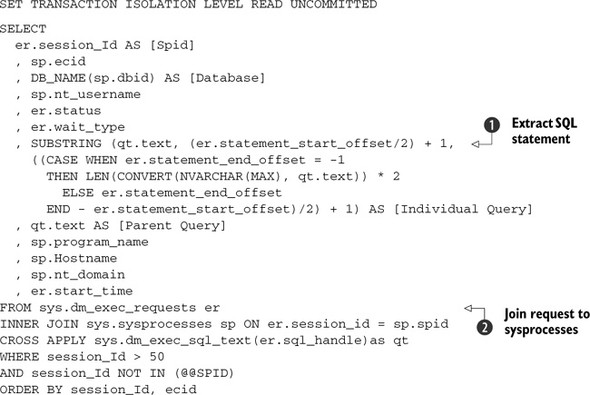
Sometimes you have problems with the overnight batch process, reported as a timeout or slow-running queries, and it would be nice to know what SQL is running during the time of this problem, giving you a starting point for further analysis.
Although you might know what stored procedure is currently running on your server (from your overnight batch scheduler or sp_who2), do you know what specific lines of SQL are executing? How are the SQL queries interacting? Is blocking occurring? You can get this information by using DMVs combined with a simple monitoring script. I’ve used such a script often to examine problems that occur during an overnight batch run.
The previous two chapters discussed scripts that allow you to discover information about poorly performing SQL at the query level. When a SQL query is executing, the time it spends on the CPU is recorded in the column total_work_time in the DMV sys.dm_exec_query_stats. In addition, there are times when the query is ready to run but is unable to, for a variety of reasons, including waiting for I/O to complete. At the query level, you can determine the amount of waiting from the difference between the total_elapsed_time and total_work_time columns in the sys.dm_exec_query_stats DMV.
It might prove useful to run this script together with the one given in chapter 5 (section 5.9) to get more complete and detailed information about what specific lines of SQL are causing the blocking and being blocked. The two sets of output can be interlinked via their common session_id.