concept transaction in category sql server

This is an excerpt from Manning's book Learn Windows SQL Server Administration in a Month of Lunches.
In the Simple recovery model, checkpointed log entries are deleted. That means you can never again reexecute them, but it means you never have to worry about the log file getting full. Well, mostly not worry. A very large transaction can certainly fill the log, since the entire transaction has to fit in the log until the transaction completes. Certain maintenance tasks like rebuilding indexes are very large transactions, so in some cases you may need to worry about the log size. But the idea behind the Simple model is that completed transactions are removed automatically from the log.

This is an excerpt from Manning's book SQL Server MVP Deep Dives Vol. 2.
The clustered index of an ever-increasing value that never changes will never get fragmented by INSERTs or UPDATEs (except UPDATEs that increase row size), thus reducing the need for index maintenance. A clustered index requires an exclusive, table-level lock in order to be rebuilt. Consequently, during a clustered index rebuild, table data is unavailable to the application except for transactions that are using the read-uncommitted isolation level. Therefore, using IDENTITY keys as clustered primary keys can reduce potential downtime.
begin transaction;

select next value for dbo.MySequence;

rollback transaction;

select next value for dbo.MySequence;
go
8. Now that the row has been inserted, a Commit log record is created, and all of the log records associated with the transaction are now flushed (written) to the transaction log file from the log cache. It’s only at this point the transaction is complete. This process is known as write-ahead logging. In other words, all data modifications must first be made to the transaction log before they’re written to the data file. Because of write-ahead logging, should the SQL Server fail before the dirty data page is written back to the data file, the transaction can be rolled forward during the recovery process when SQL Server is restarted.
9. Now that the transaction is complete, transactional locks are released and the batch is now considered complete, and the client is notified that the batch completed successfully.
So how does this example explain how a transaction log can become a bottleneck? Instead of just one row being inserted, let’s assume that tens of thousands of rows per second are being modified in a database from hundreds of simultaneous transactions. This means that all the log records for every data modification have to be written to the log file. If the I/O subsystem isn’t up to the task, transactions will have to wait before their log records can be written to the transaction log file, keeping them open longer than necessary and starting a potential chain of events (extra wait states, blocking, and so forth) that result in a bottleneck that can further hurt the performance of the server.

This is an excerpt from Manning's book SQL Server DMVs in Action: Better Queries with Dynamic Management Views.
DMV information includes metrics that relate to indexes, query execution, the operating system, Common Language Runtime (CLR), transactions, security, extended events, Resource Governor, Service Broker, replication, query notification, objects, input/output (I/O), full-text search, databases, database mirroring, change data capture (CDC), and much more. In addition, many corollary areas enhance and extend the DMV output. I’ll discuss these a little later, in the section titled “DMV companions.”
A transaction is a unit of work. A unit of work is a set of SQL queries that are treated as a unit; for example, either they all commit or none of them commit their changes to the database. You can consider the movement of money from one bank account to another as two pieces of work, but to ensure consistency, they’re treated as a single unit of work, or one transaction.
Transactions affect how units of work are carried out; this influences the locking strategy and subsequent blocking. Locks are held by transactions. To ensure that the data used or modified by two or more queries is consistent, locks are taken out on the underlying data.
Before we can get into some interesting and useful scripts, it makes sense to examine the features that will allow you to understand more fully the output from the scripts. We’ll do this in the following sections, starting with an overview of transactions.
Listing 8.3. Starting an open transaction
USE IWS_TEMP BEGIN TRANSACTION INSERT INTO [dbo].[tblCountry] ([Code], [Description]) VALUES('ENG', 'ENGLAND')Because this transaction has been started but not committed or rolled back, it’s described as open. This means it contains locks against the table dbo.tblCountry that will impact other queries that run against this table. This will allow us to investigate and discuss the impact of locks, blocking, and transactions.
Transactions are often described as having ACID properties. The initialism ACID represents the atomic, consistent, isolated, and durable properties of transactions. An overview of each of the ACID properties is given in table 8.3.

This is an excerpt from Manning's book SQL Server 2008 Administration in Action.
The process of obtaining or deriving these figures is determined by the state of the application. If the application is an existing production system, the figures can be easily obtained using Windows Performance Monitor. Alternatively, if the system is yet to be commissioned, estimates are derived using various methods. A common one is to use a test environment to profile the reads and writes per transaction type, and then multiply by the expected number of transactions per second per type.
You can perform backups in SQL Server while the database is in use and is being modified by users. Such backups are known as online backups. In order for the resultant backup to be restored as a transactionally consistent database, SQL Server includes part of the transaction log in the full database backup. Before we cover the transaction log in more detail, let’s consider an example of a full backup that’s executed against a database that’s being actively modified.
Figure 10.1 shows a hypothetical example of a transaction that starts and completes during a full backup, and modifies a page after the backup process has read it from disk. In order for the backup to be transactionally consistent, how will the backup process ensure this modified page is included in the backup file? In answering this question, let’s walk through the backup step by step. The step numbers in the following list correspond to the steps in figure 10.1.
If a transaction is canceled before it completes, either at the request of an application or due to a system error, the transaction log is used to undo, or roll back, the transaction’s modifications.
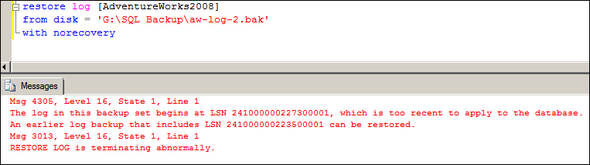
Consider figure 10.3. Starting at point 1, we perform a full database backup, after which differential and transaction log backups occur. Each of the backups serves as part of the chain. When restoring to a point in time, an unbroken sequence of log backups is required. For example, if we lost backup 4, we wouldn’t be able to restore past the end of backup 3 at 6 a.m. Tuesday. Attempting to restore the transaction log from log backup 5 would result in an error message similar to that shown in figure 10.4.
In addition to protecting against potential data loss, regular log backups limit the growth of the log file. With each transaction log backup, certain log records, discussed in more detail shortly, are removed, freeing up space for new log entries. As covered earlier, the transaction log in a database in full recovery mode will continuing growing indefinitely until a transaction log backup occurs.
The frequency of transaction log backups is an important consideration. The two main determining factors are the rate of database change and the sensitivity to data loss.
Listing 10.1. Recovering a database to a point in time
-- Backup the tail of the transaction log BACKUP LOG [AdventureWorks2008] TO DISK = N'G:\SQL Backup\AdventureWorks-Tail.bak' WITH INIT, NORECOVERY -- Restore the full backup RESTORE DATABASE [AdventureWorks2008] FROM DISK = N'G:\SQL Backup\AdventureWorks.bak' WITH NORECOVERY GO -- Restore the differential backup RESTORE DATABASE [AdventureWorks2008] FROM DISK = N'G:\SQL Backup\AdventureWorks-Diff.bak' WITH NORECOVERY GO -- Restore the transaction logs RESTORE LOG [AdventureWorks2008] FROM DISK = N'G:\SQL Backup\AdventureWorks-Trn.bak' WITH NORECOVERY GO -- Restore the final tail backup, stopping at 11.05AM RESTORE LOG [AdventureWorks2008] FROM DISK = N'G:\SQL Backup\AdventureWorks-Tail.bak' WITH RECOVERY, STOPAT = 'June 24, 2008 11:05 AM' GO