concept change in category sql

This is an excerpt from Manning's book SQL Server MVP Deep Dives Vol. 2.
The reason key value permanence is so meaningful is that it’s hard to propagate changes in key values throughout all referencing tables without disrupting the database. Although cascading referential constraints can be used in most cases to handle this task, it can incur significant data modification overhead. It’s a potential cost that never needs to be estimated when using an artificial identifier whose value never needs to change, regardless of what other property values change.
Listing 1. First solution
-- Query 1 SELECT sh.Stockholder FROM dbo.Stockholders AS sh WHERE sh.Stockname IN ('McDonalds', 'Microsoft') GROUP BY sh.Stockholder HAVING COUNT(sh.Stockname) = 2 -- Remove below AND for remainder division, or change "=" to "<=" AND COUNT(sh.Stockname) = (SELECT COUNT(*) FROM dbo.Stockholders AS x WHERE x.Stockholder = sh.Stockholder);
The report writer has the ability to make a change directly on the report part and save it to the report gallery. The next time another report writer opens a report that uses that report part, they decide if they want to keep their old version or use the new version. Determining whether the change is specific to the report or a global change is something to be decided. Now you start to see where the maintenance piece comes in. The original report writer submits a request to change the report part, and an administrator decides if it’s a one-off change or if propagation to the rest of the reports is required.

This is an excerpt from Manning's book SQL Server DMVs in Action: Better Queries with Dynamic Management Views.
Correlating the wait types with various performance counters is a well-known and much-used method of performance tuning. We’ll examine the causes of waiting together with the changes in the performance counters to suggest reasons for the problems and how to rectify them.
Previously we determined the effect of queries on performance counters and determined what effect these queries have on both wait states and performance counters. You can go one step further and display which queries have run. This will allow you to correlate the individual SQL queries with the changes in the wait states and performance counters.
Reporting the changes in performance counters, wait states, and queries over a given time period should allow you to identify the relationship between performance counters and wait states and determine how they’re influenced by the running queries. Running the SQL script given next will identify how the performance counters, wait states, and queries interact.
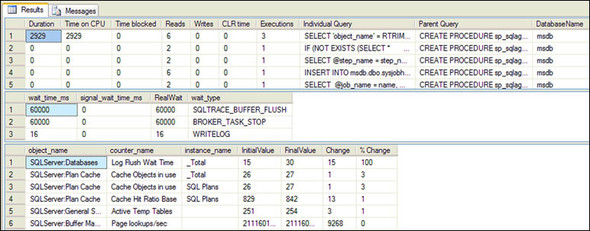
The first grid shown in figure 6.8 shows the queries that ran during the given time interval, sorted by query duration. The second grid shows the wait states that occurred during the same time interval, sorted by wait_time_ms. The last grid shows the change in the various SQL Server performance counters over the same time interval, sorted by percentage change in value. You can infer that the changed values in the wait states and performance counters are a result of running the queries. You could determine the effects of specific queries by replacing the WAITFOR statement in the script with the SQL query you want to examine.

This is an excerpt from Manning's book SQL Server MVP Deep Dives.
What is the solution? Consider how long the locks are held and how much is being locked. The default isolation level for SQL Server, READ COMMITTED, will generally only lock one row at a time when it fetches rows. Even inside a transaction, you can get different results for the same query depending on the transaction isolation level. (Only the highest transaction isolation level, serializable, will prevent other users from changing or adding rows that your query has viewed; snapshot isolation level will let your results stay constant by saving changes temporarily for your queries.) However, transaction isolation assumes that the server can discern your actions from the structure of your database. For example, consider the following:
One challenge you might come across is when your schema changes. In this case you will need to disable CDC for the table and re-enable it when the change is complete. CDC will not break without this action, but if you add, remove, or rename columns, your captured data will be incomplete.
Also, because change tracking and SQL Server Audit are synchronous, and CDC polls the transaction log after the fact, it is not so straightforward to capture the username responsible for the change. If this is an important part of your solution, then you are probably better off sticking to one of the other features discussed in this chapter, or resorting to more traditional means (for example, triggers, log reading utilities).