concept output in category sql

This is an excerpt from Manning's book SQL Server MVP Deep Dives Vol. 2.
Realize that some tests may be too complex or have elements that can’t be automated using existing tools or processes. These would be manual tests. Manual testing can potentially be time consuming, but there are times where the time and effort invested in automating may not be worth the trouble even if the task isn’t complex. For example, executing a query to verify one of the SQL Server properties using SERVERPROPERTY may be faster through a sqlcmd session or SQL Server Management Studio than it’d be to create a script, execute it, and then analyze the output.
We’ll take a brief walk through each of these Script component types. I’ll focus mainly on the use of the Script component as a transformation, because this is the most typical use of this component, and it allows me to demonstrate the use of inputs and outputs as well as the synchronicity between the two.

This is an excerpt from Manning's book SQL Server DMVs in Action: Better Queries with Dynamic Management Views.
This code snippet waits until a specified time (7 p.m. in this example
) and then prints the date/time and runs a routine named dbo.dba_BlockTracer
. If anything is blocked, dbo.dba_BlockTracer displays information about both the blockers and the blocked items. Additionally, if anything is blocked (and output produced) the variable @@ROWCOUNT will have a nonzero value
. This causes it to output the date and time and list all the SQL that’s running
(including the batch/stored procedure and the individual SQL statement within it that’s running). The utility then waits a specified time (15 seconds in this example
) and repeats. All this is repeated (except waiting until 7 p.m.) a number of times, as specified by the last GO statement (500 in this example
).
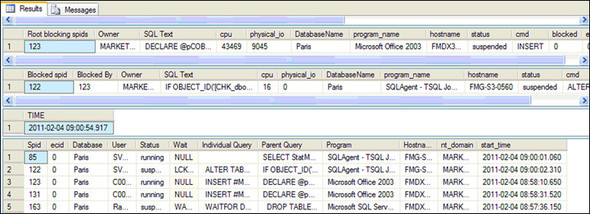
The routines show not only what’s being blocked but also details of what SQL is running when any blocking occurs. When a SQL query runs, SQL Server assigns it a unique identifier, named the session id or the SQL Server process id (spid). You’ll notice that the output in the various grids contain spids that can be used to link the output from the two utilities together. An example of the type of output for this query is given in figure 1.1.

This is an excerpt from Manning's book SQL Server MVP Deep Dives.
I’d suggest (or even mandate) using stored procedures in searched update or delete. The blind searched operation or multiple-statement update is accomplished in a single database round trip, and you can even use the OUTPUT clause in SQL Server’s DML to obtain information in rowset form showing exactly what was changed or deleted. Because this is a database-specific operation, using a stored procedure sounds like a good workaround for this problem. With the use of stored procedures as needed and the realization that most apps use the get-then-update pattern anyway, I think I’ll dismiss this worry.
The data profiling tools in SQL Server Integration Services (SSIS) 2008 include a Data Profiling task and a Data Profile Viewer. The Data Profiling task is a new task for SSIS 2008. It can help you understand large sets of data by offering a set of commonly needed data profiling options. The Data Profile Viewer is an application that can be used to review the output of the Data Profiling task. Over the course of this chapter, I’ll introduce the Data Profiling task in the context of data warehousing and explain how it can be used to explore source data and how you can automate the use of the profile information in your extract, transform, and load (ETL) processes to make decisions about your data.
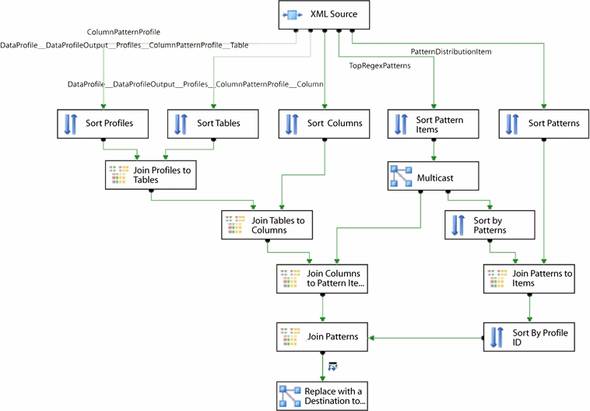
If you don’t know XSLT, you can take a few additional steps and use the XML source directly against the Data Profiling task output. First, you must provide an .XSD file for the XML source, but the .XSD published by Microsoft at http://schemas.microsoft.com/sqlserver/2008/DataDebugger/DataProfile.xsd is too complex for the XML source. Instead, you will need to generate a schema using an existing data profile that you have saved to a file. Second, you have to identify the correct outputs from the XML source. The XML source creates a separate output for each distinct element type in the XML: the output from the Data Profiling task includes at least three distinct elements for each profile you include, and for most profiles it will have four or more. This can lead to some challenges in finding the appropriate output information from the XML source. Third, because the XML source does not flatten the XML output, you have to join the multiple outputs together to assemble meaningful information. The sample package on the book’s website (http://www.manning.com/SQLServerMVPDeepDives) has an example of doing this for the Column Pattern profile. The data flow is shown in figure 3.
In the data flow shown in figure 3, the results of the Column Pattern profile are being transformed from a hierarchical structure (typical for XML) to a flattened structure suitable for saving into a database table. The hierarchy for a Column Pattern profile has five levels that need to be used for the information we are interested in, and each output from the XML source includes one of these levels. Each level contains a column that ties it to the levels used below it. In the data flow, each output from the XML source is sorted, so that consistent ordering is ensured. Then, each output, which represents one level in the hierarchical structure, is joined to the output representing the next level down in the hierarchy. Most of the levels have a ColumnPattern-Profile_ID, which can be used in the Merge Join transformation to join the levels, but there is some special handling required for the level representing the patterns, as they need to be joined on the TopRegexPatterns_ID instead of the ColumnPattern-Profile_ID. This data flow is included in the sample package for this chapter, so you can review the logic if you wish.