concept resource in category sql

This is an excerpt from Manning's book SQL Server MVP Deep Dives Vol. 2.
I’ve seen numerous cases where the DBAs and developers admit that there are serious flaws in the database design (“I inherited it this way”), but they’ll probably have to live with those flaws for many years to come. Their very valid reason is that the original design was created many years ago when the design characteristics, now recognized as flaws, had little or no negative impact. Since then, the natural evolution and expansion of the database have magnified the impact of those flaws. If the original designers had known the true extent of the resources that would be spent as a direct result of their design flaws, I’m sure they would have taken the time to think things over once more.
Resource Governor (RG)— This tool maintains a consistent level of service by limiting required resources (CPU and memory) and guaranteeing the resources for mission-critical processes. The resource allocation can be configured in real time, but the reconfiguration changes may take some time depending on the currently executing workloads.

This is an excerpt from Manning's book SQL Server MVP Deep Dives.
Because SQL Server is a service, it must be running before it can accept connections. Although this might seem obvious, for some implementations—as when using SQL Server Express Edition—the server instance might not be needed by other applications and might be consuming resources between uses. In this case the service might be shut down after the application quits. There are any number of architectural, administrative, and performance considerations to resolve when taking this approach, but given the expanding number of SQL Server Express implementations it’s wise to understand how to configure the server so the instance is running when needed and not in the way when SQL Server is not required. I usually suggest another approach: install the SQL Server Express instance on a spare system and leave it running at all times. This makes connection, administration, and countless other issues less complex.
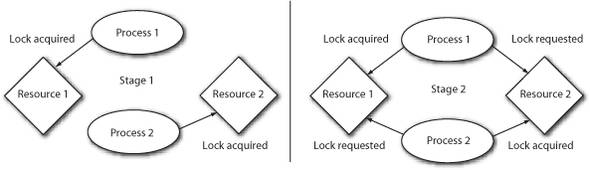
At its simplest, a deadlock refers to a locking situation that, if no outside action is taken, will never resolve itself. It occurs when two or more processes have a lock on a resource and then try to acquire a lock on the resource held by the other process, or when two or more processes hold shared locks on a resource and attempt to convert them to exclusive locks. Figure 1 illustrates an example of a deadlock scenario.
Without intervention, the two processes will wait forever for the resource and they’ll never complete. In order to resolve the situation, one of the processes must be killed and any modifications it made must be rolled back, so that the locks it held are released, allowing the other process to continue. This is the job of SQL Server’s deadlock detector. It evaluates the locks held and locks requested and, if it finds an existing deadlock condition, it picks one of the deadlocked processes and kills it. The process killed by the deadlock detector is known as the deadlock victim.