concept Script component in category sql

This is an excerpt from Manning's book SQL Server MVP Deep Dives Vol. 2.
The optimized data flow is much simpler in design and utilizes far fewer components. The Script component uses the same code as the Type 1 dimension Script component to generate the SHA1 hash code.
The SSIS Script component is, as the name suggests, a scripting interface within Integration Services that allows the direct inclusion of custom code within a data flow. Unlike the preconfigured components that are a part of SSIS, the Script component is very much a blank slate. This allows the ETL developer an immense amount of flexibility to fill the void between the built-in functionality of the SSIS data flow objects and the off-the-beaten-path ETL requirements that can’t easily be addressed using those native components. In various presentations that I’ve done on this topic, I refer to the Script component as the Swiss Army knife: it’s lightweight, easy to keep around, and great to have within reach when you’re in a tight spot. Versatile enough to serve multiple roles, the Script component can be used as a data source, transformation, or destination, and with the full power of the .NET runtime under its hood, it’s capable enough to handle almost any imaginable ETL requirement. To help streamline repetitive operations and avoid duplicate code, you can also reference existing assemblies, allowing the reuse of external code within the script task. Further, this tool uses the familiar Visual Studio interface, eliminating the need to learn to play in a new sandbox, and any prior coding experience (especially in C# or VB.NET) is easily leveraged in the Script component.
The Script component lives with its counterparts in the toolbox within the data flow components, residing by default with the transformations. Not to be confused with the script task (which is a function of the control flow workspace and can perform a variety of tasks unrelated to the data flow), the Script component is used almost exclusively for direct data interaction.
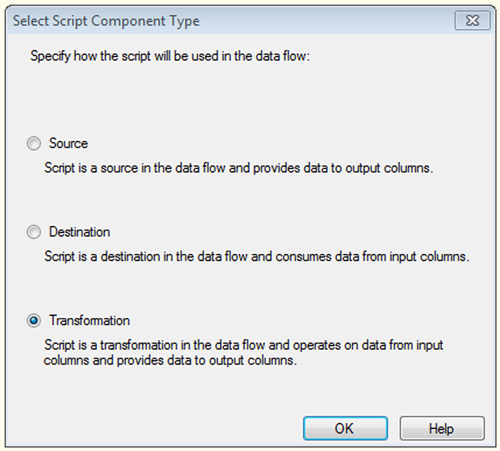
As mentioned earlier, the SSIS Script component can function as a source, a destination, or a transformation. Immediately upon introducing the Script component to a data flow surface, you’ll be prompted to set the behavior for the current instance (see figure 1). It’s important to select the correct behavior for this component, because there are some type-specific settings that are built into the component upon creation, and changing type from one to another after initial configuration can be difficult.
We’ll take a brief walk through each of these Script component types. I’ll focus mainly on the use of the Script component as a transformation, because this is the most typical use of this component, and it allows me to demonstrate the use of inputs and outputs as well as the synchronicity between the two.
Using the Script component as a transformation blends the behaviors of the script source and the script destination. You’ll have an input and one or more outputs, and the code elements for both are included. When you open the Script designer for a transformation, you’ll see that you have the <Input Name>_ProcessInputRow function, the same as occurs with scripting a destination:
   ...
   public override void Input0_ProcessInputRow(Input0Buffer Row)
{
}

...
The data should be dealt with in the <Input Name>_ProcessInputRow method; its natural iterative behavior helps to avoid reinventing the wheel while providing enough flexibility to handle even complex transformation requirements. This is true when using the Script component synchronously, because you’re sending the rows directly from the input to the output and making any changes inline.