concept system in category sql

appears as: system, systems, systems, System, The system
SQL Server MVP Deep Dives Vol. 2

This is an excerpt from Manning's book SQL Server MVP Deep Dives Vol. 2.

I’d like to emphasize the fact that a relational model database is (surprise, surprise)... a model. That may sound obvious, but it does carry a lot of meaning and corresponding responsibility. Dictionary.com defines model as “a simplified represen-tation of a system or phenomenon, as in the sciences or economics, with any hypotheses required to describe the system or explain the phenomenon, often mathematically.” A database models, in relational form or some other form, some physical or logical universe, entity, or phenomenon (or a part of one of those). It’s designed to be a mirror, in relational language and terms, of its real characteristics and functions.

In any computer programming, any standard is better than no standard (and no, the standard to have no standard is cheating and will make Genie angry). Adherence to standards ensures that when you start to look for something, you can determine the meaning in a common manner. Obviously the best standards are the ones that make it easy to understand the system without going to the documentation to decode the meaning of a name; you should have to use documentation only for clarification purposes.

Listing 3. C# code of user-defined function that returns value of a performance counter
using System; using System.Data; using System.Data.SqlClient; using System.Data.SqlTypes; using Microsoft.SqlServer.Server; using System.Diagnostics; public partial class UserDefinedFunctions { [Microsoft.SqlServer.Server.SqlFunction] public static SqlDouble ufn_clr_GetPerfCounterValue( SqlString CategoryName, SqlString CounterName, SqlString InstanceName, SqlString MachineName ) { MachineName = MachineName.IsNull ? "." : MachineName.Value; PerformanceCounter p = new PerformanceCounter( CategoryName.Value, CounterName.Value, InstanceName.Value, MachineName.Value); float value = p.NextValue(); System.Threading.Thread.Sleep(100); value = p.NextValue(); return new SqlDouble(value); } };
SQL Server DMVs in Action: Better Queries with Dynamic Management Views

This is an excerpt from Manning's book SQL Server DMVs in Action: Better Queries with Dynamic Management Views.

Table 1.1. The major DMV groups
DMV group

Description

Change data capture Change data capture relates to how SQL Server captures change activity (inserts, updates, and deletes) across one or more tables, providing centralized processing. It can be thought of as a combination of trigger and auditing processing in a central area. These DMVs contain information relating to various aspects of change data capture, including transactions, logging, and errors. This group of DMVs occurs in SQL Server 2008 and higher.
Common Language Runtime The Common Language Runtime allows code that runs on the database to be written in one of the .NET languages, offering a richer environment and language and often providing a magnitude increase in performance. These DMVs contain information relating to various aspects of the .NET Common Language Runtime, including application domains (these are wider in scope than a thread and smaller than a session), loaded assemblies, properties, and running tasks.
Database These DMVs contain information relating to various aspects of databases, including space usage, partition statistics, and session and task space information.
Database mirroring The aim of database mirroring is to increase database availability. Transaction logs are moved quickly between servers, allowing fast failover to the standby server. These DMVs contain information relating to various aspects of database mirroring, including connection information and pagerepair details.
Execution These DMVs contain information relating to various aspects of query execution, including cached plans, connections, cursors, plan attributes, stored procedure statistics, memory grants, query optimizer information, query statistics, active requests and sessions, SQL text, and trigger statistics.
Extended events Extended events allow SQL Server to integrate into Microsoft’s wider event-handling processes, allowing integration of SQL Server events with logging and monitoring tools. This group of DMVs occurs in SQL Server 2008 and higher.
Full-text search Full-text search relates to the ability to search character-based data using linguistic searches. This can be thought of as a higher-level wildcard search. These DMVs contain information relating to various aspects of fulltext search, including existing full-text catalogs, index populations currently occurring, and memory buffers/pools.
Index These DMVs contain information relating to various aspects of indexes, including missing indexes, index usage (number of seeks, scans, and lookups, by system or application, and when they last occurred), operational statistics (I/O, locking, latches, and access method), and physical statistics (size and fragmentation information).
Input/Output (I/O) These DMVs contain information relating to various aspects of I/O, including virtual file statistics (by database and file, number of reads/writes, amount of data read/written, and I/O stall time), backup tape devices, and any pending I/O requests.
Object These DMVs contain information relating to various aspects of dynamic management objects; these relate to object dependencies.
Query notification These DMVs contain information relating to various aspects of query notification subscriptions in the server.
Replication These DMVs contain information relating to various aspects of replication, including articles (type and status), transactions, and schemas (table columns).
Resource Governor In the past, running inappropriate ad hoc queries on the database sometimes caused timeout and blocking problems. SQL Server 2008 implements a resource governor that controls the amount of resources different groups can have, allowing more controlled access to resources. These DMVs contain information relating to various aspects of Resource Governor, including resource pools, governor configuration, and workload groups. This group of DMVs occurs in SQL Server 2008 and higher.
Service Broker Service Broker is concerned with providing both transactional and disconnected processing, allowing a wider range of architectural solutions to be created. These DMVs contain information relating to various aspects of Service Broker, including activated tasks, forwarded messages, connections, and queue monitors.
SQL Server Operating System These DMVs contain information relating to various aspects of the SQL Server Operating System (SQLOS), including performance counters, memory pools, schedulers, system information, tasks, threads, wait statistics, waiting tasks, and memory objects.
Transaction These DMVs contain information relating to various aspects of transactions, including snapshot, database, session, and locks.
Security These DMVs contain information relating to various aspects of security, including audit actions, cryptographic algorithms supported, open cryptographic sessions, and database encryption state (and keys).

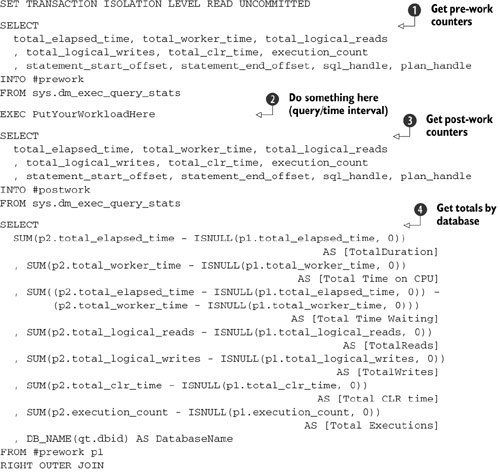
Having discussed a generic test harness, I’d now like to extend this into a more practical example, such as one used for determining the impact of a system upgrade.

Listing 11.3. Determining the performance impact of a system upgrade
SQL Server MVP Deep Dives

This is an excerpt from Manning's book SQL Server MVP Deep Dives.

In SQL Server 2005, Microsoft added in something called SNAPSHOT isolation level. In SNAPSHOT isolation level, when you start a transaction, all the data you read will look exactly as it did when you started the transaction. Currently executing processes don’t lock you out; they maintain the previous version for anyone who wants to see it. This is a nifty way to implement a system, but it presents some difficulties for modifying data—you really have to consider how the SNAPSHOT isolation level will affect your queries and applications. SNAPSHOT transaction isolation uses row versioning to store the before image of the data in tempdb, so fully understanding the impact on your hardware is very important.

As an architect first and foremost, I have always been interested in the performance and usage information I can extract out of my SQL Server instances. In versions prior to SQL Server 2005, there was a wide range of ways to get this information, such as cryptic DBCC commands, bit flags in system tables (mostly undocumented), and system stored procedures (some unsupported). SQL Server 2005 introduced us to a new way to derive this data: Dynamic Management Views (DMVs) and Dynamic Management Functions (DMFs), collectively known as DMVs.

Listing 6. Making a system stored procedure
USE [master]; GO IF OBJECT_ID('dbo.sp_AB_GetUnusedProcedures', N'P') IS NOT NULL DROP PROCEDURE dbo.sp_AB_GetUnusedProcedures; GO CREATE PROCEDURE dbo.sp_AB_GetUnusedProcedures AS BEGIN SET NOCOUNT ON; SELECT 'These procedures have not been executed in the past ' + RTRIM(uptime) + ' minutes (the last time SQL started)', sqlserver_start_time FROM AB_Utility.dbo.AB_Uptime(); SELECT [name] = AB_Utility.dbo.AB_GetThreePartName (p.[object_id], DB_ID()), p.create_date, p.modify_date FROM sys.procedures AS p LEFT OUTER JOIN sys.dm_exec_procedure_stats AS ps ON p.[object_id] = ps.[object_id] WHERE ps.[object_id] IS NULL ORDER BY p.[Name]; END GO EXEC dbo.sp_MS_marksystemobject N'dbo.sp_AB_GetUnusedProcedures'; GO USE [your_database]; GO EXEC dbo.sp_AB_GetUnusedProcedures; GO