concept bind in category svelte

This is an excerpt from Manning's book Svelte and Sapper in Action.
This works, but it’s a bit verbose. We can do better using the Svelte
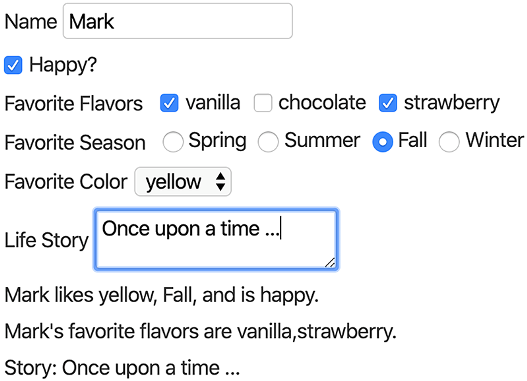
binddirective. You will see many uses of thebinddirective later, but one use is to bind the value of a form element to a variable. This causes the form element to display the current value of the variable. If a user changes the value of the form element, the variable will be updated to match.
Props pass data from parent components to child components, and optionally back to the parent using bind.Slots pass content from parent components to child components so children can decide whether and where to render it.
The value of the form elements
input,textarea, andselectcan be bound to a variable using thebinddirective. When a form element uses this, it renders the value of the variable. If a user changes the form element’s value, the bound variable is updated to match. This simulates two-way data binding and is much easier than explicitly listening for a specific event, extracting the new value from the event, and explicitly updating a variable.The Svelte compiler generates the necessary event-handling code to keep the form element and variable in sync. For
inputelements with the typenumberorrange, using thebinddirective automatically coerces values from strings to numbers.
If the name of the variable in the parent component matches the name of the prop, the
bindexpression can be shortened. For example, these are equivalent:<Child bind:cValue={cValue} /> <Child bind:cValue />