concept action in category system administration

This is an excerpt from Manning's book Operations Anti-Patterns DevOps Solutions.
My motivation for writing this was driven by the number of people I meet who felt that because their manager wasn’t onboard, they couldn’t do DevOps. To some extent that’s true. For some areas you need senior leadership buy in. But there’s still a lot of change that an individual contributor or a team lead can push through to make your lives and processes better. With a little bit of investment, it’ll also free up some of your time that’s currently spent on wasteful, low value work and unleash that freed time on more productive work. This book is going to take a lot of the lessons that I’ve learned and try to distill them into a specific set of actions that can be taken to bring the DevOps transformation out of the C-suite and down into the trenches.
Lastly, this book will be a little more prescriptive about the changes that are needed in your corner of the organization. Together we’ll dive deeper than just case studies about how things are handled at Company X. Instead we will come up with a specific set of actions that you will implement, tweak and iterate on within your organization. Notice that I said “you”. This isn’t a book that will paint you as a hapless victim of poor management. You have the power to make your situation better. You will be the change agent that your organization needs to start this DevOps journey. All you need, is a plan. Let’s get started on that.
Some of you might find this story vaguely familiar or even a bit triggering. Some might even vilify Jonah for creating something without appropriate documentation. But Jonah is as much a victim here as he is a villain. The organization has been structured and incentivized in such a way that Jonah’s actions are completely in line with how the organization is designed and structured to behave. Documentation has been given a lower degree of importance than the other tasks on Jonah’s plate. Jonah has unwittingly become a non-intentional hoarder.

This is an excerpt from Manning's book Securing DevOps.
When you sign in to CircleCI using your GitHub account, CircleCI asks you for permission to perform actions on your behalf in your GitHub account. One of these actions will be to automatically configure a webhook into the invoicer’s GitHub repository to notify CircleCI of new events. Figure 2.2 shows the result of the automatic webhook configuration in GitHub.
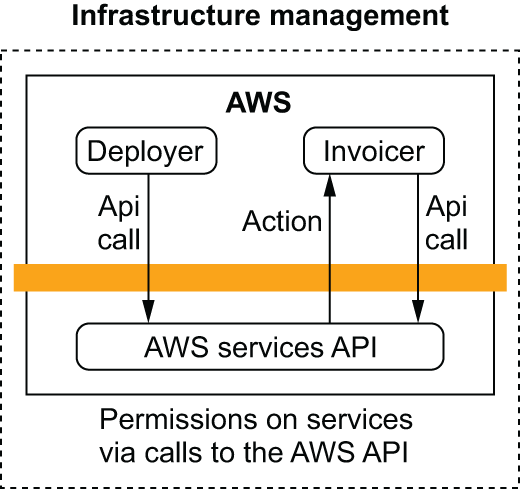
Figure 6.11 The AWS API is protected by a layer of role-based access controls that allow or deny actions from being executed by the infrastructure management layer.
Listing 6.4 Granting permissions to trigger an environment update on EBS invoicer
{
  "Version": "2012-10-17",
  "Statement": [
    {
      "Sid": "Stmt1477874633000",
 "Effect": "Allow",    #1
 "Action": [    #1
 "elasticbeanstalk:UpdateEnvironment",    #1
 “s3:CreateBucket”    #1
 ],    #1
 "Resource": [    #1
 "arn:aws:elasticbeanstalk:us-east-1:939135168275:    #1
 environment/invoicer201605211320/invoicer-api"    #1
      ]
    }
  ]
}

#1   A policy allows or denies actions on resources. Here, the effect is to allow the holder to update EB environments and create S3 buckets on the invoicer.
Actions on objective —Compromising the initial target is the first phase of the attack, and Phineas repeats the kill-chain process until he gains access to the company’s most sensitive data, with the goal being to exfiltrate it from the company network and leak it onto the internet.

This is an excerpt from Manning's book Learn System Center Configuration Manager in a Month of Lunches: Covers SCCM 1511 and Windows 10.

This is an excerpt from Manning's book SharePoint 2010 Site Owner's Manual: Flexible Collaboration without Programming.
These are just a few of the many commonly used new and great features of SharePoint 2010. You’ll get to see the rest of them in real scenarios as you read through the book. Each scenario comes from my own experience working at Microsoft based on internal applications we built, requests from customers I’ve worked with, and sites I’ve built for my own personal use. The goal is to exercise your imagination so you can see the possibilities and see how easy it is to use, even if you’re not a developer. Okay, I’m getting ahead of myself here. So you’ve met SharePoint, you know what it is, why it’s important, and what it can help you do. Now let’s see some of SharePoint’s core concepts in action.
Once you’ve completed these steps, you can select Preview in Browser to see it in action. With data entered, you should get results similar to those displayed in figure 8.8.
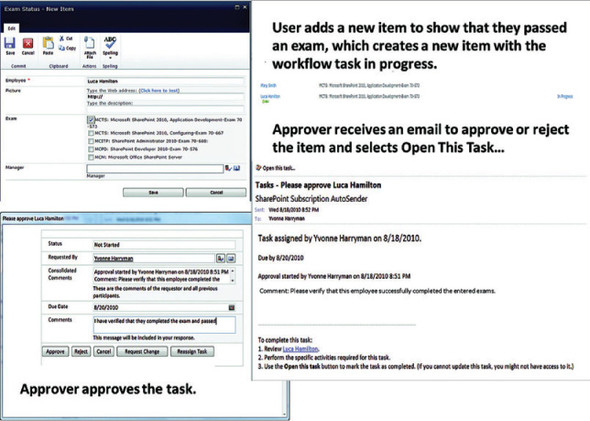
Once you complete the configuration, you’ll be on a landing page for the workflow setting. This is where you can go to manage or modify your workflow in the future. You’ve set that up so that the next time a user goes to edit or enter an item, the workflow will automatically initiate. Figure 8.14 shows what it looks like in action.

This is an excerpt from Manning's book Tuscany SCA in Action.
In the previous section we looked at the architecture and design of the travel-booking application. In this section, we’ll build the components of the application. We’ll do this in two stages. First, we’ll cut straight to the action and build a single component and run it to see how it works. Second, we’ll take a more studied look at how to wire components together into a running application.
The application’s services are now ready for action! To run them we’ll need some client code that will invoke these services. It’s good practice to use separate contributions for business service code and test client code, so we’ve created another contribution named introducing-client containing our test client code. To run this client code, we’ll need to write a small launcher program, which uses the SCANodeFactory API to create a test client node and then invokes a service method on this node. The test node runs in the same process as the launcher code. The following listing shows this launcher program.

This is an excerpt from Manning's book Azure in Action.
The hardware in each Azure server is optimized for power, cost, density, and management. The optimization process drives exactly which motherboard, chipset, and every other component needs to be in the server; this is truly bang for your buck in action. Then that server recipe is kept for a specific lifecycle, only moving to a new bill of materials when there are significant advantages to doing so.
To see this check in action, you’re going to quickly create a web page that displays a label that states whether your application is running in Windows Azure. Figure 4.2 shows that web page running in the development fabric.

This is an excerpt from Manning's book Open Source SOA.
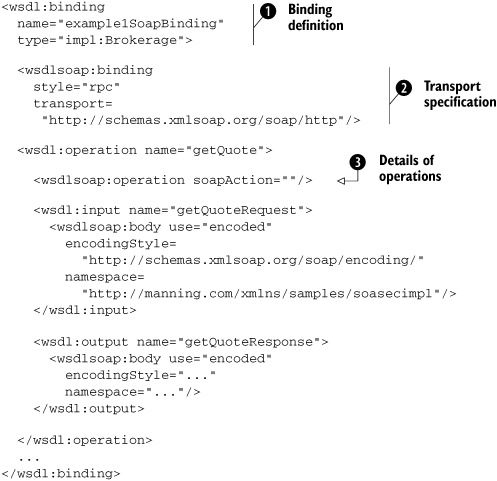
The WS-Addressing specification, one of the earliest and most well-supported of the WS-* standards, defines an in-message means for defining the desired endpoint or action for SOAP-based web services. It is significant in that, without it, only the transport protocol (typically HTTP) contains the routing rules (it’s worth noting that SOAP supports more transports than just HTTP, such as JMS). WS-Addressing supports the use of logical message destinations, which would leave the actual physical destination to be determined by a service mediator (to learn more about WS-Addressing, see the [WSAddressing] reference in the Resources section at the end of this book).
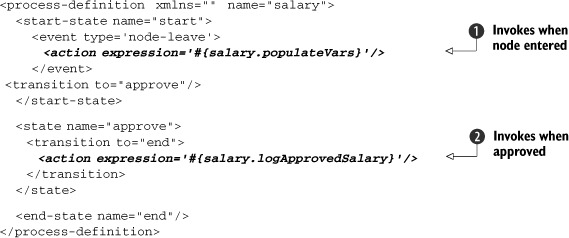
Actions and events allow programming logic to be inserted within a process model in a way transparent to the analyst or subject matter expert who designed the model. In most circumstances, the business modeler won’t have the requisite skills or inclination to deal with the underlying plumbing necessary to create a truly runtime execution process. Indeed, if the model becomes complicated by visual representation of such technical details, the utility of the model in conveying the flow of the business process will quickly become lost. Instead, Visio and other static modeling tools will again become prevalent, with the models developed by them entirely abstract in nature. jBPM attempts to balance between creating a descriptive model and producing an executable process. This balance is achieved through the use of actions.
Actions are the integration points for interfacing with other applications or services. It’s through actions that the services designed using SCA (chapters 3 and 4) can be readily used and consumed (you’ll learn more about this in chapter 7). Depending on how it’s configured, an action can be used to asynchronously send out a message to another system; used synchronously, such as when calling an external web services; or even used in a callback scenario where a request to a remote system is made and initiates a method call when it’s completed.
The action element within jPDL defines the locations where actions can be used. They are as follows:
Since this class is defined as the implementation for an action (shown in figure 5.10), it must implement the ActionHandler
interface and its required execute method
. Notice as well that, in figure 5.10, the action element contains a child element called message. This is a property value that, when the corresponding action class is instantiated, will automatically look for a member variable with the same name
. If found, it will populate that Java field with the value specified in the jPDL. So, in this case, the Java variable message is populated with the value “Going to the First State!” The execute method then takes the value that was populated into the message variable and assigns it to a process variable that’s created with the same name
. This process variable, in turn, will then be available to downstream nodes, as it’s saved in the context of the process instance. This demonstrates how properties and configuration data can be populated at runtime using Spring-style injection.
In some cases, you may find that you’re repeating the same action class in multiple locations within your jPDL. For example, you may have an event that triggers an action class for event stream processing or BAM purposes. Rather than repeating that action definition, you can define it at the root level of the jPDL, and then reference it where needed by using the @ref-name attribute of the action element (in fact, you can reference it anywhere, even if it’s within a child element elsewhere). Here’s an example:
<action ref-name='shared-action'/>shared-action is the assigned name of an action located elsewhere (or at the top level) of the jPDL. This points out the importance of using unique names for your actions.

This is an excerpt from Manning's book SOA Security.
The decision to grant access may depend on multiple criteria, such as the action that is being requested, the resource on which the action is being requested, and the groups to which the authenticated user belongs or the roles that the user plays. For example, the superuser or the administrator may access all the files in a system, but a user belonging to the HR group can access only those files that are allowed for that group.