concept Bamos server in category system administration

This is an excerpt from Manning's book SOA Governance in Action.
With the gadget server installed, the visualization part of your BAM solution, let’s now get the code from SVN, which provides you with functionality to store, process, and query for events. This is done in the same manner as shown in section 2.2. In Eclipse open the SVN Repository Exploring perspective, navigate to the Bamos folder, and, just as you did before, check out all the bamos-* projects and mavenize them. This will download all the dependencies and set up the Eclipse projects correctly. When you’ve finished doing this, you can run the org.bamos.core.launcher.BamosLauncher class from Eclipse to start the Bamos server.
Now run the Bamos server; after it’s started you’ll see the following output in the console:
We’ll start by looking at how to integrate CXF, Spring, the Mule ESB, and the Nagios monitoring tool with the WSO2 governance repository and the Bamos server. Even though there are many other tools available, this set of tools should give you a good overview of how to integrate enterprise tools and frameworks. After that we’ll look at how you can integrate a BPM engine, Activiti in this case, with these tools. Finally, I’ll show you how to access the Bamos server and the WSO2 repository from some other languages: C#, Ruby, and Python.
If you want to send an event to the Bamos server using C#, you need to create a JSON request and make an HTTP POST call. You can use the HttpWebRequest object for this, as is shown in the following listing.
Listing 9.21. Sending an event to the Bamos server from C#
using System; using System.Net; using System.IO; using System.Web; using System.Text; public class PostEventUsingCSharp { static string exampleEvent = @"{ ""event"":{ ""Processing_time"":299, ""timestamp"":""1315053621563"", ""eventclass"":""MULE_EVENT"", ""service"":""SimpleFlow"", ""server"":""test-server"" } }"; static public void Main () { Uri address = new Uri("http://localhost:9003/services/event"); HttpWebRequest request = WebRequest.Create(address) as HttpWebRequest; request.Method = "POST"; request.ContentType = "application/json"; byte[] byteData = UTF8Encoding.UTF8.GetBytes(exampleEvent); request.ContentLength = byteData.Length; using (Stream postStream = request.GetRequestStream()) { postStream.Write(byteData, 0, byteData.Length); } } }
In this section I’ll show how to send the events you processed in the Bamos server to Nagios, so that Nagios will pick them up and show them in its services overview. For this example we’ll expand on an example from chapter 7. In chapter 7 you saw how to use an Esper-based processor to determine the average processing time of an event. In this example I’ll show you to receive notifications in Nagios when the average processing time passes a specific level.
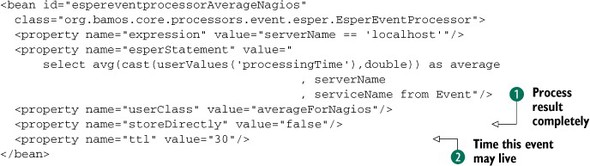
With Nagios configured you can look into configuring the Bamos server. For the Bamos server you’ll configure two processors. The first one is the Esper-based processor from chapter 7 that shows the average processing time. The configuration for this processor is shown in the next listing.
This processor will process all the events that have the property serverName set to localhost. As you saw in chapter 7, you use the esperStatement to calculate the average processing time. This statement is modified a bit to also return the serverName and the serviceName of the original event. You do this so that you can use those values in the event you send to Nagios. In listing 9.13 you can see two options you haven’t seen before. You set storeDirectly to false
. This tells the Bamos server to process the event this processor generates as if it was a new event. This means that for this new event you’ll once again check to see if any of the processors you’ve defined match. You also set the ttl property
. With this property you define how long the event should be kept in the datastore. Because you use this event only for Nagios, there’s no need to keep it in your datastore. With this configuration this event is removed after 30 seconds.