concept browser in category system administration

This is an excerpt from Manning's book Self-Sovereign Identity.
When the site calls the credential management store() method, the browser presents the user with the credential to be stored and the list of wallets the user has into which the credential can be stored. When the user selects a wallet, the browser sends a CredentialStoreEvent to the wallet provider’s service address, at which point the credential is sent from the issuer to the wallet, where it is stored (and a “hint” for the credential is saved by the browser).
Similarly, when the user visits a credential requesting site (a verifier) and the site calls the credential management get() method with a requested type of credential, the browser presents the user with hints for the list of available credentials of the requested type. When the user selects the credential, the browser sends a CredentialRequestEvent to the wallet provider’s service address, at which point the wallet sends the credential to the requester. Note that wallet and credential options are only presented to the user via the browser agent, and that credentials themselves are directly transported between wallet and issuer/verifier.
https://dbpedia.org/page/Jupiter

This is an excerpt from Manning's book Securing DevOps.
XSS attacks are caused by injecting fraudulent code into a website that’s later reflected to other site visitors as if it was normal content. The fraudulent code is executed in the browser of the target to do bad things, like stealing information or performing actions on the user’s behalf.
If you retrieve this invoice by pointing a browser at the /invoice/ endpoint of the API, as shown in figure 3.5, the description field is returned exactly like you send it: as a string. Nothing malicious happens there.
Figure 3.5 Rendering fraudulent JSON data in the browser doesn’t execute any attack.
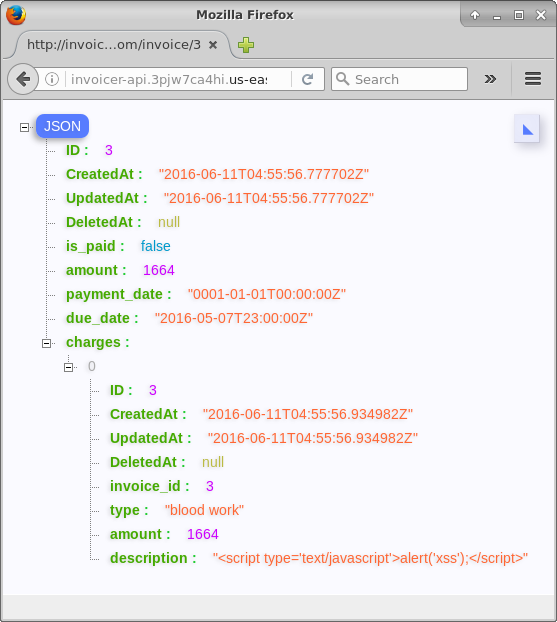
But if you access the invoice through the web interface you added to the invoicer, so the description field is rendered to the user as HTML, not as raw JSON. The browser then interprets the
<script>block as code and executes it as part of the rendering of the page. This rendering has the effect of triggering thealert()function contained in the malicious payload and displaying an alert box, as shown in figure 3.6.Figure 3.6 Rendering fraudulent JSON into an HTML document triggers the interpretation of the
<script>block and executes the XSS attack.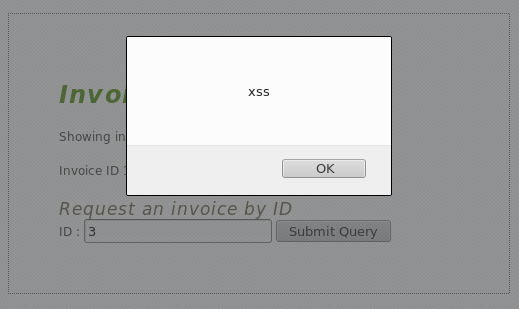
Why didn’t the malicious code get executed when you accessed the raw JSON? This is because the API endpoint that returns raw JSON also returns an HTTP header named Content-Type set to application/json. The browser notices the data isn’t an HTML document and doesn’t execute its content. XSS is only an issue on HTML pages where scripts and styles can be abused to execute malicious code. The attack is rarely an issue on web APIs, unless those can be abused to return HTML or feed data into other HTML pages.
XSS attacks come in many different forms. The attack you just used is particularly dangerous because it stores data in the invoicer’sdatabase persistently, and so is called persistent XSS. Other types of XSS don’t need to store data in the application database, but instead abuse the rendering of query parameters. The invoicer is vulnerable to this type of XSS as well, known as a DOM XSS attack, as it modifies the Document Object Model (DOM) of the browser. To execute it, you need to inject code into one of the parameter query strings, for example, the
invoiceidparameter.Listing 3.5 DOM XSS attack using malicious code in query parameters
http://securing-devops.com/invoicer/?invoiceid=<script type='text/javascript'>alert('xss');</script>


!@%STYLE%@!
{"css":"{\"css\": \"font-weight: bold;\"}","target":"[[{\"line\":0,\"ch\":55},{\"line\":0,\"ch\":100}]]"}
!@%STYLE%@!
When entering the URL from listing 3.5 in the browser, the web interface uses the value stored in the
invoiceidparameter to render part of the page. The fraudulent JavaScript code is then added to the HTML of the page and executed. This type of XSS requires an attacker to send fraudulent links to its targets for them to click, which seems like a barrier to execution, but can in fact be easily done by hiding those links inside of phishing emails or web-page buttons.

This is an excerpt from Manning's book Tuscany SCA in Action.
The TestClientImpl class simulates the calls to the SCA services that would be made as a result of the user selecting a trip from the browser and paying for it. It provides a single service named Runnable with the Java interface java.lang.Runnable.
The following sections describe the requirements for each of the three main transformations in turn. Each section refers to the corresponding stage number in figure 9.5. The process starts in the web browser JavaScript, which takes the credit card data from the HTML form and populates a JavaScript object. It then makes an Ajax invocation to the Payment component running on the server using the JSON-RPC protocol. In the browser the data is represented as a JavaScript object and exchanged over the HTTP connection using JSON format.