concept configuration in category system administration

This is an excerpt from Manning's book Securing DevOps.
Figure 2.4 shows the user interface of a GitHub pull request waiting for tests in CircleCI to finish. CircleCI retrieves a copy of the feature branch, reads the configuration in config.yml and follows all the steps to build and test the application.
Figure 2.4 The web interface of a GitHub pull request displays the status of tests running in CircleCI. Running tests are yellow; they turn green if CircleCI completed successfully, or red if a failure was encountered.

The configuration presented here is current at the time of writing, but will likely change over time as Mozilla evolves its guidelines and AWS supports more ciphers. Make sure to refer to the links provided and always use the latest version of the recommendations when configuring your endpoints.

This is an excerpt from Manning's book SOA Governance in Action.
In listing 9.3 you use HttpClient to make an authenticated
GET call to the URL specified in the configuration in listing 9.2. The result from this call is retrieved as an InputStream
and is then used to fill the Properties object
. This object is returned
and can be used by Spring to replace placeholders in its configuration files.
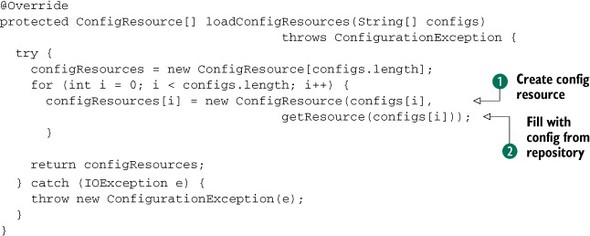
Listing 9.9. Launcher for configuration from repo
public class MuleLauncherFromRepo { private static String config = "http://10.0.0.9:9763/registry/resource/_system/governance/mule/ mule-config-repo.xml"; public static void main(String[] args) throws Exception { DefaultMuleContextFactory muleContextFactory = new DefaultMuleContextFactory(); RepoSpringConfigurationBuilder configBuilder = new RepoSpringConfigurationBuilder(config); MuleContext muleContext = muleContextFactory.createMuleContext(configBuilder); muleContext.start(); } }
3. Test the configuration—Finally, you’ll send a couple of events to the Bamos server to see whether Nagios picks up the events and shows them in its overview.

This is an excerpt from Manning's book Azure in Action.
The first project (CloudService1) contains configuration that’s specific to your Windows Azure web role. For now, we won’t look at the contents of this project and instead save that for chapter 2. Next, you’ll create a simple web page.
The XML shows two roles in this project: a web role called ServiceRuntimeWebsite and a worker role called WorkerRole1 (remember, the configuration of a worker role is exactly the same as the configuration of a web role).
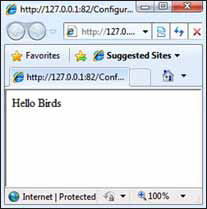
Figure 5.3 shows that you’ve modified the configuration setting mySetting from “Hello Birds Hello Trees” to “Hello Birds”.
To set your runtime configuration setting, make a copy of the configuration setting in the service definition file and paste it into the service configuration file. Then add a new attribute called value that you can set to your default runtime value. The following code shows how your new setting should look:
You can access the runtime values of the configuration setting by using the RoleEnvironment static class that you used earlier. To retrieve the value of a configuration setting, you can use the following method:
RoleEnvironment.GetConfigurationSettingValue(SettingName);To modify your existing web page to read the configuration setting from the Windows Azure configuration settings file rather than from the web.config file, add a using statement for Microsoft.WindowsAzure.ServiceRuntime at the top of your code and change the code-behind of your website to the following:

This is an excerpt from Manning's book Team Foundation Server 2008 in Action.
Topology and configuration of build agents and Team Build service— A build agent represents an instance of the Team Build service that can generate builds. Learn how to create build agents and configure various properties (such as security, build directory, and communication port) to suit your build environment.
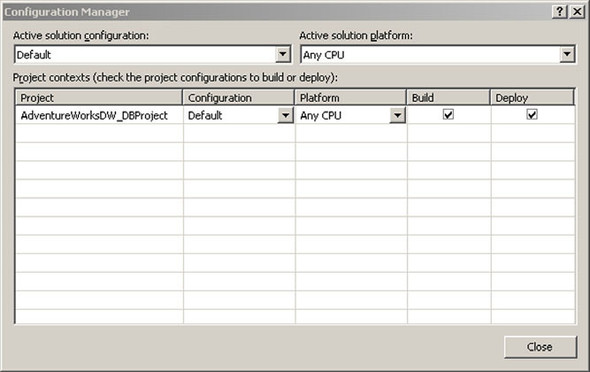
When creating a build type for a database project, you need to be aware of configuration issues. When you create a database project, you get a configuration named Default (see figure 3.26). But when you create a new Team Build project, your configuration options are Debug and Release (see figure 3.27). As a result of this mismatch, when you try to build the Team Build project, it fails.
Listing 7.20. Evaluating the build result and checking code in to TFVC
/// <summary> /// Performs the post build tasks. /// </summary> private string pPerformPostBuildTasks(Workspace workspace, PendingChange[] shelvesetChanges, Shelveset submittedShelveset, BuildConstants.BuildStatusIconID status, string developerMailAddress) { //step 4: check build status. // // If build failed: // i. undo changes from local workspace // ii. put a clean set of files in build directory, // if build failed // iii. send notification email to developer // // If build succeeded: // i. check in the changes to TFVC // ii. delete shelveset if (status == BuildConstants.BuildStatusIconID.BuildSucceeded) { // build succeeded // check in changes to TFVC; workspace.CheckIn(shelvesetChanges, submittedShelveset.OwnerName, "Checked-in by Code Submission Service", submittedShelveset.CheckinNote, submittedShelveset.WorkItemInfo, null); // Delete shelveset _vcServer.DeleteShelveset(submittedShelveset.Name, submittedShelveset.OwnerName); // create a success email if needed // return success message return Configurations.SuccessMessage; } else { // build failed // undo changes from local workspace workspace.Undo(shelvesetChanges); //generate notification email this.pGenerateEmail (Configurations.FailureMessage, developerMailAddress); // return failure message return Configurations.FailureMessage; } }