concept currency converter in category system administration

This is an excerpt from Manning's book Tuscany SCA in Action.
What does this mean in reality? It means that an SCA developer can implement a component without polluting the business code with details of how the communication between components will be handled. This separation of concerns has the added advantage of making the communications protocol a pluggable entity that can be changed at any time based on how and where the component is deployed. For example, suppose you want to make the TuscanySCATours currency converter a web service. Simple—you add the SCA Web Services binding to the service defined in the composite XML file. Suppose you then want to make the TuscanySCATours currency converter an RMI service as well. Simple—you add the SCA RMI binding to the service defined in the composite XML file. You can do both of these changes without modifying the component implementation code for the currency converter. We’ll cover both of these examples later in this chapter.
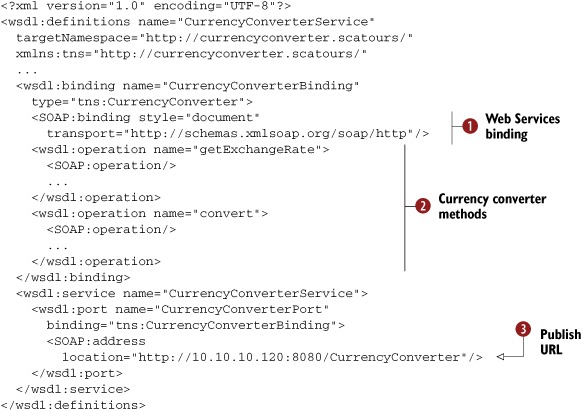
The following listing shows a fragment of the WSDL document for the currency converter. Because it’s quite long, we’ve removed the less-relevant details to keep it short.
The header of the WSDL document shows that this is the WSDL for our currency converter service. The WSDL specifies the SOAP document binding
and lists the getExchangeRate and convert methods
of the currency converter. The URL that’s used to publish the currency converter
is also listed in the WSDL. The IP address in the URL is likely to be different in your WSDL because it will match the IP address of your computer.
The CurrencyConverter is a simple component that can be used to calculate the value of one currency in a different currency. For example, it can be used to calculate the value of $100 U.S. in sterling. Figure 7.1 shows an overview of the currency converter.