concept CXF in category system administration

This is an excerpt from Manning's book SOA Governance in Action.
REST approach— For the REST approach you’ll use the REST provided by CXF. CXF implements the JAX-RS (JSR-311) specification. With this support you can easily create and expose REST-based resources using plain Java and annotations. For the data part of REST you’ll also use JSON in some examples. You’ll use the json-lib library, which gives you direct control of your JSON output. WS-* approach— For the WS-* based services, you’ll also use the CXF library. CXF is one of the best Java web service libraries and also provides support for various WS-* standards that are used throughout this book. As with REST, you’ll create your services using annotations and plain Java.
We’ll start by looking at how to integrate CXF, Spring, the Mule ESB, and the Nagios monitoring tool with the WSO2 governance repository and the Bamos server. Even though there are many other tools available, this set of tools should give you a good overview of how to integrate enterprise tools and frameworks. After that we’ll look at how you can integrate a BPM engine, Activiti in this case, with these tools. Finally, I’ll show you how to access the Bamos server and the WSO2 repository from some other languages: C#, Ruby, and Python.
In the previous chapters I’ve shown you how you can store WSDLs in the repository. A WSDL in a repository can easily be documented, found, versioned, and referenced by other artifacts. If you create a service that implements the contract defined by this WSDL, it’s common practice to allow your consumers to access the WSDL for this service. Usually this is done by appending ?wsdl to the location of the service. For instance, if you have a service that can be accessed at http://localhost:9001/services/accountService, the WSDL for this service should be made available to your consumers at http://localhost:9001/services/accountService?wsdl. Normally, this WSDL will be deployed with your application, but it would be better if you could show the WSDL as it’s stored in the repository. In that case the consumer will always be shown the latest version with the most up-to-date documentation. This would also mean that the WSDL used by the developers, for instance for code generation, should also be retrieved from the repository. In this section I’ll show you how you can do this for CXF. I’ve chosen CXF because it’s used often in open source projects and is also the web service library used by Jboss, as well as in the Mule and ServiceMix ESBs. The practices shown in this example could also easily be applied to other web service frameworks. For instance, Axis2 provides a WSDLSupplier interface for this that you can implement to tell Axis2 where to provision the WSDL description from.
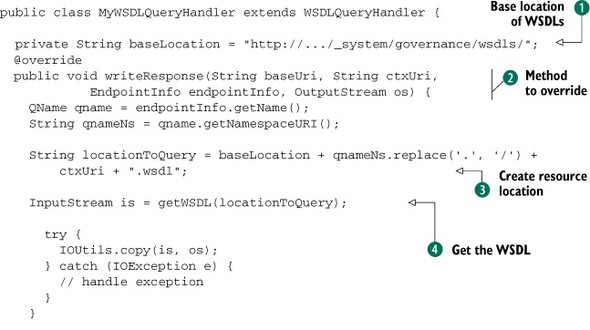
CXF uses a specific class to handle ?wsdl requests. This class is called the WSDLQuery-Handler. Whenever the ?wsdl URL is requested, the writeResponse method of this class is called. In this method CXF checks whether a separate WSDL file was specified that needs to be shown or whether it should generate a WSDL from the Java interface. If you want to provide a WSDL from the repository, you need to extend this class and override the writeResponse method. In your implementation of this method, you’ll use the name and the namespace of the service to determine where in the repository you can find the WSDL. After you know the location, you’ll make an HTTP GET call to retrieve the WSDL and show it to the user. The code for this is shown in the following listing.