concept gauge in category system administration

This is an excerpt from Manning's book SOA Governance in Action.
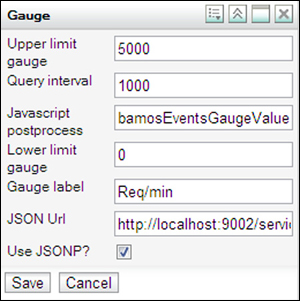
In later chapters in this book we’ll dive deeper into the different configuration options. For now you’ll create the gauge that measures the number of requests that have been sent in the last minute. For this you only need to alter the JSON URL to the following: http://localhost:9003/services/event/list?server=Traffic-Service&service=soa.governance.chapter2.traffic.services.rest.RestTrafficService&count=5000&reverse=false&lastms=60000.
Now all you need to do is add a gauge to the gadget server and configure it to display the information from this event. Open the gadget server, log in, and add the gauge gadget from URL http://localhost:9003/web/gadget/bamos-gauge.xml. Click the Settings icon for the gadget (in the upper-right corner) and configure the properties shown in table 8.5.
Table 8.5. Properties to set on the gauge gadget to show the documentation percentage
Property
Description
JSON URL You want to get a single event with the eventclass documentation. http://localhost:9003/services/event/list?class=documentation&count=1&reverse=true Lower Limit Gauge You have a percentage you want to show; the lower limit should be set to 0. Upper Limit Gauge The upper limit should be set to 100. Query Interval This determines how often the gauge is updated. For this example set it to 1000, which will update the gauge every second. Property Name You want to show the value from the documentationPercentage property. Label The label to be shown in the gauge. In this case set it to Doc: %.