concept investigator in category system administration

This is an excerpt from Manning's book Securing DevOps.
Finally, the access layergives operators an interface to analyze logs through various angles. When all goes well, dashboards are generally what people want to look at, but the importance of a good interface to access raw logs shouldn’t be underestimated: an investigator’s best friends are often simple Unix tools like grep,sed,awk, and a few lines of bash scripting.
When you need to check for the presence of IOCs on thousands of systems, endpoint-security tools are the way to go. These tools are designed specifically to assist security teams investigate their infrastructure, generally via agents deployed on every system and a backend that allows investigators to query them in real time. The fastest of these services can query hundreds of systems in a few seconds, and some can analyze live memory and query most types of IOCs.
Figure 9.2 The GRR architecture is composed of frontend servers, a data store, and backend workers. Web and command-line consoles allow investigators to interact with the service.
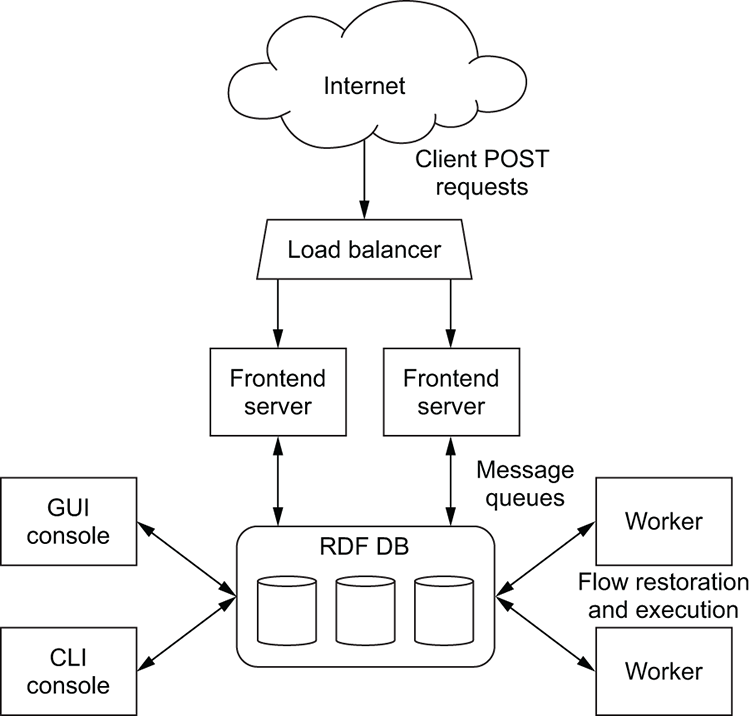
MIG provides command-line tools to investigate endpoints. Listing 9.8 shows an example investigation that uses the file module to query all systems (
-t all) for a file in the /usr/bin directory (–path /usr/bin) matching a given SHA256 hash (-sha2). The investigation is sent to 808 endpoints, where agents compute the SHA256 hash of each file in the /usr/bin tree, compare them to the provided hash, and return results to the investigator via the hosted service. The investigation completes on almost all endpoints in less than 30 seconds.Listing 9.8 MIG investigating /usr/bin for a given SHA256
$ /usr/local/bin/mig file    #1
-t all    #1
-path /usr/bin    #1
-sha2 ea414c53bb6a57d8b08c5ed7300fb388258e5bf0bcac8ec    #1
808 agents will be targeted. Following action ID 7978299359234.    #2
798/808 [=====================================] 98.76% 14/s    #2
98.76% done in 28s    #2
server1.myorg.example.net /usr/bin/wget    #3
 [lastmodified:2016-06-14 08:18:09 +0000 UTC,    #3
 mode:-rwxr-xr-x,    #3
    size:474656] in search 's1'
    #3
bastion.myorg.example.net /usr/bin/wget
   [lastmodified:2016-06-14 08:18:09 +0000 UTC,
    mode:-rwxr-xr-x,
    size:474656] in search 's1'
ip-172-32-0-12 /usr/bin/wget
   [lastmodified:2016-06-14 08:18:09 +0000 UTC,
    mode:-rwxr-xr-x,
    size:474656] in search 's1'

3 agents have found results

#1   The MIG command line runs a file investigation on all endpoints to look for a file having a given SHA256 checksum stored in /usr/bin.
#2   While the investigation is running, a progress bar shows the completion status.
#3   Results show the name of the endpoint and file location, as well as metadata about the file that returned a match.
Although more limited in capabilities than GRR, the speed at which MIG allows investigators to inspect their infrastructure makes it a great tool to quickly narrow down the scope of a security incident. We’ve used it a great deal at Mozilla to locate files, IPs, or processes that are involved with many different issues, such as the following: