concept IP address in category system administration

This is an excerpt from Manning's book Self-Sovereign Identity.
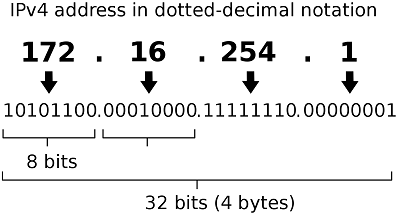
What made the Internet possible was a new addressing system that allows any device on the Internet to form a connection with and send data packets to any other device on the Internet. Figure 3.10 is a diagram of an IP (Internet Protocol) version 4 address.
Figure 2.10: Example of an IP address—the addressing format that let any device on the Internet talk to any other device on the Internet.[56]
The DID resolution process is based directly on the Read operation defined by the applicable DID method, which as noted can vary considerably depending on how the DID method is designed. This means DID resolution is not confined to a single protocol in the same way as DNS (which makes it possible to resolve domain names to IP addresses) or HTTP (which is used to retrieve representations of resources from Web servers).

This is an excerpt from Manning's book Learn Cisco Network Administration in a Month of Lunches.
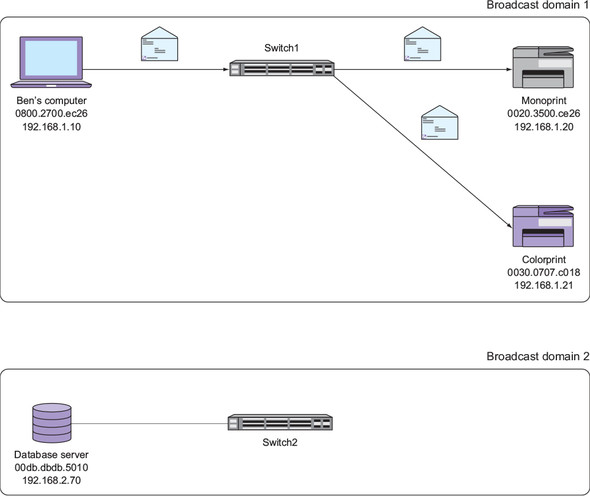
Why do devices have both a MAC address and an IP address?
Many organizations use a network-monitoring package like WhatsUp Gold to track network bandwidth utilization and uptime. When the network begins to slow, your manager may turn to the network administrator (you) to find out who the top talkers are—those devices that historically use up the most bandwidth. Most of the time, knowing the IP addresses of these top talkers is enough to figure out where they are, especially if they’re servers in a data center where things don’t move around very much. But occasionally you may encounter a mysterious device—nobody knows where or what it is!
Almost every end-user device on your network—whether it’s a printer, server, PC, IP phone, or something else—has an IP address. It’s possible that you’ll need to track down a device in an office far, far away and have no idea what its IP address is. How you obtain the IP address for such a device can vary widely depending on what the device is. Unless it’s a PC or server that you can run an ifconfig or ipconfig against, finding out the IP address is beyond the scope of this book.

This is an excerpt from Manning's book Learn Active Directory Management in a Month of Lunches.
Table 11.1. Prerequisites for creating a domain controller
Prerequisite
Commentary
1 Install operating system, service pack, and patches. Ensure that the patching is up to date and that any service packs have been applied. This should be a part of your normal build process. Ensure Windows is activated by your organization’s standard mechanism. 2 Rename the machine. Windows provides a machine-generated name when you first perform the installation. Change the name before making the system a domain controller. 3 Configure the machine with a static IP address. Domain controllers can be configured to obtain an IP address from DHCP, but it’s best practice to configure a static IP address. 4 Configure the machine to use a DNS server. If you’re creating a new domain or forest, you may not need this step if the system will become a DNS server as well as a domain controller. 5 Join the machine to the domain. You can’t do this if you’re creating a new domain or a new forest. 6 Permissions. In all cases you need to have administrator access to the system. You need to be a member of the Domain Admins group to create a domain controller in an existing domain. To add a domain to an existing forest you need to be a member of the Enterprise Admins group (in the root domain).
If the IP address of your machine isn’t on the correct subnet, it won’t find the domain controller and your users will have problems. In section 19.1.1 you learned how to find the IP address of a machine. Put that knowledge to use by testing the machine’s IP address and comparing it to the AD Subnets defined for the AD Site the machine should be in.