concept KeyInfo element in category system administration

This is an excerpt from Manning's book SOA Security.
We also need to add information about the recipient’s certificate that was used to encrypt the key to EncryptedKey. As shown in listing 6.10, this is done using a KeyInfo element that wraps a SecurityTokenReference. Listing 6.16 shows the code for this step.
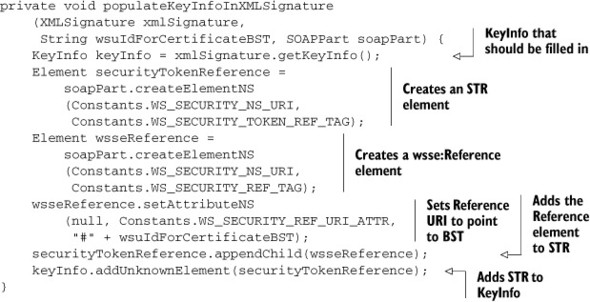
We now have the Signature and BinarySecurityToken elements prepended to the Security header, as shown in listing 7.1. Now, we are ready to start filling in the content of the Signature element shown in listing 7.2. Let us first deal with the KeyInfo element. Listing 7.4 showed what we want in the Signature’s KeyInfo element. Here it is once again.
<ds:KeyInfo>
  <wsse:SecurityTokenReference>
    <wsse:Reference URI="#SignatureKey-2478770"/>
  </wsse:SecurityTokenReference>
</ds:KeyInfo>
As we have set a wsu:Id on the BinarySecurityToken we just created, we can create a KeyInfo element, add to it a SecurityTokenReference element and add to that a wsse:Reference pointing to the BinarySecurityToken using its wsu:Id. Listing 7.8 shows how to do this.
The code in this snippet, once again, involves simple DOM API calls, as the XMLSignature instance constructed in step 4 exposes a KeyInfo element for direct manipulation. Let’s now move on to the next step (step 7 in table 7.3), where we add a Reference to each of the elements that need to be protected using signatures.
The KeyInfo element
provides information on the key that can be used to verify the signature. We will return to a discussion of KeyInfo shortly. We will first look at the contents of the SignedInfo element
.
Now, take a look at listing 7.4 and what the KeyInfo element contains in our example.
