concept metadata in category system administration

This is an excerpt from Manning's book SharePoint 2010 Site Owner's Manual: Flexible Collaboration without Programming.
Metadata-Driven Refinement Panel allows you to narrow search results based on metadata.
Ensure that all proposals capture required metadata, such as start and end date of the project.

This is an excerpt from Manning's book Azure in Action.
Visual Studio starts to build a solution file for you that contains a few projects. The first project is given the name that you entered on the New Project window. This new project will be the Azure project, and it doesn’t contain a lot. It merely contains the model and configuration Azure needs to run your website. You can think of this information as the metadata for your whole Azure application. The project also contains links to other projects in your solution, and the role type those projects play in your application. These links are stored in the Roles folder. The solution and project structure is shown in figure 2.6.
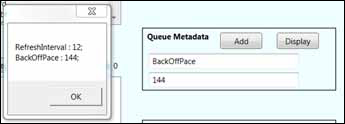
A queue also has a set of metadata associated with it. This metadata can be up to 8 KB in size and is a simple collection of name/value key pairs. This metadata can help you track and manage your queues. Although the name of a queue can help you understand what the use of the queue is, the metadata can be useful in a more dynamic situation. For example, the name of the queue might be the customer number that the queue is related to, but you could store the customer’s service level (tin, silver, molybdenum, and gold) as a piece of metadata. This metadata then lives with the queue and can be accessed by any producer or consumer of the queue.
The metadata for a queue is attached as a property on the CloudQueue object. You work with it like any other name value collection. In this code, we first add a new entry to the metadata called ProjectName, with a value of ElectronReintroductionPhasing. But this new entry won’t be saved back to the queue service until we call SetMetaData, which connects to the service and uploads the metadata for the queue in the cloud.

This is an excerpt from Manning's book SOA Security.
Need for including metadata along with encryption As we may not be encrypting the whole message, we need a standard way to communicate what parts have been encrypted and how.
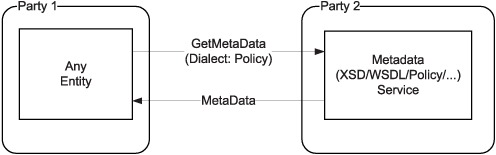
Figure 9.7. WS-MetadataExchange provides a simple protocol to fetch metadata such as XSD, WSDL, and WS-Policy. The Dialect element in the GetMetaData request is used to indicate what type of metadata is being requested. To fetch a WS-Policy document, the Dialect element can be set to a URI that identifies WS-Policy as the type of requested metadata.