The 60:30:10 rule balances a user interface by assigning about 60 percent of the space to a primary color, 30 percent to a secondary color, and 10 percent to an accent. Use shades, tints, and color-aware grays to soften intensity while preserving a coherent palette. section 9.2.1
Treat the percentages as a visual starting point rather than a calculation to follow exactly. The goal is to prevent colors from competing for dominance while leaving enough contrast to guide attention and clarify the next action. section 9.2.2
Apply the rule incrementally:
- Choose a base color that will appear most often across the website or app. section 9.4
- Choose one or two additional colors for secondary areas and accents. section 9.4
- Create useful shades and tints, then add grays containing a hint of the primary hue or temperature. section 9.2.1 section 9.4
- Check whether the interface feels balanced, readable, and clear about where users should look next. section 9.2.2
Using a triadic palette
A purple, orange, and green triad can feel intense when all three colors compete equally. Make purple the dominant color, use orange across secondary areas, and reserve green for small accents. Adjust each color with shades or tints to reduce visual competition. section 9.2.1
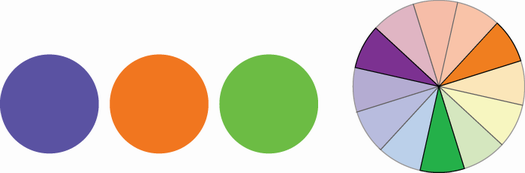
Inspect the purple, orange, and green triadic palette before assigning one color visual dominance. section 9.2.1
