An 8P8C connector is the modular eight-position, eight-contact connector used at the ends of Ethernet copper UTP cables. Each contact connects to one of the cable’s eight wires. RJ45 is the common name, although it is technically imprecise. section 3.3
The connector carries four twisted wire pairs. 10BASE-T and 100BASE-T use two pairs, while 1000BASE-T and 10GBASE-T use all four. The correct pin arrangement matters because pairs carry transmit and receive signals. section 3.3 section 3.3.2
Use the connector and cable type with these practical distinctions:
- Use a straight-through cable when corresponding pin pairs connect between different device roles, such as a PC and a switch. section 3.3.2
- Use a crossover cable when devices transmit on the same pin pair, such as two routers; Auto MDI-X can adjust the pin roles automatically. section 3.3.2 section 3.5
- Remember that 10BASE-T and 100BASE-T use pins 1–2 and 3–6; faster listed standards use all eight wires. section 3.3.2
PC-to-switch connection
A straight-through UTP cable connects the PC’s transmit pair on pins 1–2 to the switch’s receive pair on pins 1–2. The switch’s transmit pair on pins 3–6 connects to the PC’s receive pair. section 3.3.2
Figure 3.2 Two 8P8C ports on a Cisco switch (left) and an 8P8C connector on a copper UTP network cable (right)
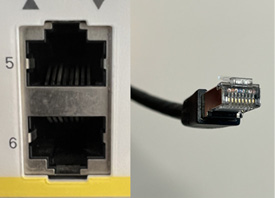
Inspect the connector beside two matching ports on a Cisco switch to relate the physical plug, contacts, and port. section 3.3
