An accent color is a contrasting or distinctive color applied selectively to attract attention and emphasize interface elements. Choose one or two accents alongside a dominant base color, then create usable tints and shades. section 9.4
Use accents to establish visual hierarchy rather than coloring everything. Reserve them for important actions, highlighted information, and interface states so users can see where to look and what to do next. section 9.5 section 10.7
Apply an accent color deliberately:
- Keep the base or primary color dominant, and use accents for secondary emphasis. section 9.4
- Highlight a main call to action, such as a search button, without competing with the headline. section 9.5
- Repeat the accent at selected points to guide attention through the page, such as cards and later buttons. section 10.7
- Limit strong background color when imagery already supplies visual interest, preventing the design from becoming muddy. section 10.7
Travel landing page
A muted blue palette uses golden yellow as its accent. Gold marks the search button, Trending Packages card, and Group Travel button, creating a path through the page while blue remains the brand color. section 10.7
Figure 10.13 After defining our color palette, we can use our palette to bring more hierarchy to the page. The gold accent color highlights the areas we want users to focus on and draws them down the page.
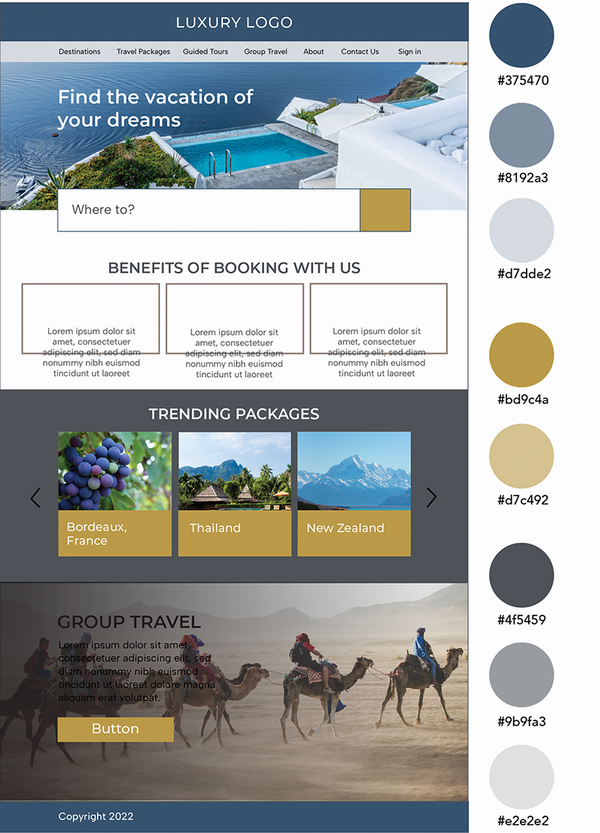
Shows how a gold accent creates hierarchy and directs attention through a travel website. section 10.7
