An access control entry (ACE) is one ordered rule inside an access control list (ACL). It matches packet conditions and takes an action: permit forwards the packet, while deny discards it. The router checks ACEs from top to bottom and stops at the first match, so placement determines the ACL’s effect. section 23.1.1 section 23.4
Use these rules when reading or designing ACEs:
- Treat each ACE as an if-then condition: if the packet matches every specified parameter, apply permit or deny. section 23.4 section 24.1.2
- Place specific deny rules before broader permit rules; otherwise a broader rule can shadow the later ACE. section 23.1.1 section 23.4
- Remember the implicit deny: packets matching no explicit ACE are denied even though that final rule is hidden. section 23.1.1 section 23.4
- Apply the containing ACL to an interface before it affects traffic; inbound filters received packets and outbound filters forwarded packets. section 23.4 section 23.2.2
- Recognize standard ACEs by source IP matching and extended ACEs by protocol, source or destination IP, and optional TCP or UDP ports. section 23.4 section 24.1.1
Blocking one subnet while allowing the rest
A standard numbered ACL can deny engineering traffic and then permit the remaining internal addresses: access-list 1 deny 192.168.1.0 0.0.0.255 followed by access-list 1 permit 192.168.0.0 0.0.255.255. Applied outbound on R2’s G0/0, the first ACE blocks engineering packets, while the second permits other 192.168.0.0/16 traffic. Hosts outside that range reach the implicit deny. A named ACL uses a separate configuration mode and sequence numbers, such as deny 192.168.1.11, deny 192.168.2.17, and permit any. section 23.2.1 section 23.2.2
Figure 23.1 How a router evaluates a packet against an ACL. If the source IP matches 192.168.1.0/24, then deny the packet. Otherwise, if the source IP matches 192.168.0.0/16, then permit the packet. Otherwise, deny the packet.
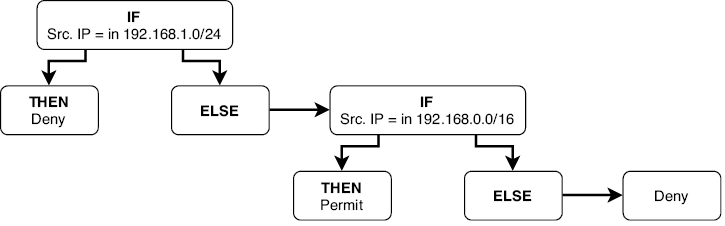
Follow the router’s evaluation path: test the first ACE, stop when a condition matches, and use the implicit deny when no explicit condition matches. section 23.1.1
Named ACL configuration makes individual ACEs easier to maintain. Enter named ACL mode, delete an ACE with no followed by its sequence number, insert a replacement at a chosen sequence number, or resequence the list when sequence gaps become too small. Verify the resulting entries with show access-lists or show ip access-lists. section 24.3.1 section 24.3.2 section 23.2.1
