An access token lets an authenticated app call protected API routes. In an OAuth2 browser login, the app sends the user to an identity provider rather than handling the password itself. After login, the provider redirects back with a code; OidcClient processes the response and returns the tokens needed by the app. section 8.1.2
Figure 8.3 Step 1: Call the LoginAsync method of the OidcClient package. Step 2: The OidcClient package will call WebAuthenticator and display the login page on IdentityServer. Step 3: The user will log in to IdentityServer. Step 4: IdentityServer returns the result via WebAuthenticator. Step 5: The parsed result is returned to OidcClient. Step 6: OidcClient extracts the JWT from the result and returns it to the caller of the LoginAsync method.
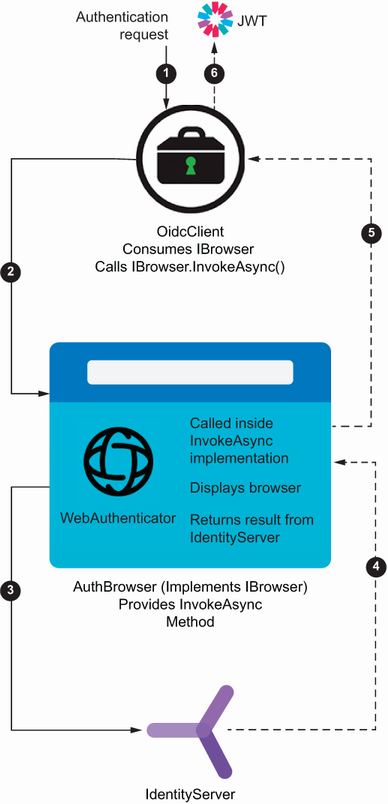
The login path moves from OidcClient to WebAuthenticator and the identity provider, then returns a parsed response whose JWT is extracted for the caller. section 8.1.2
To make authenticated API calls without repeating header code:
- Configure OidcClient with the authority, client ID, scope, redirect URI, and a browser implementation backed by WebAuthenticator. section 8.1.2
- Complete LoginAsync and keep the successful result’s access token for the API client. section 8.3.2
- Associate a DelegatingHandler with HttpClient so every request receives the token header automatically. section 8.3.2
Attach the token through an HTTP pipeline
After a successful login, assign loginResult.AccessToken to the handler’s token value. Its SendAsync override adds that value to each request before passing the request to the base handler. Requests that omit the required header are not authorized. section 8.3.2
A mobile or desktop redirect uses a custom URL scheme registered with the operating system, allowing the identity provider’s browser response to return to the app. Android, iOS, macOS, and Windows each require platform-specific registration. section 8.1.2
