Active mode is an LACP setting that actively attempts to negotiate an EtherChannel with a neighboring switch. It corresponds to PAgP desirable mode. section 16.2.1 section 16.5
Use active mode when configuring LACP on member interfaces:
- Apply channel-group group-number mode active under the physical member interfaces. section 16.2.1
- Pair the configuration with a neighboring LACP passive interface, then verify bundled ports with show etherchannel summary. section 16.2.1 section 16.5
- Check the neighbor’s mode with show lacp neighbor; the A flag identifies active mode and P identifies passive mode. section 16.2.1
LACP active/passive configuration
SW1(config)# interface range g0/0-1 SW1(config-if-range)# channel-group 1 mode active SW2(config)# interface range g0/0-1 SW2(config-if-range)# channel-group 1 mode passive SW2(config-if-range)# do show etherchannel summary 1 Po1(SU) LACP Gi0/0(P) Gi0/1(P) The ports form one LACP EtherChannel; configure the port-channel interface for access or trunk operation. section 16.2.1 section 16.5
Figure 16.7 An EtherChannel is formed between SW1 and SW2 using LACP. SW1’s G0/0 and G0/1 ports are configured in LACP active mode, and SW2’s G0/0 and G0/1 ports are configured in LACP passive mode. switchport mode trunk is applied to each switch’s port channel interface to make the EtherChannel a trunk.
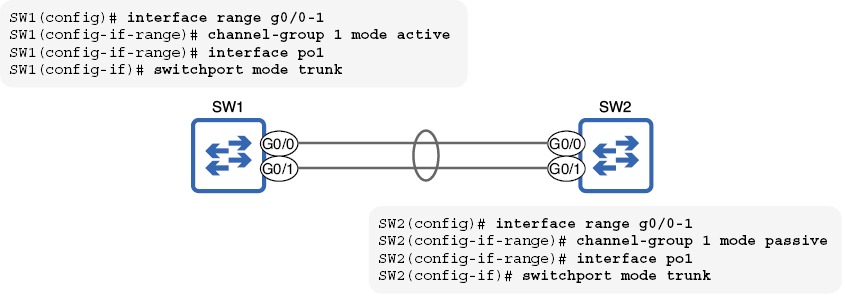
Diagram the active/passive LACP relationship and the resulting trunked EtherChannel. section 16.2.1
