addEventListener registers a callback for a browser event on an event target. In React, use it for window, document, or other DOM events that React does not manage directly. section 8.10 section 8.8.1
Use the browser API when you need to:
- Listen for events on window or document, such as browser resizing. section 8.8.1
- Choose bubbling or capture behavior when registering a listener. section 8.3.1
- Attach listeners to DOM nodes through a reference when React event properties are insufficient. section 8.10
Track the browser window size
function WindowSize() { const [size, setSize] = useState(getWindowSize()); useEffect(() => { const onResize = () => setSize(getWindowSize()); window.addEventListener("resize", onResize); return () => window.removeEventListener("resize", onResize); }, [setSize]); return <h1>Window size: {size}</h1>; } section 8.8.1
Figure 8.7 When you click the black button, the browser will start propagating events throughout the nodes in the document starting at the window, moving down through the document tree in the capture phase until the target, and then moving back up the tree in the bubbling phase until it reaches the window.
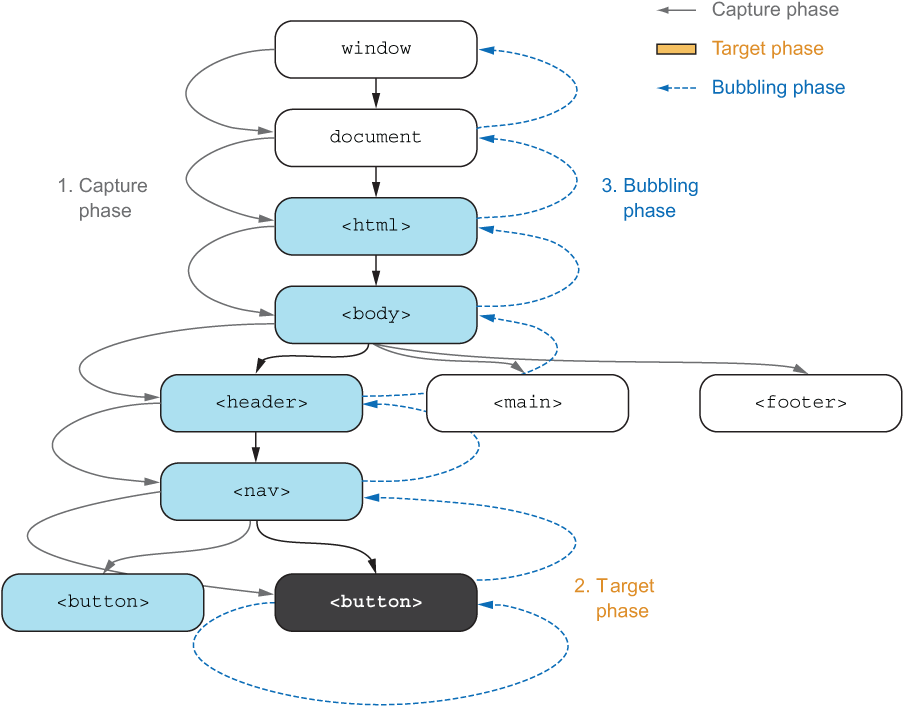
Follow the event path from window through the document tree during capture, then back through ancestors during bubbling. section 8.3.1

