liveBook · Manning

Advanced module

As explained in WordPress Power Toolkit: Harness AI to build next-level websites

The Advanced module is a Gutenberg sidebar panel that exposes additional block settings such as CSS classes.

The Advanced module is a Gutenberg sidebar panel for assigning CSS classes to a selected block. Open the Block tab, expand Advanced, and enter a class name in Additional CSS Class(es). section 7.7

Use this workflow:

  • Select a block and open the three-dot menu. section 7.7
  • Choose the Block tab, scroll to Advanced, and click its down arrow. section 7.7
  • Type the predefined CSS class into Additional CSS Class(es). section 7.7
  • Convert a Classic block to blocks first if the Advanced control is unavailable. section 7.7

Applying a class

A paragraph can use a class such as greensans, provided that class has been defined in Additional CSS. section 7.7

Figure 7.13 You can apply classes to a block using Gutenberg’s Additional CSS Class(es) field.
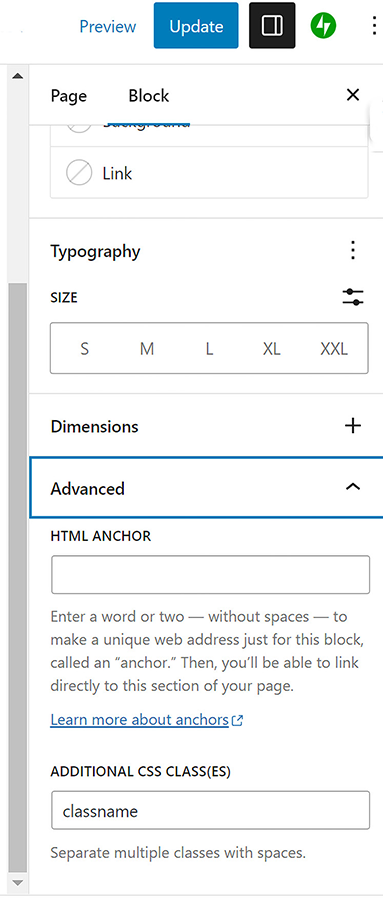
Use the figure to identify the Additional CSS Class(es) field in the Gutenberg sidebar. section 7.7

How WordPress Power Toolkit: Harness AI to build next-level websites covers it

How deep it goes
Explains opening Advanced, entering a class, and handling Classic blocks that lack the control.
Examples
Uses a paragraph with a greensans class and a figure showing the Additional CSS Class(es) field.
What it assumes
Assumes a CSS class exists in Additional CSS and teaches where to enter its name in Gutenberg.
What you can do after
Operate Gutenberg to assign a predefined CSS class to a supported block.
How it connects
Connects CSS classes with Additional CSS, inline HTML, Gutenberg, and the Classic block.

Related concepts

This explainer was generated by Manning's knowledge graph from the text of WordPress Power Toolkit: Harness AI to build next-level websites. The section links point to the parts of the book it draws on.