liveBook · Manning

Aggregate transformation

As explained in 100 SQL Server Mistakes and How to Avoid Them

An aggregate transformation groups input rows and computes aggregate values such as averages, counts, sums, minima, or maxima.

Treat an aggregate transformation as a data-flow step that groups input rows and calculates summary values. In a marketing-impressions flow, it calculates average bid price and CPM after dates are rolled up. section 6.3.2

Use the transformation when a summarized result is more useful than individual source rows:

  • Read impressions from marketing.Impressions. section 6.3.2
  • Normalize EventTime to a date before aggregation. section 6.3.2
  • Calculate average bid price and CPM, then insert or update reporting.ImpressionAggregates. section 6.3.2

Marketing impressions

A Merge Aggregates data flow converts timestamped impressions into daily reporting rows. Its upsert destination inserts a new grouped result or updates an existing key combination. section 6.3.2

Figure 6.11 Aggregate Transformation Editor
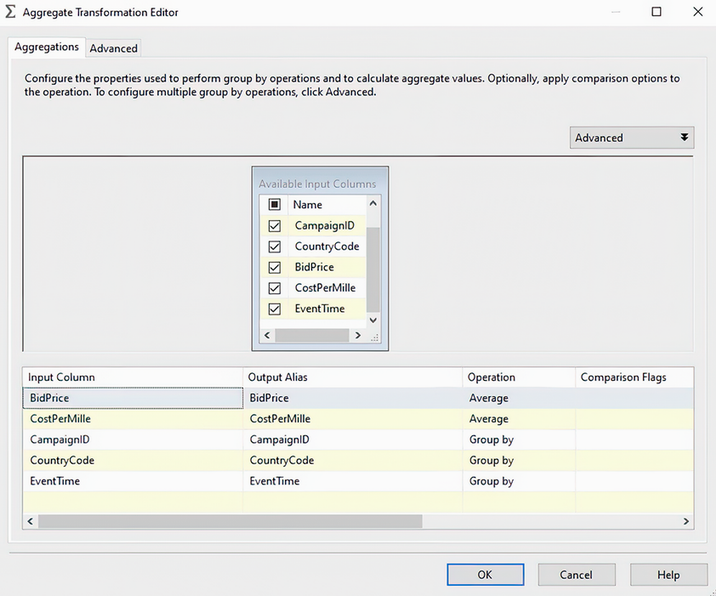
Inspect the Aggregate Transformation Editor to follow the transformation’s configuration in the data flow. section 6.3.2

How 100 SQL Server Mistakes and How to Avoid Them covers it

How deep it goes
Demonstrates date preparation, average calculations, and upsert output without detailing the transformation’s internal implementation.
Examples
Uses marketing.Impressions, rounded EventTime values, average bid price, CPM, and reporting.ImpressionAggregates.
What you can do after
Build grouped reporting flows that calculate summary metrics and insert or update aggregate rows.
How it connects
Connects derived column transformation, SSIS data flow, error paths, and upsert destination.

Related concepts

This explainer was generated by Manning's knowledge graph from the text of 100 SQL Server Mistakes and How to Avoid Them. The section links point to the parts of the book it draws on.