An AI Foundry project is an isolated command center for one AI scenario. It gathers data, models, jobs, deployments, and access controls so a team has one organized place to work. section 7.4.1 section 7.6
A project helps teams:
- Separate one AI effort from other projects or environments. section 7.4.1
- Organize datasets, labeling tasks, training runs, model histories, and deployment definitions. section 7.4.1 section 7.6
- Control sensitive activities through fine-grained roles, managed identities, audit logs, and centralized security. section 7.4.1 section 7.6
Banning Books recommendation project
Banning Books creates an AI Foundry resource named bb-ai-foundry in the BanningRG resource group, selects a subscription and region, then uses a project for its Book Recommendation Engine. Data scientists, engineers, and content editors can find the relevant datasets, training work, and deployment assets in one place. section 7.4.1
Figure 7.4 Configuration of the AI Foundry project
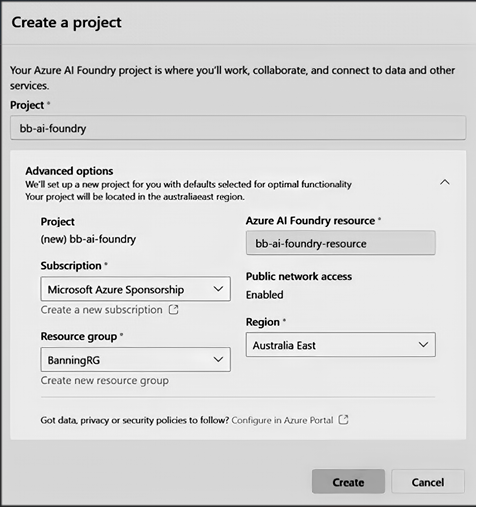
Review the configuration choices for the subscription, resource group, and region when creating an AI Foundry project. section 7.4.1
