liveBook · Manning

AI functionality explanation

As explained in The Art of AI Product Development

AI functionality explanation is communication about an AI system’s capabilities, processes, limitations, and behavior that helps users form accurate expectations.

A predictive feature may display a score without telling users what it means. Explaining the AI’s capabilities and processes helps them form a more accurate mental model and set appropriate expectations. section 10.2.2

Choose explanations based on what users need to understand:

  • If users are unsure how to use a feature, pair an explanation with intuitive guidance, suggestions, or templates. section 10.2.2
  • If an output may be mistaken, explain uncertainty and provide feedback options; a confidence score can help users calibrate trust. section 10.2.2
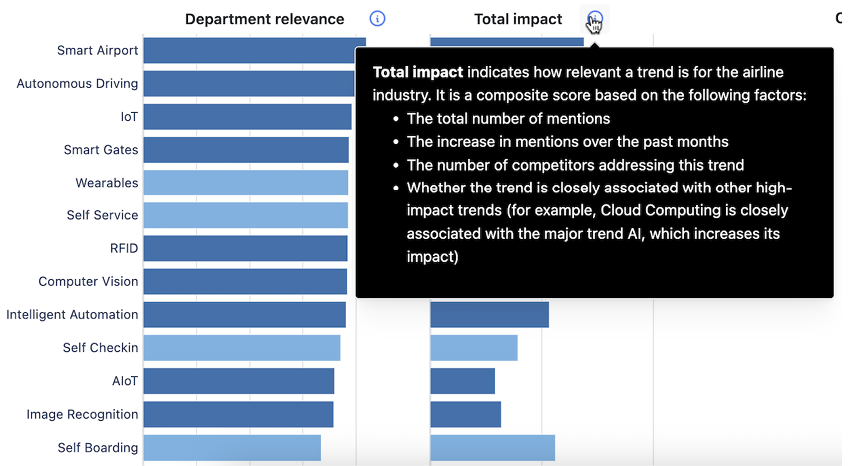
Figure 10.16 For data visualizations and predictive AI features, use interactive elements such as tooltips to explain scores and values.
A screenshot of a graph

AI-generated content may be incorrect.

A tooltip can explain scores and values directly within a predictive visualization, where users need that context. section 10.2.2

How The Art of AI Product Development covers it

How deep it goes
Gives UX guidelines and a tooltip pattern, without prescribing a technical implementation.
Examples
Uses tooltips that explain scores and values in predictive visualizations.
What you can do after
Practice explaining AI capabilities and processes where users need clearer expectations or help interpreting outputs.
How it connects
Links AI functionality explanation to usage guidance, calibrated trust, uncertainty, and feedback.

This explainer was generated by Manning's knowledge graph from the text of The Art of AI Product Development. The section links point to the parts of the book it draws on.