AI state is the serializable data an AI application keeps for model interactions and server-side work. In a chat application, it can hold conversation history, timestamps, conversation IDs, and JSON representations of generated components. Keep it separate from UI state, which holds rendered React elements and client-side interaction state such as loading indicators. This avoids sending model context to the client merely to render the interface. section 4.2.1 section 4.2
In a React or Next.js chat flow:
- Create an AI context provider with createAI, defining initial AI and UI states and the available server actions. section 4.2.2
- In a server action, use getMutableAIState to read conversation history and supply it with the new user message to the model. Finalize the updated history when generation completes. section 4.2.3
- Return the generated display to the client and update UI state for rendering. Use useActions, useUIState, and useAIState where client components need access to those actions or states. section 4.2.3
- For persistence, save completed AI state with onSetAIState; a saved state can later be supplied as initialAIState. section 4.2.2
Provider setup for a chat
A provider can start with an empty AI conversation and a separate UI message list: const AI = createAI({ actions: { continueConversation }, initialAIState: [], initialUIState: { messages: [] }, onSetAIState: async ({ state, done }) => { if (done) await saveToDatabase(state); }, }); Here, continueConversation is the application’s server action and saveToDatabase is its persistence function. Wrap the application layout in <AI> so components can access the provider. section 4.2.2 section 4.2.3
Figure 4.8 AI and UI state representation. Once the user submits a prompt, it goes through a pipeline of events and actions for the final output to be consistent.
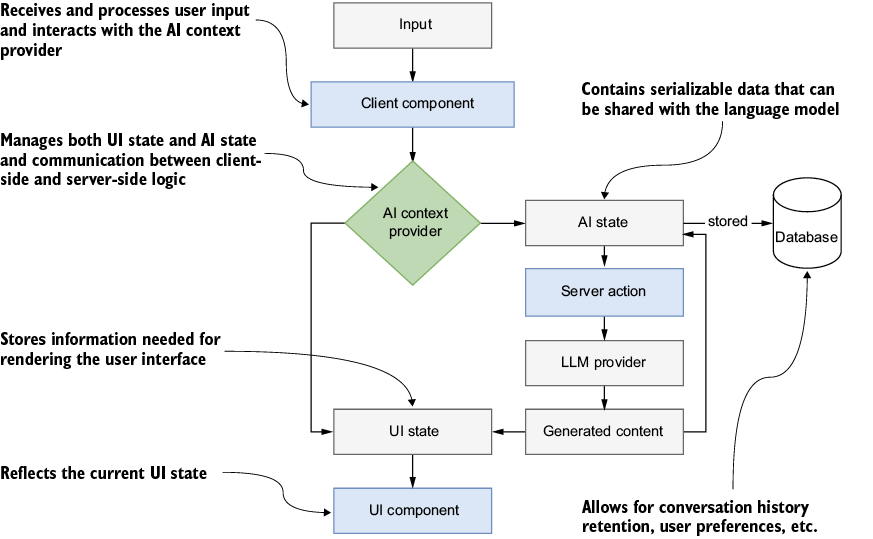
The flow diagram traces input from a client component through AI state and a server action, then back to updated AI and UI states; it also shows where serialization and storage fit. section 4.2.1
