liveBook · Manning

Aliasing

As explained in How Computers Make Books

Jagged or otherwise distorted visual appearance caused by representing a high-resolution signal at insufficient resolution.

Aliasing appears when a high-resolution shape or signal is represented with too few dots. A smooth line then becomes jagged, because the available resolution cannot preserve its original form. section 1.3

Lines, letters, and screens

A diagonal line made from black-and-white dots can look uneven. A filled ampersand shows the same problem: gray dots along its boundary soften the jagged edge. This use of gray is anti-aliasing. section 1.3

Figure 1.12 A shape filled first with black and white dots and then with dots of differing shades of gray
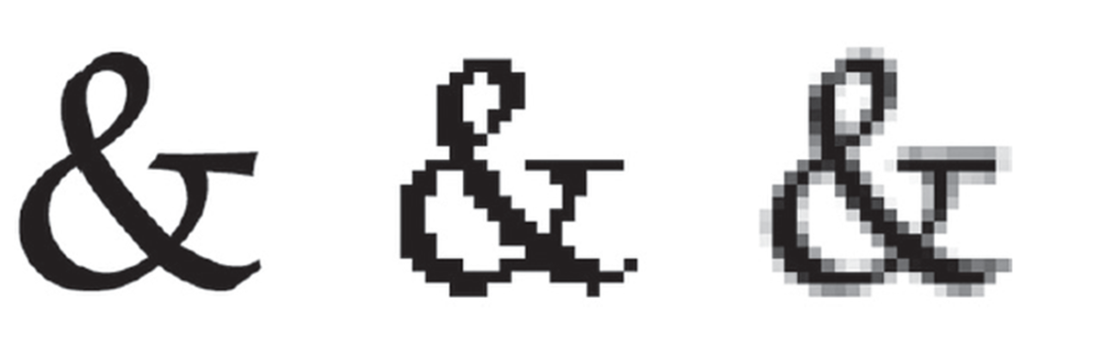
Compare the same shape rendered first with black-and-white dots and then with shades of gray. section 1.3

The visible effect depends on resolution and viewing distance: a screen, smartphone, and billboard can require different dot densities. Magnified LCD pixels reveal red, green, and blue sub-pixels building the displayed grays. section 1.3

How How Computers Make Books covers it

How deep it goes
Defines aliasing through lines and shapes, then connects it to resolution, viewing distance, anti-aliasing, and LCD sub-pixels.
Examples
Uses diagonal lines, an ampersand, gray dots, microscope images, and screen, smartphone, and billboard viewing distances.
What it assumes
Builds from lines, dots, shapes, and viewing distance before introducing signal-processing terminology.
What you can do after
Apply anti-aliasing by using gray shades to make low-resolution lines and shape boundaries appear smoother.
How it connects
Connects aliasing with signal processing, resolution, anti-aliasing, and LCD displays.

Also explained in

Compare how 2 books explain aliasing →

Related concepts

This explainer was generated by Manning's knowledge graph from the text of How Computers Make Books. The section links point to the parts of the book it draws on.