Amazon Relational Database Service (RDS) provides managed relational databases on AWS. Choose an engine—PostgreSQL, MySQL, MariaDB, Oracle Database, Microsoft SQL Server, or Amazon Aurora—and select the database size. AWS handles operating tasks such as installation, patching, backups, and recovery. You still choose the configuration and manage how your application uses the database. section 10.0 section 10.1.3
For a WordPress site, an RDS MySQL database stores articles, comments, and users while EC2 web servers run the application. Keeping the database separate from a web server avoids relying on that one machine for both jobs. RDS costs more per instance than running a database on EC2, but reduces the work of operating one yourself. section 2.1 section 10.0 section 10.1
A practical setup follows this sequence:
- Create an RDS database instance, choosing its engine, allocated storage, instance class, database name, and administrator credentials. A CloudFormation template can create it alongside the WordPress web servers. section 10.1.1
- Keep the database inside the VPC rather than making it publicly accessible. For MySQL, attach a security group that accepts port 3306 connections only from the web servers’ security group. section 10.1.1 section 10.4.2
- Connect the application to the database endpoint. To import an existing MySQL database, export a dump, copy it to an EC2 instance in the same region and VPC, and load it into RDS from that instance. section 10.1.1 section 10.2
Importing WordPress data
After copying a MySQL dump to the EC2 instance, find the RDS endpoint with `aws rds describe-db-instances --query "DBInstances[0].Endpoint"`. From that instance, load the dump with `mysql --host $DBAddress --user wordpress -p < wordpress-import.sql`. The database must permit a network connection from the instance. section 10.2 section 10.4.2
Plan for data loss and outages. RDS supports automated backups, point-in-time restore within the retention period, and manual snapshots you can take before a risky update or schema change. Manual snapshots remain until you delete them. For production workloads, Multi-AZ deployment adds a standby instance: RDS synchronously replicates data and automatically fails over if the primary becomes unavailable. You pay for both instances. section 10.3.2 section 10.5 section 10.8
Figure 10.5 The primary database is replicated to the standby database when running in high-availability mode.
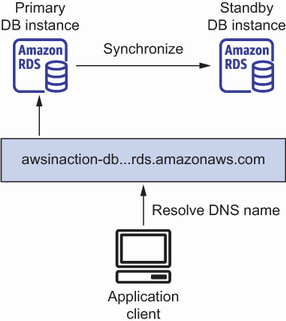
The diagram shows how a high-availability RDS deployment keeps a standby database synchronized with its primary. section 10.5
Management access and data access are separate. IAM policies control who can create, change, or delete RDS instances; the database engine controls access inside the database. Monitor RDS metrics in CloudWatch and set alarms for problems such as low free storage, high CPU use, or low free memory. Managed operation does not remove the need to watch database health or account for instance and storage costs. section 10.4.1 section 10.7 section 10.1.3
