An analytics rule is a Microsoft Sentinel threat-detection configuration. It evaluates data already ingested from relevant sources for suspicious activity or signs of compromise, helping protect business-critical resources such as revenue-generating applications. Rules are a core Sentinel capability and can be enabled according to an organization’s use cases. section 8.3.4 section 8.4
Choose a rule type that matches the detection goal. Microsoft security rules create Sentinel incidents from alerts generated by Microsoft security solutions. Fusion correlates signals across products to find multistage attacks. Machine learning behavioral analytics and anomaly rules use supplied templates, while threat intelligence rules alert when feed indicators match event-log data such as Syslog entries, IP addresses, or URLs. Scheduled rules use built-in or custom queries, and near-real-time rules run every minute. section 8.4
Use analytics rules as a layered detection capability rather than a single control:
- Deploy related connectors, workbooks, analytics, and automations through Content hub when addressing a new vulnerability. section 8.3.4
- Enable the default Fusion rule or other rule types that fit the organization’s threat scenarios. section 8.4
- Create scheduled query rules when built-in detections do not express the organization’s own use cases and requirements. section 8.4 section 8.13
- Simulate scheduled-rule results against organizational data to check whether the detection returns the needed results. section 8.13
Create a Microsoft security rule
In Sentinel, filter rule templates to Microsoft Security Only, select a template whose data source is the relevant Microsoft security solution, and choose Create Rule. Keep the prepopulated name and description or adjust them, retain default remaining options, leave Automation Rules blank, validate, and create the rule. The active rule can then create incidents from alerts such as those from Microsoft Entra ID Protection or Microsoft Defender for Cloud. section 8.4.2
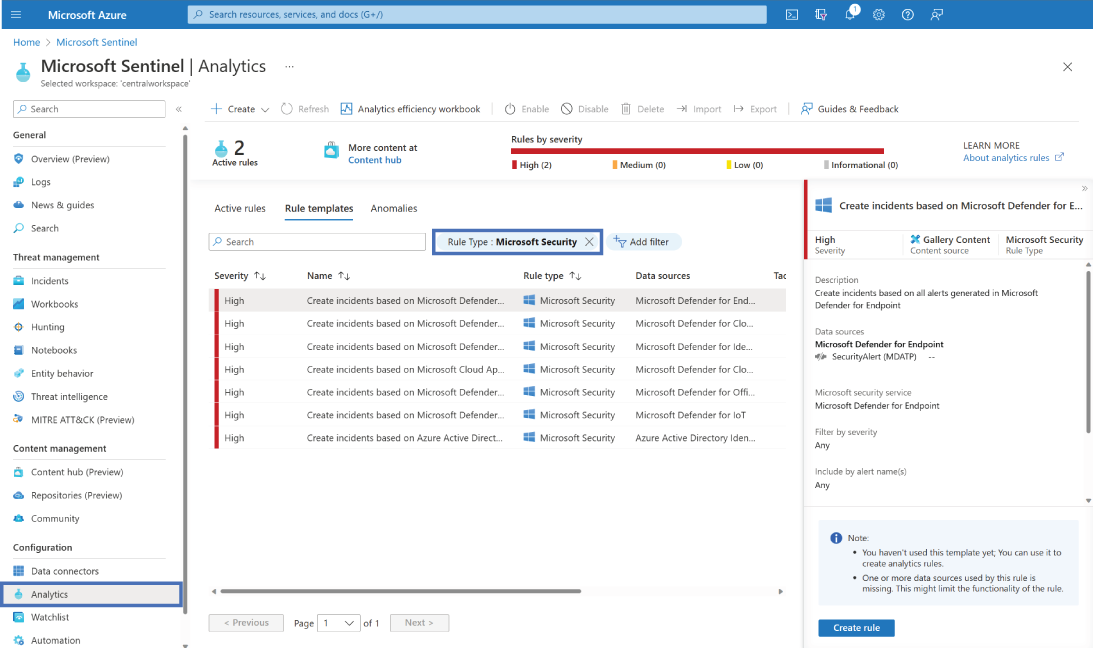
Browse the Microsoft security rule templates to identify templates associated with the relevant Microsoft security solution before creating a rule. section 8.4.2
Rule detections feed the Incidents dashboard, where Sentinel correlates security events and alerts into incidents for investigation. Use filters, such as High severity, to prioritize triage. Incident details can provide a timeline, evidence, entities, top insights, and similar incidents, supplying context for deciding what happened and what to investigate next. section 8.5
Analytics rules target specific threat scenarios or known compromise patterns, such as repeated failed logins in a short period. Pair them with UEBA when unknown suspicious activity matters: UEBA establishes baselines from an entity’s history, peer activity, and organization-wide behavior to identify anomalies that fixed rules may not anticipate. section 8.6.1
